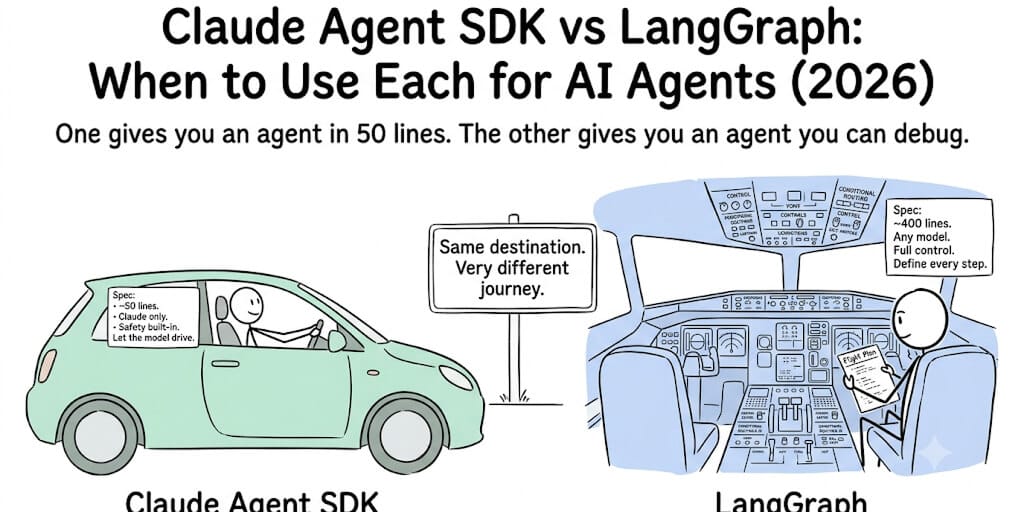
Claude Agent SDK is deliberately simple. LangGraph is deliberately complex. One gives you an agent in 50 lines. The other gives you an agent you can debug. Here's when each approach wins and when it costs you.
I built a code review agent last month on the Claude Agent SDK. Fifty-three lines of Python. Define the tools (read file, list directory, run tests). Create the agent. Call agent.run(). Done. It worked on the first try.
Then I needed to add conditional logic. If the code has security issues, route to a security reviewer agent before approving. If tests fail, retry with a fix. If the fix fails, escalate to human.
Suddenly, 53 lines wasn't enough. The SDK's agent loop handles "call tools until done." It doesn't handle "if this, go here. If that, go there. If the third thing, stop and ask a human." That's a graph problem. That's LangGraph.
Here's the honest Claude Agent SDK vs LangGraph comparison. Not features. Not benchmarks. When each one saves you time and when each one costs you time.
The fundamental difference (one sentence each)
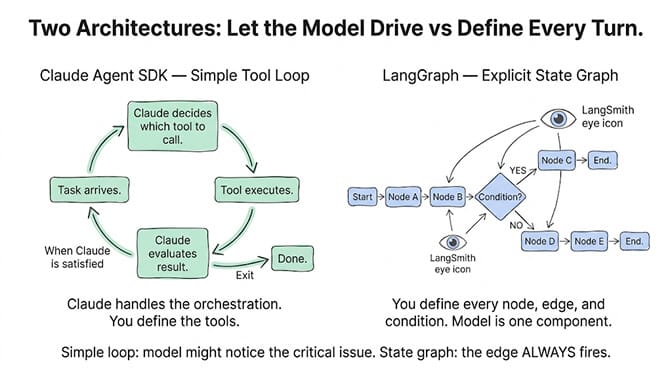
Claude Agent SDK: An agent is a Claude model with tools. The model decides which tools to call, calls them, and loops until the task is done. You define the tools. Claude handles the orchestration.
LangGraph: An agent is a state graph. You define every node (action), every edge (transition), and every condition. You control the orchestration. The model is just one component inside the graph.
Claude Agent SDK: "Let Claude figure out the workflow." LangGraph: "I'll define the workflow. Claude just handles individual steps."
Claude Agent SDK: the "let the model drive" approach
The Claude Agent SDK takes a tool-use-first approach. Your agent is a Claude model (Sonnet, Opus) equipped with tools. The model receives a task, decides which tools to call, executes them, evaluates the results, and loops until it's satisfied with the answer.
June 2026 update: Anthropic shipped hierarchical subagent spawning and fallback model chains. Your agent can now invoke other agents as tools (a planning agent spawns a research agent, which spawns a writing agent). Each subagent runs its own tool loop independently.
What this means in practice:
from anthropic_agent import Agent, tool

@tool
def read_file(path: str) -> str:
    return open(path).read()

@tool
def run_tests(directory: str) -> str:
    return subprocess.run(["pytest", directory], capture_output=True).stdout

agent = Agent(
    model="claude-sonnet-4-6",
    tools=[read_file, run_tests],
    instructions="Review the code for bugs and security issues."
)

result = agent.run("Review the code in /src/auth.py")
That's a working agent. ~15 lines. Claude decides when to read files, when to run tests, and when to stop. You don't define the workflow. The model figures it out.
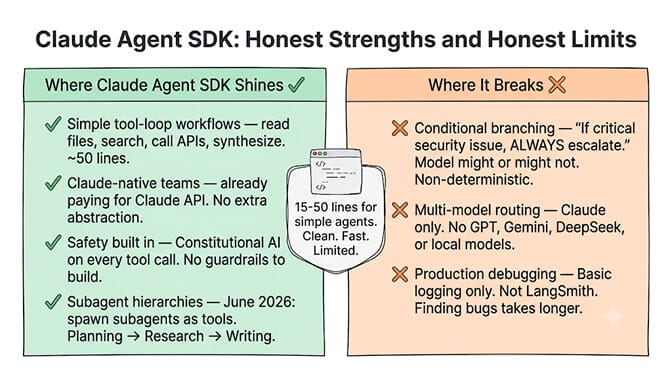
Where this shines: Simple tool-calling agents. Code review. Research. Document analysis. Any task where "read things, think about them, do things, repeat" is the entire workflow.
Where this breaks: When you need explicit control over the flow. "If the security scan finds a critical issue, stop immediately and notify the team." The SDK doesn't have conditional edges. The model might notice the critical issue and stop... or it might continue reviewing other files first. You can't guarantee the behavior.
LangGraph: the "I'll define every step" approach
LangGraph models your agent as a state graph with explicit nodes and edges. You define what happens at each step, what conditions trigger which transitions, and where the agent stops.
The same code review agent in LangGraph:
from langgraph.graph import StateGraph

def read_code(state):
    # Read file, update state
    return {"code": open(state["path"]).read()}

def security_scan(state):
    # Run security check
    return {"security_issues": scan(state["code"])}

def route_by_severity(state):
    if state["security_issues"]["critical"]:
        return "escalate"
    return "continue_review"

graph = StateGraph()
graph.add_node("read", read_code)
graph.add_node("scan", security_scan)
graph.add_node("review", full_review)
graph.add_node("escalate", notify_team)
graph.add_conditional_edges("scan", route_by_severity)
That's ~40 lines (simplified). More code. But the behavior is deterministic. If there's a critical security issue, it ALWAYS escalates. No "the model might notice." It's a graph edge. It always fires.
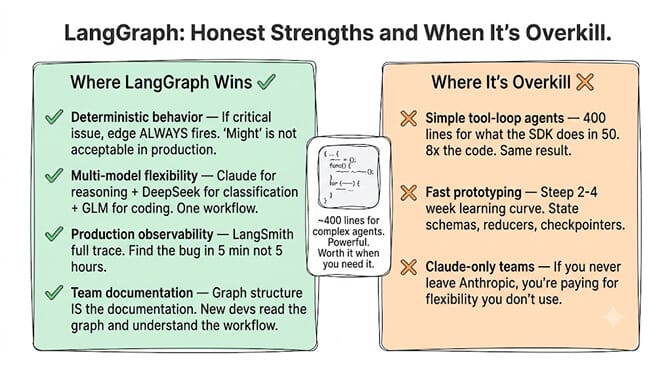
Where this shines: Complex workflows with conditional branching. Multi-step pipelines where some steps must happen in a specific order. Production agents where "the model might do the right thing" isn't acceptable. Full observability via LangSmith.
Where this breaks: Simple agents. If your agent just needs to "use tools until done," LangGraph is overkill. You're writing 400 lines for something the Claude SDK does in 50.
For the full comparison of LangGraph vs CrewAI vs AutoGen, see our three-way framework breakdown.
The comparison table
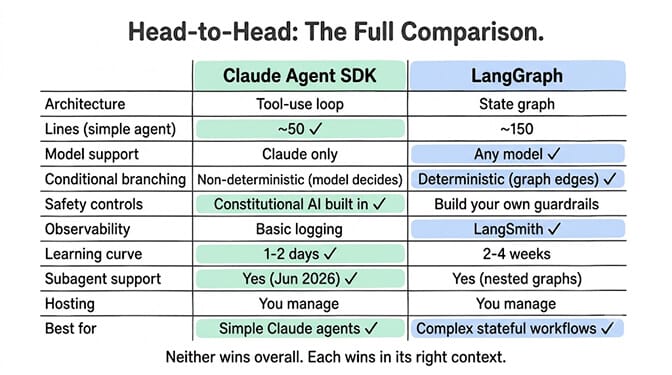
| Claude Agent SDK | LangGraph | |
|---|---|---|
| Architecture | Tool-use loop | State graph |
| Lines of code (simple agent) | ~50 | ~150 |
| Lines of code (complex agent) | ~150 (subagents) | ~400 |
| Model support | Claude only | Any model (OpenAI, Claude, Gemini, local) |
| Conditional branching | Model decides (non-deterministic) | Graph edges (deterministic) |
| Subagent support | Yes (hierarchical spawning, Jun 2026) | Yes (nested graphs) |
| Observability | Basic logging | LangSmith ($39-399/mo) |
| Safety controls | Constitutional AI built in | You build guardrails |
| Hosting | You manage | You manage |
| Learning curve | Low (1-2 days) | Steep (2-4 weeks) |
| Best for | Claude-native teams, simple tool agents | Complex stateful workflows, multi-provider |
| Pricing | Free SDK + Claude API costs | Free SDK + LangSmith + API costs |
When Claude Agent SDK is the right choice
Your agent uses Claude exclusively. If you're already paying for Claude API access and don't need to switch models, the SDK is the natural fit. No abstraction layer between you and the model. Direct access to Claude's tool-use capabilities.
Your workflow is "tools until done." Read files, search databases, call APIs, synthesize results. If the workflow doesn't have conditional branches or mandatory sequences, the SDK's simple loop is all you need.
You want safety built in. The SDK inherits Claude's constitutional AI principles. Every tool call and response passes through Anthropic's safety layer. On LangGraph, you build your own guardrails (spending caps, action approval, output validation).
You need subagent hierarchies. The June 2026 update makes the SDK the simplest way to build agents that spawn other agents. A planning agent that delegates to research, writing, and review subagents. Each subagent is just another Agent object used as a tool.
When LangGraph is the right choice
You need multi-model flexibility. LangGraph works with any LLM provider. Use Claude for reasoning, DeepSeek Flash for classification, GLM 5.2 for coding, Gemini for multimodal. Model routing within a single agent workflow.
You need deterministic behavior. "If the security scan finds a critical issue, ALWAYS escalate." Not "usually escalate." Not "Claude will probably escalate." The graph edge fires every time. For production agents where wrong behavior costs money, determinism matters more than simplicity.
You need production observability. LangSmith shows you the full execution trace: which nodes fired, how long each took, what the model saw at each step, where it went wrong. The Claude SDK gives you basic logging. For debugging production failures at scale, LangSmith is the difference between finding the bug in 5 minutes and finding it in 5 hours.
You're building for a team. LangGraph's explicit graph structure is documentation. New developers can read the graph definition and understand the workflow without reading through prompt engineering. The Claude SDK's "model figures it out" approach means the workflow lives in the model's reasoning, not in your code.
If you're reading this and thinking both of these require Python and infrastructure management, you're right. For agents without code, BetterClaw deploys agents in 60 seconds with a visual builder. 200+ verified skills. 28+ model providers via BYOK. Free plan with 1 agent and 100 credits a month. $49/month on Pro.
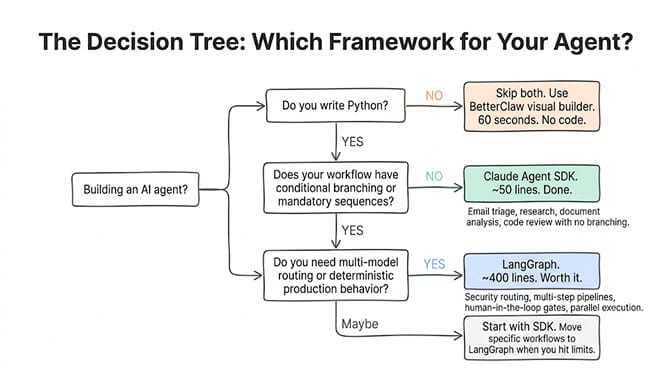
The honest take: most agents don't need LangGraph
Here's the part that might annoy LangGraph fans. Most agent workflows are "use tools until done." Email triage. Data extraction. Research. Summarization. Meeting prep. Content drafting. These are tool-loop workflows. The Claude Agent SDK handles them in 50 lines. LangGraph handles them in 400 lines. Same result. 8x the code.
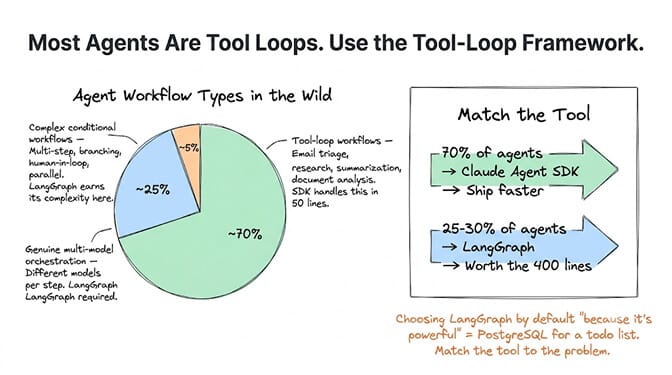
The 20-30% of workflows that genuinely need graph-based orchestration (multi-step conditional logic, mandatory sequences, human-in-the-loop gates, parallel execution paths) are real. And for those, LangGraph is the right tool.
But choosing LangGraph by default "because it's more powerful" is like choosing PostgreSQL for a todo list app. Technically correct. Practically overkill. Start with the Claude Agent SDK. If you hit a workflow that needs conditional branching or deterministic behavior, move that specific workflow to LangGraph. Keep the simple ones on the SDK.
The agents that ship aren't the ones built on the fanciest framework. They're the ones built on the framework that matches the actual complexity of the workflow. Match the tool to the problem. Not the other way around.
Both the Claude Agent SDK and LangGraph assume you write Python and manage your own infrastructure. If that's not your situation, BetterClaw gives you agent orchestration through a visual builder. It supports Claude via BYOK (same models as the SDK) plus 27 other providers (the flexibility of LangGraph). No framework to learn. No graph to define. Free to start. $49/month for Pro.
Frequently Asked Questions
What is the Claude Agent SDK?
The Claude Agent SDK is Anthropic's framework for building AI agents powered by Claude models. It uses a tool-use-first approach: you define tools, give them to a Claude model, and the model decides which tools to call and in what order. June 2026 added hierarchical subagent spawning (agents as tools) and fallback model chains. The SDK powers Claude Code and is designed for simplicity over maximum control.
How does Claude Agent SDK compare to LangGraph?
Claude Agent SDK is simpler (50 lines vs 400 for a comparable agent) but less flexible. It's locked to Claude models with non-deterministic workflow control (the model decides the flow). LangGraph supports any model, provides deterministic conditional branching via graph edges, and includes LangSmith for production observability. Use the SDK for simple tool-loop agents. Use LangGraph for complex conditional workflows.
Can I use multiple AI models with the Claude Agent SDK?
No. The Claude Agent SDK only supports Claude models (Sonnet, Opus, Haiku). You cannot use GPT, Gemini, DeepSeek, or local models within the SDK's agent loop. If you need multi-model support, use LangGraph (any provider), or a platform like BetterClaw (28+ providers via BYOK). The SDK's June 2026 update added fallback model chains within the Claude family (e.g., try Opus, fall back to Sonnet).
Is LangGraph overkill for simple agents?
Yes. For tool-loop workflows (read data, process it, generate output), LangGraph adds significant code overhead without proportional benefit. The Claude Agent SDK handles these in ~50 lines. LangGraph's strength is complex conditional workflows where deterministic behavior, parallel execution, and human-in-the-loop gates are required. Start with the simpler option. Move to LangGraph when you hit limitations.
How much does each framework cost?
Both SDKs are free (open-source). Hidden costs differ: Claude Agent SDK requires Claude API costs only ($3-25/M depending on model). LangGraph requires LangSmith for production observability ($39-399/month) plus API costs for whatever models you use, plus hosting. On BetterClaw, the platform is $0 (free plan) or $49/month (Pro) and supports both Claude and 27+ other providers via BYOK with zero markup.