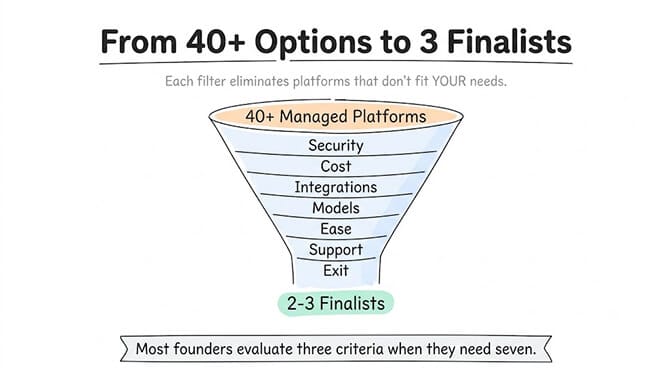
40+ platforms exist. Most founders evaluate three criteria when they need seven. Here's the scorecard.
A founder I know spent eleven weeks evaluating managed AI agent platforms. Spreadsheets, demos, vendor calls, reference checks. Then he picked the one with the best sales deck.
Three months later he was migrating off it. The agent worked, but the platform charged a 40% markup on every LLM call. His $200/month budget became $340. And the vendor's "200+ integrations" turned out to be 200 connectors, not 200 working integrations. His specific stack (HubSpot, Slack, a custom webhook) required three workarounds and a Zapier subscription to bridge the gaps.
He didn't evaluate the wrong platform. He evaluated the right platform on the wrong criteria.
This happens constantly. Gartner projects 40% of enterprise apps will embed AI agents by end of 2026. The market responded with 40+ managed AI agent platforms. And every single one of them claims to be the easiest, the most powerful, the most secure.
Here's the thing. Most of those claims are technically true in some narrow context. The difference between a good pick and an expensive mistake comes down to which questions you ask before you sign up.
This is the checklist I wish someone had given that founder before he started.
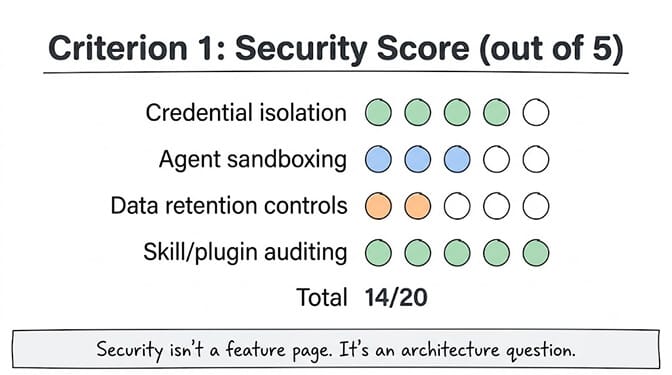
Criterion 1: Security isn't a feature page. It's an architecture question.
Every managed AI agent platform has a security page. Most say the same things: "encrypted at rest," "SOC 2 in progress," "enterprise-grade security."
Ignore the marketing. Ask these four questions:
Where do your credentials live? When you connect Gmail, HubSpot, or Slack, those OAuth tokens have to be stored somewhere. Some platforms store them in the same database as your agent configs. Some encrypt them separately. Some purge them from agent memory after use. The difference matters because if the platform gets breached, the question is whether the attacker gets your tokens or just your agent configs.
How are agent actions sandboxed? If your agent can run code, write files, or call APIs, what stops a misconfigured skill from accessing another customer's data? The answer should involve isolated containers, not just "role-based access control."
What happens to your data between sessions? Does the platform persist conversation history indefinitely, or does it have retention policies? Your agent remembers everything it's told. If that includes customer PII, medical information, or financial data, "we store everything forever" is a liability, not a feature.
Does the platform audit third-party skills? If there's a marketplace or plugin system, who vets the code? The ClawHavoc campaign discovered 1,400+ malicious skills on a major open-source agent marketplace in January 2026. Cisco separately found a third-party skill performing data exfiltration. This isn't theoretical. For a full breakdown of agent security risks in 2026, we covered every major incident.
Score 5/5 if: credentials are encrypted separately (AES-256 or equivalent), agents run in isolated containers, data retention is configurable, and skills are audited before listing. Score 1/5 if you can't find answers to these questions on the website or in the docs.
Criterion 2: The real cost is never the sticker price
This is where most founders get burned.
A managed AI agent platform might charge $20/month per agent. Sounds reasonable. But that $20 doesn't include the LLM inference costs. And many platforms add a markup on those inference costs. Sometimes 20%. Sometimes 40%. Sometimes they don't disclose the exact number.
Here's a simple test. Ask the vendor: "If I send 1 million input tokens and 1 million output tokens through GPT-5.5, how much do I pay you versus how much do I pay OpenAI?"
If the answer is "you pay us and we handle it," dig deeper. That usually means markup.
The alternative model is BYOK (Bring Your Own Key). You connect your own OpenAI, Anthropic, or DeepSeek API key. The platform routes your requests. You pay the LLM provider directly at their published rates. The platform charges a flat subscription fee for the agent infrastructure, not a percentage of your usage. This is how BetterClaw bills, and it is worth asking any vendor to state their markup in writing.
Why this matters: as your agent does more work, your LLM costs scale linearly. A 30% markup on $100/month is annoying. A 30% markup on $3,000/month is a second employee's salary.
For a detailed cost comparison between managed platforms and self-hosted AI agents, we ran the full TCO analysis across 12 months.
Other cost questions to ask: Is there a free tier, and does it include every feature or just a stripped-down version? Are there per-task fees on top of the subscription? Does the pricing change based on which LLM model you use? Are there overage charges?
Score 5/5 if: BYOK with zero markup, transparent flat pricing, free tier with full feature access, no per-task fees. Score 1/5 if you can't figure out the total cost from the pricing page alone.
Criterion 3: Integrations that actually work for YOUR stack
"200+ integrations" is a vanity number. What matters is whether the three or four integrations you actually need are first-class, maintained, and work without duct tape.
Here's how to test this. Before your demo call, make a list of your exact stack. Not general categories. Specific tools. HubSpot CRM, not "a CRM." Slack, not "a messaging tool." Google Calendar, not "a calendar."
Then ask: Is each integration one-click OAuth, or does it require API key setup, webhook configuration, or a third-party bridge?
One-click OAuth means you click "Connect Gmail," authorize, done. Your agent can read and send emails. API key setup means you're digging through developer consoles, generating tokens, and pasting them into config fields. Both can work, but if you're a non-technical founder, the difference between "click authorize" and "generate a service account JSON key" is the difference between deploying today and deploying next week.
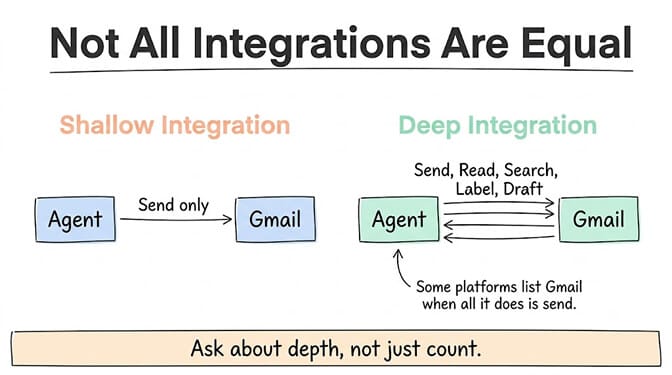
Also ask about depth. Can the Gmail integration only send emails, or can it also read, search, label, and draft? Some platforms list "Gmail" as an integration when all it does is send. That's not a Gmail integration. That's a notification service wearing a costume.
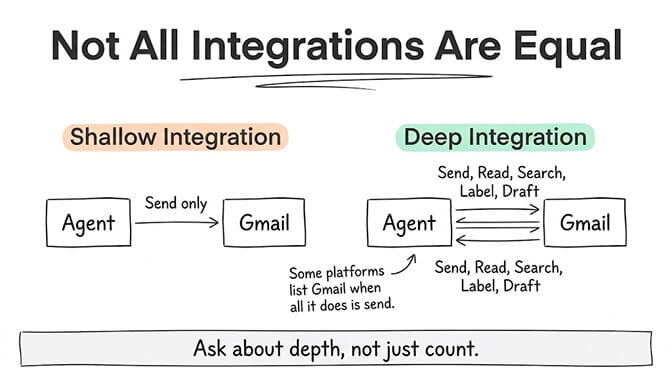
Score 5/5 if: your specific stack has one-click OAuth setup, deep read/write capabilities, and no third-party bridge required. Score 1/5 if the integrations you need aren't listed or require manual API configuration.
Criterion 4: Model flexibility determines your future costs
This one catches people off guard six months in.
Some managed AI agent platforms lock you to a single LLM provider. You build your agent on GPT-5.5, the platform only supports OpenAI, and when DeepSeek drops a permanent 75% price cut, you can't take advantage of it because your platform doesn't support DeepSeek.
Others support multiple providers but charge differently for each. Some even limit which models you can use on certain plans.
The question isn't "what model do I want today?" It's "what model will I want in three months when the pricing shifts again?" In the last two weeks alone, Opus 4.8 launched with new effort control, DeepSeek made its V4 Pro discount permanent, and GPT-5.5 Instant became the ChatGPT default. If your platform can't keep up with that pace of change, your costs will be frozen at whatever the market looked like when you signed up.
A good managed AI agent platform supports 20+ model providers and lets you swap models per agent without rebuilding your workflows. If you're curious about how to choose the right LLM for each task, the decision framework is simpler than most people think.
This is where we think about it a lot at BetterClaw. We support 28+ AI model providers with BYOK and zero inference markup. Switch models in a dropdown. Assign different models to different agents. Your support agent runs on DeepSeek ($0.44/MTok). Your coding agent runs on Opus 4.8 ($5/MTok). Same platform, same interface, radically different cost profiles. Free plan available, $49/month on Pro. No credit card for free.
Score 5/5 if: 20+ model providers supported, model swappable per agent without workflow changes, BYOK available. Score 1/5 if the platform only supports one or two providers.
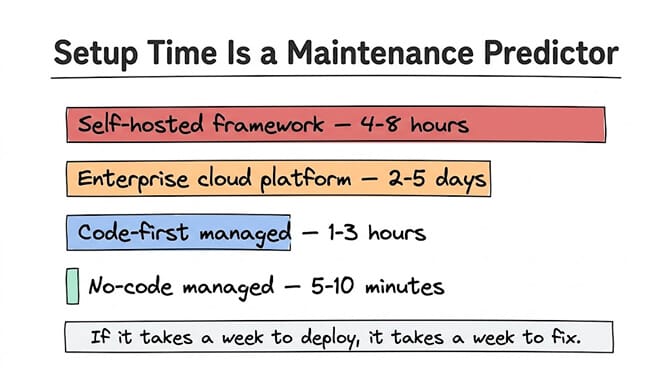
Criterion 5: Setup time tells you everything about maintenance time
If the platform takes two weeks to configure your first agent, it will take two weeks to fix your agent when something breaks.
Setup complexity is a leading indicator of ongoing operational burden. Platforms that require you to define YAML configs, set environment variables, configure webhooks manually, or write Python glue code are telling you something: every time you want to change something, you'll need to repeat a version of that process.
The test is simple. Can a non-technical team member build and deploy an agent without help from engineering? Not a toy demo agent. A real agent that connects to your tools, handles actual tasks, and runs autonomously.
If the answer is no, the platform isn't really "managed." It's "hosted with a pretty dashboard on top."
McKinsey estimates the addressable value of AI agents at $2.6-4.4 trillion, but most of that value sits inside operations teams, customer support, HR, and finance. The people who need agents most are usually the people least equipped to write code. A managed platform that requires coding knowledge is solving the wrong half of the problem.
Score 5/5 if: first agent deploys in under 10 minutes by a non-technical user, visual builder, no code required. Score 1/5 if setup requires a developer.
Criterion 6: Support matters more than you think (until month three)
Every platform has great support during the sales process. The real test is month three, when you're a paying customer and something breaks on a Saturday.
Ask these questions: What's the SLA? Is there a dedicated contact, or is it a shared support queue? Can you reach a human in under 4 hours for critical issues? Is there community support (forums, Discord, Slack) where other users share solutions?
Also ask about documentation quality. Open the docs before your demo. Search for a specific error or edge case. If the docs are thin, marketing-heavy, or last updated six months ago, that tells you how the company prioritizes post-sale support.
For enterprise deployments (5+ agents, mission-critical workflows), support SLA isn't a nice-to-have. It's a requirement. Our AI agent builder comparison names the best AI agent platform for enterprise teams and what each plan includes.
Score 5/5 if: published SLA, dedicated support contact on paid plans, active community, comprehensive and current docs. Score 1/5 if the only support channel is email with no published response time.
Criterion 7: The exit question nobody asks until it's too late
Here's the criterion that separates experienced operators from first-time buyers.
What happens when you leave?
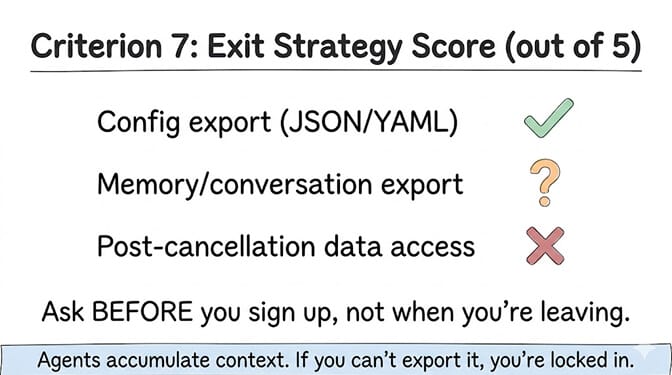
Can you export your agent configurations? Your conversation history? Your training data and memory? Or does the platform treat your agent as a black box that only works inside their walls?
Vendor lock-in in the AI agent space is more aggressive than traditional SaaS because agents accumulate context over time. An agent that's been running for six months has memory, learned preferences, conversation patterns, and integration configs that represent real operational value. If you can't export that, you're not renting a tool. You're building on top of someone else's foundation.
Ask specifically: Can I export agent configs in a standard format (JSON, YAML)? Can I export conversation and memory data? If I cancel, how long do I have to retrieve my data?
Score 5/5 if: full data export in standard formats, 30+ day data access after cancellation, no proprietary lock-in on agent logic. Score 1/5 if there's no export option or data is deleted immediately on cancellation.
The full scorecard: how to use it
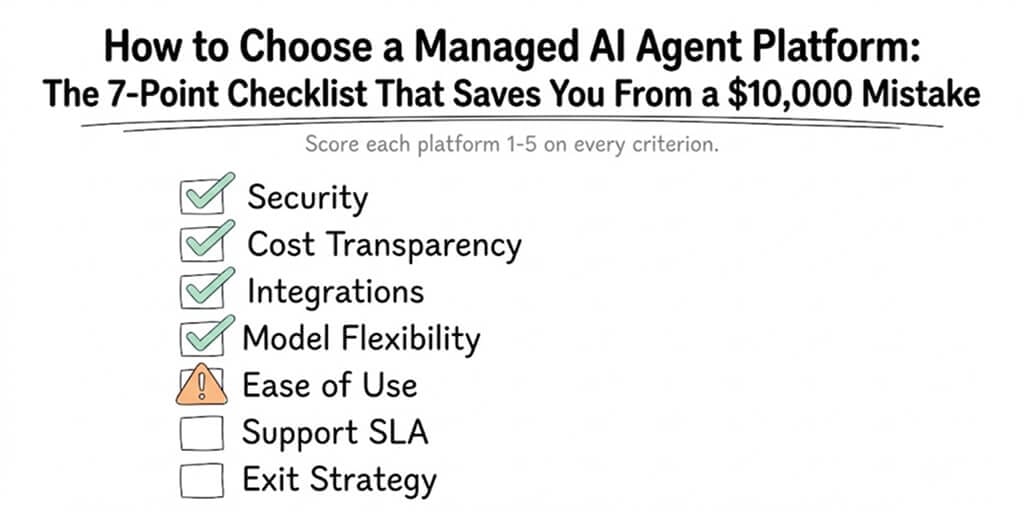
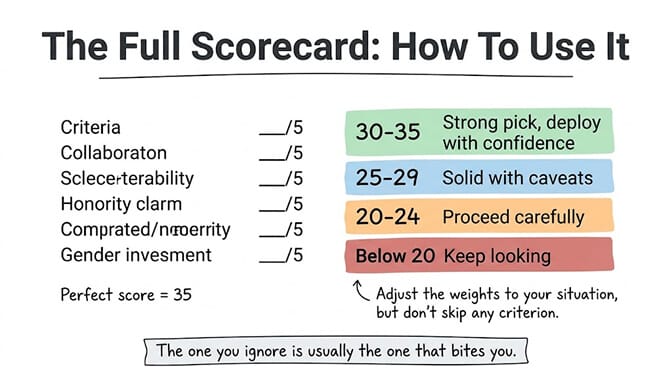
Rate each platform you're evaluating on all seven criteria. Use a 1-5 scale. Be honest. A perfect score is 35. In practice, anything above 28 is excellent. Below 20 should give you serious pause.
Here's the scoring breakdown:
- 30-35: Strong pick. Few compromises. Deploy with confidence.
- 25-29: Solid with caveats. Identify the weak spots and decide if you can live with them.
- 20-24: Proceed carefully. Significant gaps in at least two areas.
- Below 20: Keep looking. The platform isn't ready for your use case.
The criteria aren't equally weighted for everyone. A healthcare startup might weight security at 3x. A bootstrapped founder might weight cost at 3x. Adjust the multipliers to your situation, but don't skip any criterion entirely. The one you ignore is usually the one that bites you.
The thing most checklists miss
I've seen dozens of "how to evaluate" guides. Most of them focus on features. Does it have memory? Does it support multi-agent? Does it have a visual builder?
Features matter, but they're table stakes in 2026. Salesforce found that the average enterprise is already running 12 AI agents, and expects to reach 20 by 2027. At that scale, the questions shift from "can the platform do X?" to "how much operational burden does the platform create as we grow?"
The managed AI agent platform you pick in week one is the platform you maintain in month six, debug in month nine, and either scale or migrate off in month twelve. The checklist above isn't about picking the shiniest tool. It's about avoiding the migration you shouldn't have to do.
The best platforms disappear into the background. You think about your agent workflows, your customer outcomes, your business logic. Not your infrastructure.
If any of this resonated, give BetterClaw a look. Free plan with 1 agent and 100 credits a month. $49/month for Pro. We handle the infrastructure, the security, and the model routing. You handle the interesting part.
Frequently Asked Questions
What is a managed AI agent platform?
A managed AI agent platform is a hosted service that lets you build, deploy, and run autonomous AI agents without managing your own servers, containers, or infrastructure. The platform handles hosting, security, scaling, and updates. You focus on configuring the agent's behavior, connecting integrations, and defining workflows. Examples range from no-code visual builders to enterprise cloud solutions.
How does a managed AI agent platform compare to self-hosted frameworks like CrewAI or LangGraph?
Managed platforms handle infrastructure, security patches, and scaling automatically, while self-hosted frameworks give you full control but require you to manage servers, Docker containers, and dependencies yourself. The tradeoff is customization vs operational burden. Self-hosted costs $50-200/month in infrastructure alone plus ongoing engineering time. Managed platforms start at $0-19/month with the infrastructure included.
How long does it take to evaluate and deploy on a managed AI agent platform?
A structured evaluation using a 7-criterion checklist takes 3-5 days across 2-3 finalist platforms. Actual deployment depends on the platform: no-code visual builders can deploy a working agent in 5-10 minutes, while more complex platforms may take 1-2 weeks of configuration. Request a free tier or trial on each finalist to test real workflows, not just demo environments.
How much does a managed AI agent platform typically cost?
Pricing varies dramatically. Some platforms charge $0-19/month per agent with BYOK (you pay LLM providers directly). Others charge $50-200/month per agent with markup on LLM inference. Enterprise platforms like Vertex AI Agent Builder use complex usage-based pricing. The key question is total cost: subscription plus LLM markup plus per-task fees plus overage charges. Ask for an all-in estimate based on your expected usage.
Is a managed AI agent platform secure enough for handling sensitive customer data?
It depends entirely on the platform's architecture. Look for: isolated containers per agent, AES-256 credential encryption, secrets auto-purge from memory, SOC 2 compliance (or equivalent), and audited skill marketplaces. Avoid platforms that store all customer credentials in a shared database or don't audit third-party plugins. In January 2026, the ClawHavoc campaign found 1,400+ malicious skills in an unaudited marketplace, showing that skill vetting is a critical security factor.