Stop scrolling through your inbox every month hunting for receipts. Build an agent that finds, extracts, and organizes them into a spreadsheet while you sleep.
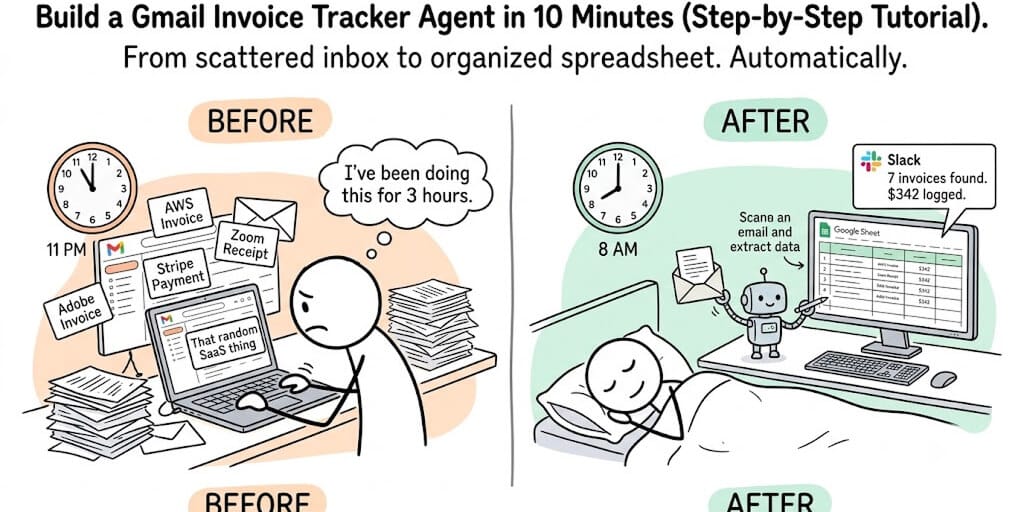
Tax season. 11 PM. I'm scrolling through 14 months of Gmail searching for every invoice and receipt I forgot to file. AWS. Zoom. Adobe. Stripe. HubSpot. That random SaaS tool I subscribed to in March and forgot existed.
Three hours later, I had a spreadsheet with 47 entries. Probably missed 10 more. Definitely got some amounts wrong because half the invoices were in the email body and the other half were PDF attachments I had to open individually.
Never again.
The next morning I built a Gmail invoice tracker agent. It scans my inbox every day at 8 AM, finds every invoice and receipt from the last 24 hours, extracts the vendor name, amount, date, category, and tax, adds each one to a Google Sheet, and sends me a Slack summary. To set up the spreadsheet side, see how to connect Google Sheets to an AI agent.
Total build time: 10 minutes. It's been running for four months. It's found $2,300 in deductible expenses I would have missed.
Here's how to build the same thing.
What the agent actually does (the workflow)
Before we build, here's the complete workflow:
Every morning at 8 AM, the agent wakes up. It searches your Gmail for emails received in the last 24 hours that look like invoices or receipts. It reads each email (subject, body, sender), identifies the key fields (vendor, amount, date, category, tax amount if listed), formats the data as a structured row, adds it to a Google Sheet, and optionally sends you a daily or weekly summary on Slack or Telegram.
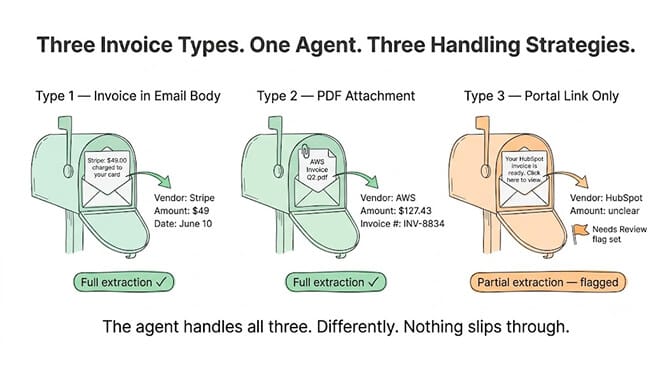
The agent handles the three types of invoice emails you'll encounter: invoices in the email body (Stripe, PayPal), invoices as PDF attachments (AWS, Adobe), and invoice notification emails that link to an external portal (HubSpot, Salesforce).
For the first two, the agent extracts directly. For the third, it captures what's available in the email (vendor, date, likely amount from the subject line) and flags it for manual verification.
Step 1: Connect Gmail (2 minutes)
Your agent needs read access to your Gmail. On a no-code agent platform, this is a one-click OAuth connection. You'll see a Google sign-in screen, grant read access, and the connection is live.
Important: Grant read-only access if your platform supports it. This agent doesn't need to send, delete, or modify emails. It only reads. The less permission it has, the less damage it can do if something goes wrong. (For the full breakdown of OAuth scopes, see how to connect your AI agent to Gmail safely.)
On BetterClaw, Gmail is one of the 120+ connectors, with one-click OAuth. Connect, authorize, done. Credentials are encrypted with AES-256 and auto-purge from agent memory after 5 minutes. Because this build also writes to Google Sheets, the Google Workspace skill is worth a look: it covers Gmail, Sheets, Drive, Docs, Calendar and Contacts in one integration.
If you're building on a framework like LangChain or CrewAI instead, you'll need to set up Gmail API credentials through Google Cloud Console, handle OAuth token refresh, and store credentials securely. On BetterClaw that entire step is a one-click OAuth grant, which is why this tutorial takes ten minutes rather than an afternoon. That's a 2-4 hour detour before you've written your first line of agent logic.
Step 2: Write the system prompt (the most important part)
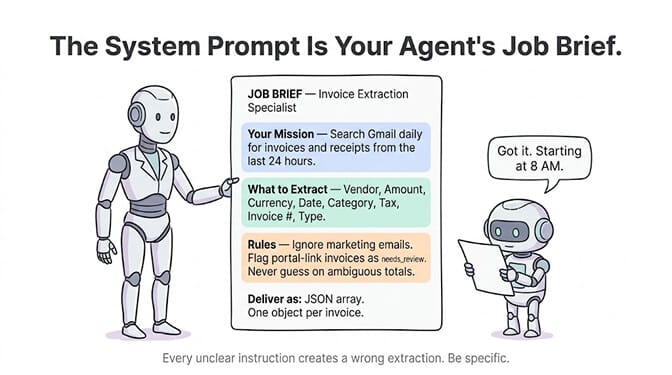
The system prompt tells the agent what to look for, how to extract it, and what format to output. Here's a sample you can adapt:
You are an invoice and receipt tracking agent. Every time you are triggered, search Gmail for emails received in the last 24 hours that contain invoices, receipts, payment confirmations, or billing notifications.

For each invoice/receipt found, extract:
- Vendor name (the company that sent the invoice)
- Amount (total amount charged, in the original currency)
- Currency (USD, EUR, GBP, etc.)
- Date (the invoice or payment date, not the email date)
- Category (one of: Software, Hosting, Marketing, Professional Services, Office, Travel, Meals, Subscriptions, Hardware, Other)
- Tax amount (if listed separately, otherwise "N/A")
- Invoice number (if visible, otherwise "N/A")
- Type (Invoice, Receipt, Payment Confirmation)

Output as JSON array. One object per invoice/receipt found.

Rules:
- If the email is a notification linking to an external portal (e.g., "View your invoice"), extract what you can from the email and set a "needs_review" field to true.
- If the amount is ambiguous (e.g., multiple line items without a clear total), use the total if visible, otherwise flag with needs_review: true.
- Ignore marketing emails, newsletters, and promotional offers even if they mention pricing.
- Ignore emails that are replies or forwards of invoices already processed.
This prompt covers 90% of real-world invoice emails. The needs_review flag is critical. It tells you which entries the agent wasn't confident about, so you can verify manually without checking everything.
Step 3: Set up the output (Google Sheets)
Create a Google Sheet with these columns:
Date | Vendor | Amount | Currency | Category | Tax | Invoice # | Type | Needs Review | Source Email Subject
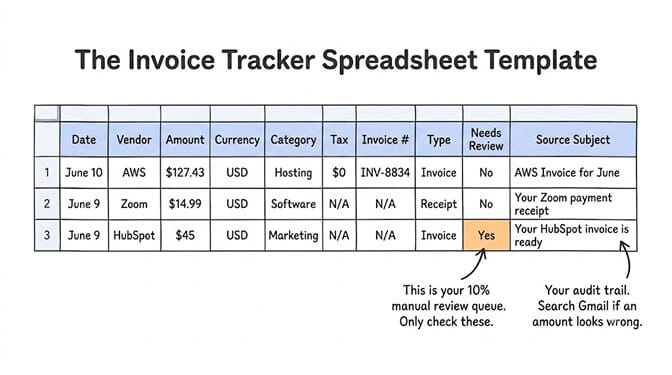
Connect the Sheet to your agent (another OAuth connection). The agent writes a new row for each invoice it finds.
The "Source Email Subject" column is your audit trail. If an amount looks wrong, you can search your Gmail for that subject line and verify.
The output template matters more than most people think. Add a "Needs Review" column. It's the difference between trusting the agent blindly (bad) and reviewing only the 10% it wasn't sure about (good).
Step 4: Schedule it (runs every morning at 8 AM)
A manually triggered invoice agent is better than nothing. A scheduled one is the point.
Set the agent to run daily at 8 AM (or whatever time works for your workflow). By the time you open your laptop, the spreadsheet is already updated with yesterday's invoices.
On BetterClaw Pro, heartbeat scheduling handles this. Pick the time. Toggle on. The agent wakes up, does its job, and goes back to sleep.
If you're self-hosting, you'll set up a cron job (0 8 * * *) on your VPS, handle what happens when cron fires but your agent crashes, and build alerting for failures. See our scheduling guide for the full comparison of scheduling approaches.
Step 5: Add a weekly summary (optional but useful)
The daily scan populates your spreadsheet. A weekly summary gives you the overview.
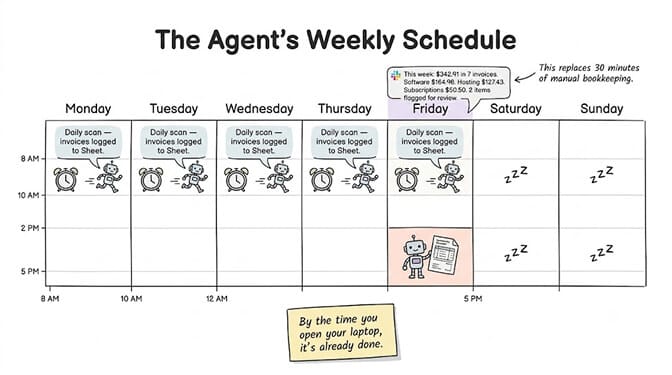
Add a second trigger: every Friday at 5 PM, the agent reads the spreadsheet, totals this week's expenses by category, and sends you a summary on Slack or Telegram. Both delivery routes run over webhooks, which are a Pro feature, so this step lands on the same plan as the scheduling in step 4.
Something like:
"This week: $342.91 in 7 invoices. Software: $164.98. Hosting: $127.43. Subscriptions: $50.50. 2 items flagged for review."
That one message replaces 30 minutes of manual bookkeeping.
McKinsey estimates AI agents represent a $2.6-4.4 trillion addressable market. Not all of that is enterprise. A solopreneur saving 2 hours per month on invoice tracking is $2,400/year in recovered time (at $100/hour). The agent costs maybe $3/month in API fees.
This is exactly the kind of practical, personal agent that platforms like BetterClaw were built for. Gmail + Sheets + Slack, connected in a visual builder. No code. No server. Free plan with 1 agent and 100 credits a month. $49/month on Pro, which is the plan this build actually needs: scheduling, Slack and Telegram webhooks, 12,000 credits a month, and per-agent cost caps. BYOK with zero markup.
The edge cases (and how to handle them)
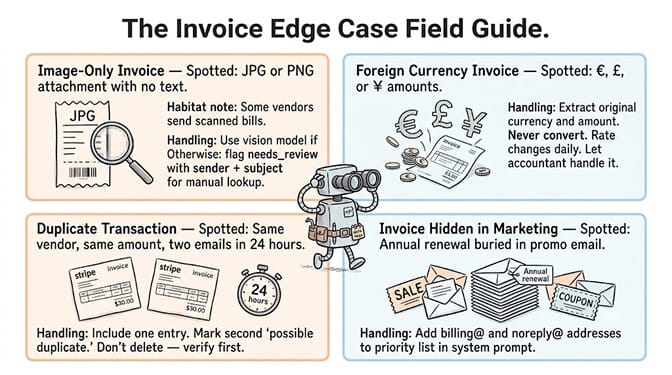
Image-only invoices
Some vendors send invoices as image attachments (JPG, PNG) instead of PDFs. If your LLM supports vision (Claude, GPT-4o, Gemini), it can read image-based invoices directly. If not, the agent should flag these with needs_review: true and include the sender name and subject line so you can find them manually.
Foreign currency invoices
The agent should extract the amount in the original currency and note the currency code. Don't ask the agent to convert currencies. Exchange rates change daily, and getting it wrong creates bookkeeping headaches. Let your accountant handle conversion.
Duplicate detection
If a vendor sends a payment confirmation AND a receipt for the same transaction, the agent might create two entries. Add a rule to the system prompt: "If two emails from the same vendor within 24 hours reference the same amount, include only one entry and note 'possible duplicate' on the second."
Annual invoices buried in promotions
Some SaaS companies embed annual renewal invoices in emails that look like marketing. Add common vendor domains to a priority list in the system prompt so the agent pays extra attention to emails from billing@aws.com, noreply@stripe.com, etc.
The cost math (spoiler: it's almost nothing)
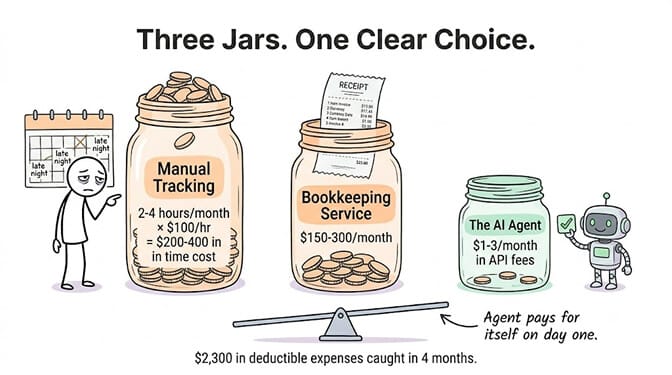
A daily Gmail scan that processes 3-5 invoice emails uses roughly 5,000-10,000 tokens per run. On Claude Sonnet at $3/million input tokens, that's approximately $0.015-$0.03 per day. Under $1/month in API costs.
Even on a busy month with 20+ invoices, you're looking at $2-3 in total API fees. Compare that to the 2+ hours you'd spend doing it manually. Or the $150-300/month a bookkeeping service charges.
The agent pays for itself on day one.
The best personal AI agents aren't the flashy ones. They're the ones that quietly do the boring thing you keep putting off. Once invoice tracking is running, the same Gmail connection powers email triage and morning briefings. Invoice tracking is boring. It's also expensive to neglect (missed deductions, surprise charges, tax-time panic).
Build the agent. Let it run. Open your spreadsheet once a week. That's the whole system. Or skip the build: the ready-made Invoice & Expense workflow logs receipts from Gmail into Google Sheets every morning, and the Software Spend Auditor turns the same receipts into a monthly list of every subscription you pay for.
Give BetterClaw a look if you want this running by lunch. Gmail + Sheets + Slack, connected in a visual builder. Free plan with 1 agent and 100 credits a month. $49/month for Pro with the scheduling and webhooks this build runs on, plus 12,000 credits a month. Your invoice agent takes about 10 minutes to build. We handle the infrastructure. You handle tax season without the panic.
Frequently Asked Questions
What is a Gmail invoice tracker agent?
A Gmail invoice tracker agent is an AI agent that automatically scans your Gmail inbox for invoices, receipts, and payment confirmations, extracts key fields (vendor, amount, date, category, tax), and adds them to a structured spreadsheet. It runs on a schedule (typically daily), so your expense tracking stays current without manual effort. The agent handles invoices in email bodies, PDF attachments, and notification-style emails.
How does a Gmail invoice agent compare to manual bookkeeping?
Manual invoice tracking typically takes 2-4 hours per month for a solopreneur with 15-30 monthly transactions. An AI agent does the same work in under 2 minutes per day, costs $1-3/month in API fees, and catches invoices you'd miss manually. The key advantage is consistency: the agent checks every single day without forgetting, getting busy, or procrastinating. The limitation is that roughly 10% of entries may need manual review (portal-link invoices, image-only attachments).
How long does it take to set up a Gmail invoice tracker agent?
On a no-code platform like BetterClaw: approximately 10 minutes. Connect Gmail (1 click), connect Google Sheets (1 click), write or paste the system prompt (5 minutes), set the schedule (1 minute), configure output channel (1 minute). On a code-based framework like LangChain or CrewAI: 2-4 hours including Gmail API setup, OAuth token handling, credential storage, scheduling, and output formatting.
How much does it cost to run a Gmail invoice tracker agent?
This build needs BetterClaw Pro at $49/month ($39/month billed annually), because the daily schedule and the Slack or Telegram summary both depend on Pro features; that gets you 5 agents and 12,000 credits a month. The free plan ($0, 1 agent, 100 credits/month) will hold the agent itself but not the scheduling or the webhook delivery. LLM API costs are minimal: processing 3-5 invoice emails daily uses 5,000-10,000 tokens, costing approximately $0.01-0.03/day on Claude Sonnet ($3/M tokens). Total monthly cost: $1-3 in API fees. Compare that to bookkeeping services at $150-300/month or 2-4 hours of your own time.
Is it safe to give an AI agent access to my Gmail?
Yes, with proper configuration. Grant read-only access (the agent doesn't need to send or delete emails). Use OAuth (not password sharing) for authentication. On BetterClaw, credentials are encrypted with AES-256 and auto-purge from agent memory after 5 minutes. The agent processes email content through your LLM provider's API, so verify your provider's data handling policies. For sensitive financial data, use a provider with enterprise data terms that prohibit using your data for model training.