You're staring at a throttle message. Here's exactly what triggered it, when it resets, and 5 workarounds that work right now.
You're mid-conversation with Claude. You've been iterating on a draft, or debugging code, or working through a research question, and the replies have been good. Then a message pops up telling you you've hit your usage limit. No warning. No countdown. Just... done.
Here's the part that makes it worse. You don't know when it resets. You don't know whether waiting 10 minutes or 5 hours is the right move. And if you're on a paid plan, you're wondering what exactly you're paying for.
This post covers what "rate limited" actually means across all three Claude surfaces (Claude.ai chat, the API, and Cowork), when each type of limit resets, and five workarounds you can use right now while you wait.
What "rate limited" actually means on Claude
Rate limiting on Claude is a compute constraint, not a paywall trick. Running Claude Opus 4.8 on complex tasks requires enormous GPU resources, and Anthropic limits usage to ensure consistent performance for all users. The limits exist because the hardware has a ceiling, not because Anthropic wants you to upgrade (though upgrading does raise the ceiling).
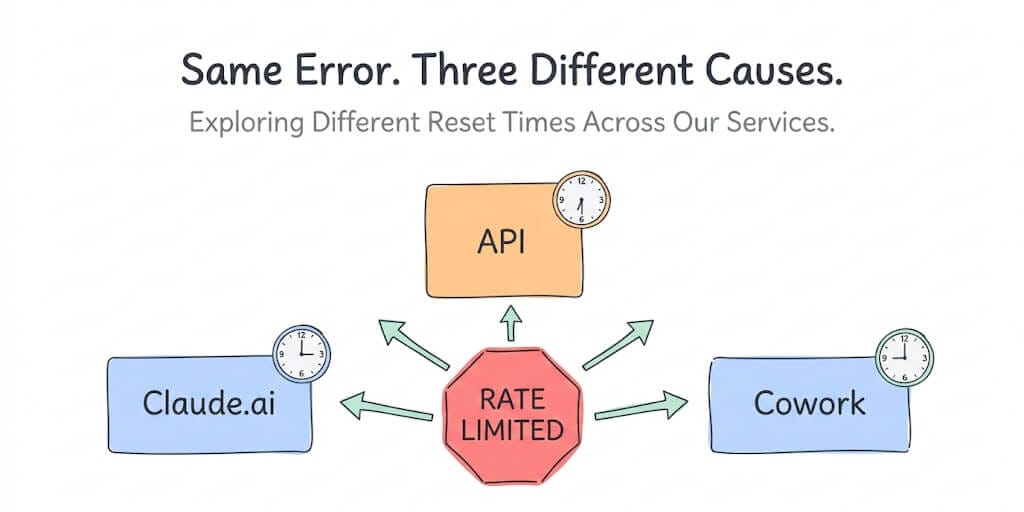
The confusing part: Claude has three different surfaces, and each one enforces limits differently.
Claude.ai (the chat interface) uses a rolling usage budget measured in tokens. Claude enforces two overlapping limits: a five-hour rolling window measured in tokens, and a weekly usage cap. Exact quotas depend on your plan tier. Pro provides a baseline allocation. Max 5x gives five times that. Max 20x gives twenty times.
The Claude API uses per-minute limits measured in requests per minute (RPM), input tokens per minute (ITPM), and output tokens per minute (OTPM). These are enforced per model class at the organization level and scale with your API tier.
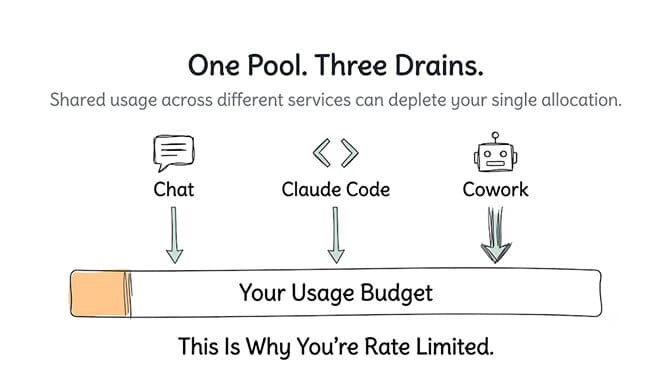
Claude Cowork and Claude Code share the same usage pool as your Claude.ai chat. And this is where most of the confusion lives.
The single most important thing to understand: Chat, Claude Code, and Cowork all draw from the same pool. A heavy Cowork session can exhaust your chat allocation without you ever opening a chat window.
Rate limits by plan (the table worth bookmarking)
| Surface | Free | Pro ($20/mo) | Max 5x ($100/mo) | Max 20x ($200/mo) |
|---|---|---|---|---|
| Claude.ai chat | Rolling budget, most limited | 5-hour rolling window + weekly cap | ~5x Pro allocation | ~20x Pro allocation |
| Claude Code | Not available | Shared pool with chat | Shared pool (5x) | Shared pool (20x) |
| Cowork | Not available | Shared pool with chat | Shared pool (5x) | Shared pool (20x) |
| Default model | Sonnet 5 | All models | All models | All models |
| Opus access | No | Yes (within budget) | Yes (within budget) | Yes (within budget) |
Anthropic doubled Claude's five-hour rate limits on May 6, 2026, powered by a compute deal that added over 300 megawatts of new GPU capacity and more than 220,000 NVIDIA GPUs. So the current limits are already roughly twice what they were before May 2026.
For the API, limits scale by spending tier:
| API Tier | Credit Threshold | Opus Input TPM | Opus Output TPM |
|---|---|---|---|
| Tier 1 | $0+ | 500,000 | 80,000 |
| Tier 2 | $40+ | 2,000,000 | 200,000 |
| Tier 3 | $200+ | 5,000,000 | 400,000 |
| Tier 4 | $400+ | 10,000,000 | 800,000 |
These numbers represent a 10x to 16x increase from pre-May 2026 levels. Tier 1 input tokens per minute went from 30,000 to 500,000. Output tokens went from 8,000 to 80,000.
Why Cowork hits the limit so much faster than chat
This is where most people get it wrong. They upgrade to Pro thinking it gives them hours of Cowork time. Then they hit the rate limit after 45 minutes of active agentic work and wonder what happened.
Cowork sessions consume 5 to 20 times more usage allocation than standard chat, leaving Pro plan users throttled within an hour of active agentic work.
Here's why. A single chat message might use 1,000 to 5,000 tokens. A single Cowork action can use 50,000 to 150,000 tokens, because it includes the system prompt, the accumulated conversation history, the contents of files pulled into context, and tool-use tokens generated by operations like file reads and web searches.
A seemingly simple "edit this file" command in Claude Code can consume between 50,000 and 150,000 tokens in a single API call once the full context window is assembled. Ten of those in a row, and you've burned through a significant chunk of your five-hour budget in under ten minutes.
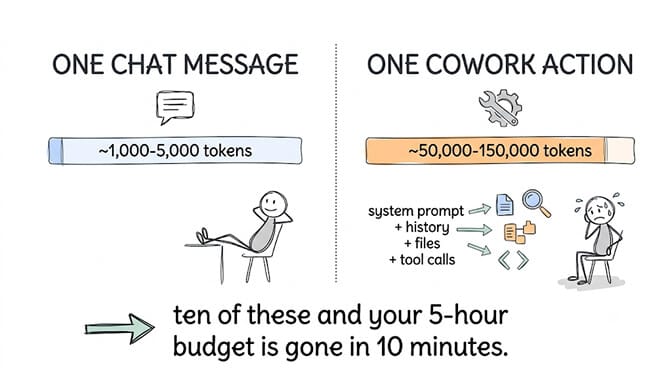
If you're using Cowork or Claude Code on a Pro plan and hitting limits within an hour, you're not doing anything wrong. The consumption rate is just structurally different from chat. Our deep dive on the Cowork "rate limit reached" error covers the Cowork-specific quota mechanics, including the ghost-usage bug that burns quota on sessions you never ran.
When does the rate limit reset?
Claude.ai / Claude Code / Cowork: the five-hour rolling window. This means it's not a hard reset at a specific time. As your oldest usage ages out of the five-hour window, capacity frees up gradually. If you used a burst of tokens three hours ago, some of that budget becomes available again two hours from now.
Weekly cap: a separate limit that tracks total usage across the week. Even if your five-hour window has capacity, you can hit the weekly ceiling. This resets on a rolling basis as well.
API: per-minute limits. If you hit the RPM or TPM ceiling, wait 60 seconds and you're back. API rate limits reset on a per-minute rolling basis, not on a calendar schedule.
Here's what nobody tells you about the reset: because it's rolling, not clock-based, there's no magic "wait until midnight" reset. Your best move when you hit the limit is to wait 1 to 2 hours for the five-hour window to start freeing up, not to refresh the page every 30 seconds hoping for a hard reset that doesn't exist.
5 workarounds that actually help right now
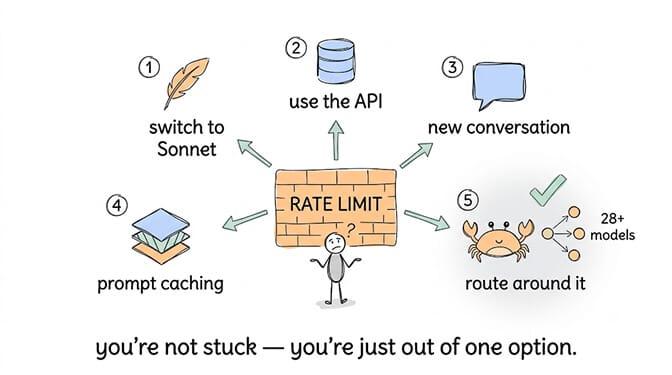
1. Switch to a lighter model
If you were using Opus 4.8 and hit the limit, try switching to Sonnet. Rate limits apply separately per model, so you can run different models up to their respective limits simultaneously. The Opus pool being exhausted doesn't affect your Sonnet budget. For many tasks, especially drafting, summarization, and classification, Sonnet produces comparable results at a fraction of the compute cost.
2. Use the API instead of the chat interface
If you have API access, your API limits are completely separate from your Claude.ai subscription limits. Use Claude subscriptions for human workflows. Use the API for production workloads. Moving your heavier work to the API means your chat budget stays available for conversational use, and API rate limits reset every minute instead of every five hours.
3. Start a new conversation for long sessions
Every follow-up message in the same conversation appends to the context, meaning token consumption per request grows over the course of a session. Starting a new conversation resets the context to just the system prompt, which means each message consumes far fewer tokens. You lose continuity, but you gain significantly more messages before hitting the limit.
4. Enable prompt caching (API users)
With an 80 percent cache hit rate against a 2,000,000 input tokens per minute limit, you can effectively process roughly 10,000,000 total input tokens per minute. Prompt caching is the single best lever for raising your effective throughput on the API, because cached tokens count at a fraction of their normal rate against your per-minute limits.
For more on how caching and context management reduce both costs and rate limit pressure, our guide to cutting agent token costs covers the specific techniques in detail.
5. Route through a multi-model gateway
If hitting Claude's limits is a recurring production problem and not just a personal inconvenience, the architectural fix is to stop depending on a single provider entirely. An agent that routes simple tasks to Gemini Flash or DeepSeek and reserves Claude for complex reasoning never fully stops when one provider throttles.
This is a meaningful part of how BetterClaw handles the rate limit problem for autonomous agents. Our visual agent builder supports 28+ model providers with zero inference markup and automatic fallback when one provider rate limits. If Claude throttles, the agent switches to another capable model instead of stopping. Free plan, no credit card, bring your own API keys.
When Claude throttles, your agent keeps working.
28+ model providers, zero inference markup, automatic fallback on rate limits. Free forever, not a trial. Start free → No credit card · BYOK · Deploy in ~60 seconds
The honest assessment: is upgrading worth it?
Free to Pro ($20/mo): yes, if you use Claude regularly. Free limits are tight enough that any daily user will hit them. Pro's doubled five-hour window (post-May 2026) gives you a meaningful workday of chat usage.
Pro to Max 5x ($100/mo): only if you're doing heavy Cowork or Claude Code sessions. For chat-only users, Pro is almost always enough. For developers running Claude Code on real projects, Pro's shared pool gets exhausted within an hour of active use, and Max 5x is where the headroom becomes workable.
Pro to Max 20x ($200/mo): only if you're running extended Claude Code or Cowork sessions daily. This is a professional-developer plan, not a power-user plan. Max 20x was introduced specifically for developers running Claude Code for extended sessions and professionals processing large document volumes daily.
Don't upgrade because you're frustrated. Upgrade because you've measured which model and surface is consuming your budget and confirmed that the next tier's allocation actually covers it.
The takeaway for agent builders specifically
If you're building agents that run on Claude's API, rate limits are an infrastructure problem, not a plan problem. Tier 1 now starts at 500,000 input tokens per minute, which is genuinely workable for most single-agent setups. But agents that loop, retry on failure, or run multiple concurrent sessions can hit even generous per-minute limits during bursts.
The structural fix is model routing with fallback. Send classification and formatting tasks to cheaper, faster models. Reserve Claude for the tasks that genuinely need its reasoning depth. And make sure your agent doesn't stop working entirely when any single provider throttles.
If you'd rather have model routing and fallback handled automatically instead of building it yourself, give BetterClaw a try. Free plan with 1 agent and 500 credits a month. $49/month for Pro. 28+ model providers, zero markup, and when Claude rate limits, your agent keeps working. Your first deploy takes about 60 seconds.
Frequently Asked Questions
What does "rate limited" mean on Claude?
It means you've exceeded the number of tokens Claude allows within a rolling time window. For Claude.ai, this is a five-hour rolling budget shared across Chat, Claude Code, and Cowork. For the API, it's a per-minute limit on requests and tokens. It's a compute capacity constraint, not a billing error.
How long do Claude rate limits last?
Claude.ai uses a rolling five-hour window, so limits ease gradually as your oldest usage ages out, typically freeing up capacity within 1 to 2 hours after you stop. API limits reset every minute. There's no hard daily reset at midnight for either surface.
How do Claude Pro rate limits compare to Max 5x?
Max 5x provides approximately five times the token budget of Pro across the same five-hour rolling window and weekly cap. For chat-only users, Pro is usually sufficient. For users running Claude Code or Cowork sessions, which consume 5 to 20 times more tokens per interaction than chat, Max 5x provides the headroom that Pro lacks.
Is Claude Pro worth $20 a month for rate limits alone?
If you use Claude daily, yes. Free-tier limits are restrictive enough that regular users hit them within a few conversations. Pro's doubled limits (as of May 2026) give most chat-only users a full workday of usage. If your primary use is Claude Code or Cowork, Pro may not be enough and Max 5x at $100 may be the right tier.
Can I avoid Claude rate limits entirely?
Not on any single plan or provider. But you can minimize the impact by switching models (Opus and Sonnet have separate pools), using the API for production workloads (separate limits from chat), starting new conversations to reduce per-message token consumption, and routing through multiple model providers so your workflow doesn't depend on Claude's availability alone.