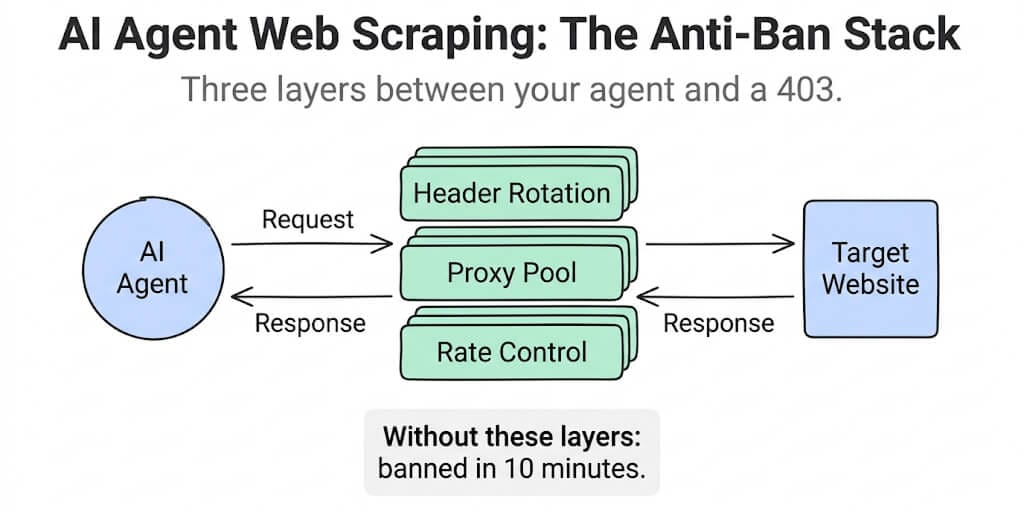
Your agent scraped 50 pages perfectly. Then it scraped 50 more at the same speed, with the same headers, from the same IP. Now it's banned. Here's the full configuration that keeps it running.
The agent worked beautifully for about twelve minutes.
It hit a competitor's pricing page, extracted the product name, price, and availability into a clean JSON object, dropped it into Google Sheets, and moved to the next URL. Fast. Accurate. Exactly what we built it to do.
Then every request started returning 403. Banned.
Here's what went wrong: the agent sent 200 requests in 12 minutes from the same IP, with the same user-agent string (python-requests/2.31.0), at perfectly even 3.6-second intervals, with no cookies, no referrer, and no JavaScript execution. To the website's anti-bot system, this was the most obvious non-human traffic pattern imaginable.
AI agents get banned faster than traditional scrapers because they're worse at pretending to be human. A traditional scraper is purpose-built with stealth in mind. An AI agent is purpose-built to complete tasks. Stealth is an afterthought.
Here's how to set up an AI agent for web scraping that actually survives long enough to be useful.
Why AI agents get banned faster than regular scrapers
A traditional Python scraper with Scrapy or Playwright is configured for stealth from the start. The developer thinks about headers, proxies, and timing because that's the core engineering problem.
An AI agent approaches scraping differently. You tell it "go to this URL and extract the price." It uses whatever HTTP library or browser tool is available. Default headers. Default timing. No proxy. No fingerprint management.
Three things give agents away immediately:
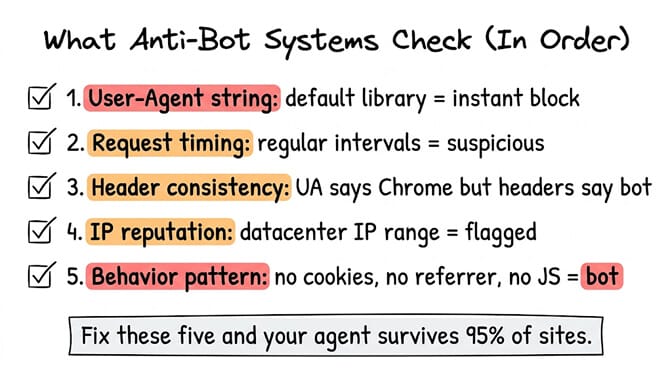
Default user-agent strings. python-requests/2.31.0, node-fetch/1.0, or even an empty UA. These are instant block triggers. Every anti-bot system in 2026 checks the UA first. A default library string is the equivalent of wearing a name tag that says "I am a bot."
Perfectly regular timing. Humans browse erratically. Click, read for 30 seconds, click, read for 2 minutes, click three pages fast, pause. AI agents request pages at machine-regular intervals. 3 seconds. 3 seconds. 3 seconds. This pattern is trivially detectable.
Inconsistent fingerprints. The agent sends a Chrome 120 user-agent string but includes no Accept-Language, no Accept-Encoding, no Sec-Ch-Ua headers that a real Chrome 120 browser would send. The headers don't match the claimed browser. Modern detection systems (Cloudflare, Datadome, PerimeterX) check for this consistency.
The #1 reason AI agents get banned: they send requests that look like a bot pretending to be a browser, which is worse than a bot that doesn't pretend at all. Inconsistency is more suspicious than honesty.
The header configuration that actually works
Your agent's HTTP headers need to look like they came from a real browser. Not just the user-agent. ALL the headers. Here's the configuration:
User-Agent: Mozilla/5.0 (Macintosh; Intel Mac OS X 10_15_7) AppleWebKit/537.36 (KHTML, like Gecko) Chrome/125.0.0.0 Safari/537.36
Accept: text/html,application/xhtml+xml,application/xml;q=0.9,image/avif,image/webp,image/apng,*/*;q=0.8
Accept-Language: en-US,en;q=0.9
Accept-Encoding: gzip, deflate, br
Sec-Ch-Ua: "Google Chrome";v="125", "Chromium";v="125", "Not.A/Brand";v="24"
Sec-Ch-Ua-Mobile: ?0
Sec-Ch-Ua-Platform: "macOS"
Connection: keep-alive
Upgrade-Insecure-Requests: 1
Critical rule: every header must be internally consistent. If your UA says Chrome 125 on macOS, your Sec-Ch-Ua must match Chrome 125 and your Sec-Ch-Ua-Platform must say macOS. A mobile UA with a desktop platform header is more suspicious than no headers at all.
Rotate through 5-10 realistic UA strings. Not 100. Modern detection looks for rotation patterns too. A pool of 5-10 current browser strings (Chrome, Firefox, Safari, Edge) is realistic. Rotate per session, not per request.
For agent builders, include these headers in your agent's system prompt or tool configuration. Tell the agent: "When making HTTP requests, always include these headers. Rotate the User-Agent from this list. Never use default library headers."
The proxy layer (this is where most agents skip and die)
Without proxies, all your agent's requests come from one IP. One IP making 200 requests to the same site in an hour gets rate-limited or banned on most commercial sites.
Three proxy types, ranked by stealth:
Datacenter proxies ($1-5/GB). Fast, cheap, and often blocked. Cloud provider IP ranges (AWS, GCP, Azure, Hetzner) are flagged by most anti-bot systems. Fine for low-stakes scraping on sites without sophisticated protection. Bad for anything with Cloudflare or Datadome.
Residential proxies ($5-15/GB). Route through real home network IPs. Much harder to detect because they look like regular household internet traffic. The standard choice for serious scraping in 2026. Providers: Bright Data, Oxylabs, IPRoyal.
Mobile proxies ($15-30/GB). Route through cellular network IPs. The hardest to block because cellular IPs are shared by many legitimate users. Websites are reluctant to block them because they'd block real mobile customers. The premium option for high-value, ban-sensitive scraping.
The rotation pattern matters. Don't rotate per request. Use "sticky sessions" where one IP handles 5-20 requests (a realistic browsing session) before rotating. Rotating every single request creates "teleporting" behavior where the same user appears from New York, then London, then Tokyo in three consecutive requests. That's more suspicious than staying on one IP.
For your agent, configure the proxy at the tool level, not in the system prompt. The agent shouldn't manage proxy logic. The scraping tool should handle it transparently. Some platforms include a residential proxy with the plan, so you can build an AI agent that browses without sourcing and rotating IPs yourself.
Rate limit detection (make your agent back off automatically)
Here's the instruction to include in your agent's system prompt:
When scraping websites:
1. Wait a random delay between 2 and 8 seconds between requests
   (never use fixed intervals)
2. If you receive a 429 (Too Many Requests) response, wait 30 seconds
   and retry with a different approach
3. If you receive a 403 (Forbidden), stop scraping that domain immediately
   and report the block
4. If you receive a CAPTCHA page instead of content, stop and flag
   the URL for manual review
5. Never make more than 30 requests to the same domain in a 10-minute window
6. If 3 consecutive requests to the same domain fail, stop and report
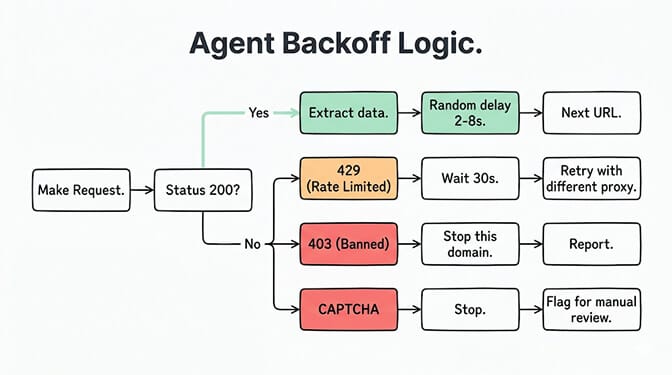
The key insight: random delays are more important than slow speeds. An agent making requests every 2-8 seconds randomly looks human. An agent making requests every 5 seconds precisely looks like a machine set to 5 seconds.
Making your agent respect robots.txt (and why it matters)
Include this in your agent's system prompt:
Before scraping any new domain:
1. First fetch robots.txt at [domain]/robots.txt
2. Check if the path you need is disallowed for your user-agent
   or for all agents (User-agent: *)
3. If the path is disallowed, DO NOT scrape it. Report that the
   page is blocked by robots.txt
4. Respect Crawl-delay if specified
5. Never scrape pages requiring authentication unless you have
   explicit permission
This isn't just ethical. It's practical. Sites that discover bot traffic violating robots.txt escalate to legal teams. Sites that see bot traffic respecting robots.txt usually leave it alone. Robots.txt compliance is your agent's best defense against non-technical enforcement.
Which model to use for extraction
Not every model is equally good at structured extraction from HTML.
For parsing HTML and extracting specific fields (price, product name, availability, contact info), models with strong instruction following and structured output capabilities work best. Claude Sonnet handles structured extraction reliably with low hallucination on field values. DeepSeek V4 Flash is the budget option at $0.14/M input. GLM 5.1 is strong on structured tasks at $0.98/M. (See our full model comparison if you're picking an extraction model.)
The model's job is extraction, not browsing. Give it raw HTML (or better, a cleaned text extract from the page) and a clear output schema:
{
  "product_name": "string",
  "price": "number",
  "currency": "string",
  "availability": "in_stock | out_of_stock | limited",
  "last_updated": "ISO date"
}
The more specific your output schema, the more consistent the extraction. Don't say "extract product information." Say "extract these five fields in this exact JSON format."
This kind of structured extraction workflow is exactly what BetterClaw's visual builder handles well. Connect your scraping tool, define the output schema, pipe results into Google Sheets or Notion via OAuth, schedule the agent to run daily. No glue code between the scraper and the output destination. Free plan with 1 agent and 100 credits a month. $49/month on Pro. BYOK with zero markup.
The full agent config (paste-ready)
Here's a complete system prompt for a scraping agent. Adapt the target URLs and output schema to your use case:
You are a web data extraction agent. Your job is to visit specified
URLs, extract structured data, and output it in JSON format.

SCRAPING RULES:
- Wait a random delay of 2 to 8 seconds between each request
- Rotate User-Agent from this list:
  [Chrome 125 macOS, Chrome 125 Windows, Firefox 126 macOS,
   Safari 17.5 macOS, Edge 125 Windows]
- Always include matching Accept, Accept-Language, Sec-Ch-Ua headers
- Never use default library headers
- If you receive a 429 response, wait 30 seconds and retry once
- If you receive a 403 or CAPTCHA, stop and report the blocked URL
- Never exceed 30 requests to one domain per 10-minute window
- Check robots.txt before scraping any new domain
- If a path is disallowed in robots.txt, skip it and report

EXTRACTION FORMAT:
For each URL, extract:
{
  "url": "the page URL",
  "product_name": "exact product name",
  "price": numeric value only,
  "currency": "USD/EUR/GBP etc",
  "availability": "in_stock/out_of_stock/limited",
  "extracted_at": "ISO 8601 timestamp"
}

OUTPUT:
Append each extracted record as a new row in the connected
Google Sheet. If extraction fails for a URL, log the URL and
error reason in the "Failed" sheet tab.

SCHEDULE: Run daily at 7:00 AM. Process URLs from the "Targets"
sheet tab, column A.
This config covers headers, timing, rate limits, robots.txt, extraction format, and output destination. Adapt it. The structure is more important than the specific values.
The honest caveat (read this before you deploy)
Web scraping exists in a gray area. Robots.txt is a convention, not a law. Terms of Service vary by site. Some sites explicitly prohibit automated access. Others allow it with restrictions.
The configuration above makes your agent polite, ethical, and hard to detect. It doesn't make it legal on every site. Check the Terms of Service for your target sites. If a site prohibits scraping, respect that.
For public pricing data, job listings, and publicly available information, scraping is generally accepted when done respectfully (rate-limited, robots.txt compliant, not bypassing paywalls). For private data, authenticated content, or explicitly prohibited sites, don't scrape. Period.
Gartner projects 40% of enterprise applications will embed AI agents by end of 2026. Competitive intelligence, price monitoring, and market research are among the top agent use cases. The teams that scrape ethically and sustainably will build lasting data advantages. The teams that scrape aggressively will burn their IPs and get blocked.
Give BetterClaw a look if you want your scraping agent piped directly into Sheets, Slack, or HubSpot without writing glue code. 25+ OAuth integrations. Scheduled runs. Per-agent cost caps. Free plan with 1 agent and 100 credits a month. $49/month for Pro.
Frequently Asked Questions
How do I set up an AI agent for web scraping without getting banned?
Configure three layers: headers (rotate 5-10 realistic browser UA strings with matching Accept, Accept-Language, and Sec-Ch-Ua headers), proxies (residential or mobile proxies with sticky sessions of 5-20 requests per IP), and rate control (random 2-8 second delays, 30 request cap per 10 minutes per domain, automatic backoff on 429/403 responses). Include robots.txt checking in your agent's system prompt. The full paste-ready config is in the article above.
Which AI model is best for web scraping and data extraction?
For structured extraction from HTML (prices, names, availability), Claude Sonnet 4.6 provides the most reliable results with low hallucination on field values. DeepSeek V4 Flash ($0.14/M input) is the budget option for high-volume extraction. GLM 5.1 ($0.98/M) is strong on structured tasks. The key is giving the model a specific JSON output schema rather than asking for general "product information." Specific schemas produce consistent output regardless of model.
Do I need proxies for AI agent scraping?
For scraping more than 50 pages per day from a single domain, yes. Without proxies, all requests come from one IP and get rate-limited or banned quickly. Residential proxies ($5-15/GB) are the standard for most scraping. Datacenter proxies ($1-5/GB) work for sites without sophisticated bot detection. Mobile proxies ($15-30/GB) are hardest to block but most expensive. For scraping a few pages occasionally, proxies may not be necessary.
How much does it cost to run an AI scraping agent monthly?
Platform cost: $0 (BetterClaw free) to $49/month (Pro with scheduling and proxy access). LLM API: $3-15/month for 1,000-5,000 pages/day depending on model (DeepSeek Flash at $0.14/M is cheapest). Proxies: $10-50/month for residential proxy access depending on volume. Total: $15-115/month for a production scraping agent. Compare to manual research (5-10 hours/week at $50/hr = $1,000-2,000/month) or commercial scraping APIs ($100-500/month).
Is AI agent web scraping legal?
Web scraping legality depends on what you scrape, how you scrape it, and the target site's Terms of Service. Publicly available data (pricing, job listings, public profiles) scraped at respectful rates with robots.txt compliance is generally accepted. Bypassing authentication, ignoring robots.txt directives, violating Terms of Service, or scraping personal data may violate laws like CFAA (US), GDPR (EU), or site-specific terms. Always check the target site's ToS and consult legal counsel for commercial scraping operations.