Your AI agent sent 47 emails last night. How many were correct? How much did it cost? Did it access credentials it shouldn't have? If you can't answer these in 30 seconds, you have an observability problem.
A user messaged us in March. His agent had been running for 11 days. Working great. Triaging support emails, drafting replies, routing escalations to Slack.
On day 12, the agent hit an ambiguous customer complaint. Something about a "billing issue" that was actually a refund request wrapped inside a feature suggestion. The agent couldn't classify it. So it re-read the email. Re-classified. Re-read again. Re-classified again.
For four hours.
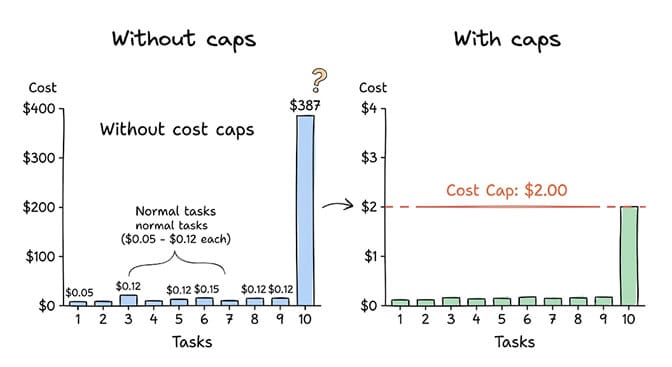
By the time the user checked his dashboard the next morning, that single task had consumed $387 in LLM tokens. One email. Almost four hundred dollars.
This is what happens when you run AI agents in production without AI agent observability. Not LLM observability. Not prompt tracking. Agent observability. The kind that tells you what your agent is doing, what it's spending, and what it's accessing. In real time.
AI agent observability is not LLM observability
Here's the distinction most people miss.
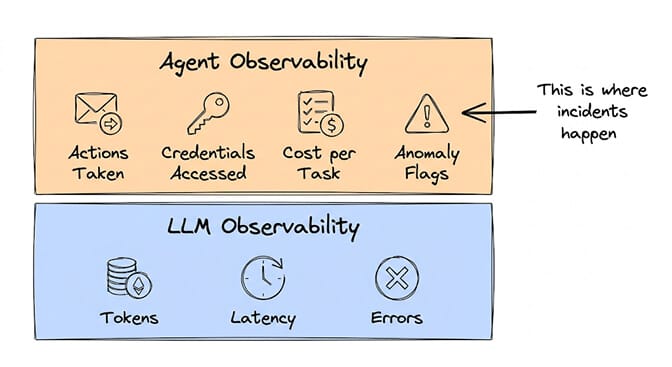
LLM observability tracks the model layer: token usage, latency, error rates, prompt/completion pairs, model version. Tools like Langfuse, Arize, and Helicone handle this well. They answer the question "how is the model performing?"
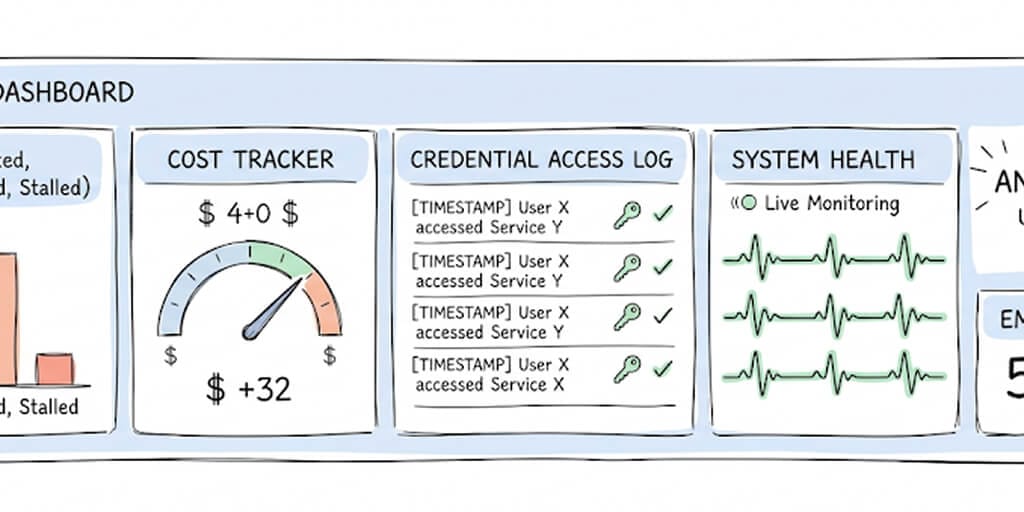
AI agent observability tracks everything the LLM observability layer tracks, plus the action layer: emails sent, meetings booked, files accessed, credentials used, tasks completed vs failed vs stalled. It answers a different question: "what is the agent doing, and should it be doing that?"
The $387 runaway task wasn't an LLM problem. The model was performing fine. Low latency. No errors. Clean completions. The problem was at the agent behavior layer: a reasoning loop that kept consuming tokens because nothing was monitoring the agent's actions and cost in real time.
Most "AI observability" platforms don't track agent actions. They track model calls. That gap is where the expensive, embarrassing, and sometimes dangerous incidents happen.
The 7 metrics you need to monitor in production
If you're running AI agents in production (or about to), here are the seven metrics that matter. Not the seven metrics that sound impressive on a vendor's feature page. The seven that prevent incidents.
1. Cost per task. How many LLM tokens does each completed task consume? More importantly, what's the variance? If your average task costs $0.08 but one task costs $387, you need to know immediately. Not the next morning.
2. Task completion rate. What percentage of tasks complete successfully vs fail vs stall? A healthy agent should complete 85%+ of tasks. If completion rate drops below 70%, something changed. Maybe the incoming data shifted. Maybe a skill broke. Maybe the LLM provider updated their model.
3. Action accuracy. Of the actions your agent takes (emails sent, Slack messages posted, meetings booked), what percentage are correct? This requires spot-checking or approval workflows, especially in the first week of deployment. BetterClaw's trust levels (Intern, Specialist, Lead) exist specifically for this. Start at Intern. Review every action. Promote to Specialist when accuracy is validated.
4. Credential access log. Which API keys were accessed, by which skill, for which agent, and when? Was the access granted or denied? This is the metric your CISO will ask about first. If you can't produce a credential access audit trail, your security review will fail.
5. Latency per step. How long does each reasoning and action step take? A sudden spike in step latency often indicates a reasoning loop (the agent is re-processing the same input repeatedly) or an API timeout from a connected service.
6. Anomaly flags. Unusual patterns that don't fit the agent's normal behavior: sudden cost spikes, credential access outside business hours, repeated task failures, new external API calls that weren't part of the original configuration. This is the hardest metric to implement from scratch and the most important one to have.
7. Memory usage. How much of the context window is being consumed? Is the agent retrieving relevant memories or pulling stale ones? Context bloat (filling the context window with irrelevant information) is a silent performance killer. It makes the agent slower, less accurate, and more expensive per task.
If you're tracking token usage but not tracking what your agent is doing with those tokens, you're monitoring the engine while ignoring where the car is driving.
The $400 runaway task (and why cost caps aren't optional)
Let me tell you how the $387 incident could have been prevented.
The pattern is common: an agent receives an ambiguous input. It can't confidently classify it. So it reasons about it again. And again. Each iteration consumes tokens. Without a hard spending limit, the agent keeps reasoning indefinitely.
This isn't a bug in the agent's logic. It's a gap in the guardrails. The agent is doing exactly what it was told: "read the email, classify it, and respond." It just can't classify this particular email, so it keeps trying.
The fix is simple: per-agent cost caps.
Set a maximum spend per task. Set a maximum daily spend per agent. If either threshold is hit, the task pauses and alerts a human. The agent doesn't keep burning tokens on an unsolvable problem.
BetterClaw includes per-agent spending limits as a core feature. You set the cap. The agent respects it. If it hits the limit, the task goes to your review queue instead of your LLM bill. This is available on every plan, including free.
On self-hosted frameworks (CrewAI, AutoGen, LangGraph), there's no built-in cost cap. You'd need to build custom middleware that tracks token consumption per task and kills the process when a threshold is reached. That's a week of development work for something that should be a settings toggle.
How BetterClaw handles AI agent observability
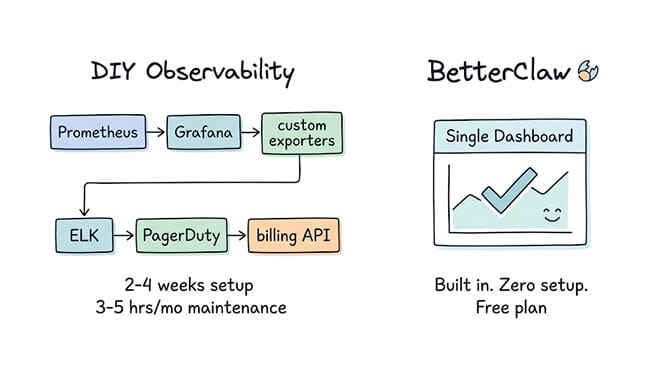
We didn't build observability as an add-on. It's built into the platform. Here's what you get without installing Prometheus, configuring Grafana, or writing a single line of custom metrics code.
Real-time task monitoring. Every task has a visible status: Backlog, Scheduled, Ready, In Progress, Complete, Failed. You can see what your agent is doing right now, not what it did yesterday.
Per-agent cost tracking with spending caps. Set maximum spend per task and per day. The dashboard shows running costs in real time. When a cap is hit, the task pauses and you get notified.
Credential access history. Every key access is logged: which key, which agent, which skill, when, and whether access was granted or denied. Exportable for compliance audits.
Health monitoring with auto-pause. If the platform detects anomalous behavior (repeated failures, cost spikes, unexpected credential access patterns), it automatically pauses the agent and notifies you. You don't need to be watching the dashboard at 2 AM. The platform watches for you.
Full audit trail. Every action your agent takes is logged with timestamps. Who approved it (or whether it was autonomous). What the input was. What the output was. This is the trail your compliance team needs for SOC 2, HIPAA, or internal security reviews.
One-click kill switch. If something goes wrong, any team member (including non-technical ones) can immediately shut down an agent with a single click. No SSH. No terminal. No deployment rollback.
Most of this is available on the free plan, with no setup required. Cost tracking is basic on Free and advanced on Pro.
We covered the full security architecture, including the 4-layer skill vetting process and secrets auto-purge, in a separate deep-dive. The observability layer sits on top of that foundation.
BetterClaw's observability dashboard is included at every pricing tier. Free plan: $0/month, 1 agent, 500 credits/month, basic cost tracking. Pro: $49/month, 5 agents, 12,000 credits/month, advanced cost tracking with per-agent caps. Business: $149/month, advanced cost tracking with alerts. Enterprise: custom pricing with SSO, custom cost dashboards, and a dedicated account manager. If you're evaluating platforms and observability is a requirement, start here and check the dashboard yourself.
The DIY alternative (and why it takes 2-4 weeks)
If you're running agents on a self-hosted framework like CrewAI, AutoGen, or LangGraph, here's what building equivalent observability looks like.
Metrics dashboards: Prometheus + Grafana. 2-3 days to set up, configure scrapers, and build dashboards. You get system metrics out of the box, but agent-specific metrics (cost per task, action accuracy, credential access) require custom exporters.
Custom exporters: You need to instrument your agent code to emit metrics for every action taken, every credential accessed, and every task status change. 1-2 weeks of development time. This is the hardest part because you're essentially building an observability layer from scratch.
Log aggregation: ELK stack (Elasticsearch, Logstash, Kibana) or Grafana Loki. 1-2 days to set up. Then you need to structure your agent logs so they're actually searchable and useful.
Alerting: PagerDuty or Opsgenie integration. Half a day to configure. Then you need to define what "anomalous" means for your specific agents and write the alerting rules.
Cost tracking: Custom integration with your LLM provider's billing API. Another day of development. Plus ongoing maintenance when the API changes.
Total: 2-4 weeks of engineering time. 3-5 hours per month of ongoing maintenance. And you still probably won't have auto-pause on anomalies or a one-click kill switch.
The AI agent frameworks comparison covers how CrewAI, AutoGen, LangGraph, and others handle (or don't handle) production operations beyond just building agents.
The production readiness checklist
Before deploying any AI agent to production, verify you have these five things. Print this out. Tape it next to your monitor. Do not skip any of them.
1. Cost per task monitoring with hard caps. Not soft limits. Not alerts after the fact. Hard caps that pause the task before it burns through your budget.
2. Credential access logging. Every key, every access, every agent, every timestamp. Exportable. This is non-negotiable for any environment handling customer data.
3. Anomaly detection with auto-pause. The system should catch problems before you do. If your agent starts behaving unexpectedly at 3 AM, auto-pause protects you until you can investigate.
4. Kill switch accessible to non-technical team members. If something goes wrong and your engineer is asleep, your ops lead needs to be able to stop the agent. One click. No terminal.
5. Weekly audit trail review process. Not just having the logs. Actually reviewing them. A 15-minute weekly review catches drift, permission creep, and edge cases before they become incidents.
The AI agent marketplace security guide covers the skill vetting side of the production safety equation. This observability checklist covers the operational side. You need both.
You can't run agents in the dark
Here's the uncomfortable truth about AI agents in 2026.
The technology is ready for production. The monitoring practices aren't. Gartner predicts 40% of enterprise applications will embed AI agents by end of 2026, but most of those deployments will ship without adequate observability. That means $400 runaway tasks. Unauthorized credential access discovered weeks after the fact. Agents sending incorrect information to customers without anyone noticing.
The companies that succeed with AI agents won't be the ones with the most sophisticated models. They'll be the ones that know what their agents are doing.
Observability isn't glamorous. Nobody tweets about their Grafana dashboards. But it's the difference between an AI agent program that scales and one that gets shut down after the first incident.
If your organization is running AI agents (or planning to) and observability is a gap, we offer a free AI readiness audit. We assess your current setup, identify monitoring gaps, and show you exactly what production-grade agent observability looks like for your specific environment. No commitment. If BetterClaw fits, we implement it. If not, you walk away with a clear checklist.
Frequently Asked Questions
What is AI agent observability?
AI agent observability is the ability to monitor, understand, and audit what your AI agent is doing in real time. It goes beyond LLM observability (token usage, latency, error rates) to include agent-specific metrics: actions taken (emails sent, meetings booked), credentials accessed, cost per task, task completion rates, and anomaly detection. Without agent observability, you know how the model is performing but not what the agent is doing with that performance.
How does AI agent observability compare to LLM observability tools like Langfuse?
LLM observability tools like Langfuse, Arize, and Helicone track the model layer: tokens, latency, prompts, completions. They answer "how is the model performing?" AI agent observability adds the action layer: what actions did the agent take, which credentials did it access, how much did each task cost, and did anything anomalous happen. BetterClaw includes both layers in a single built-in dashboard. If you're using Langfuse with a self-hosted framework, you still need to build the agent action layer yourself.
How do I set up monitoring for my AI agent?
On BetterClaw, monitoring is built in with zero setup. Every agent gets real-time task tracking, cost monitoring with spending caps, credential access logging, health monitoring with auto-pause, and a one-click kill switch. On self-hosted frameworks (CrewAI, AutoGen, LangGraph), you need to set up Prometheus + Grafana for metrics, build custom exporters for agent-specific tracking, configure log aggregation, and integrate alerting. Expect 2-4 weeks of engineering time for equivalent coverage.
How much does AI agent monitoring cost?
On BetterClaw, the observability dashboard is included at every pricing tier. Free plan ($0/month): 1 agent, 500 credits/month, dashboard, basic cost tracking, audit trail. Pro ($49/month): 5 agents, 12,000 credits/month, advanced cost tracking. Business ($149/month): advanced cost tracking with alerts. Enterprise (custom pricing): SSO, custom cost dashboards, dedicated account manager. On self-hosted frameworks, the monitoring tools themselves (Prometheus, Grafana, ELK) are free but require 2-4 weeks of engineering time to set up and 3-5 hours/month of ongoing maintenance.
Can I prevent runaway AI agent costs?
Yes. BetterClaw includes per-agent and per-task cost caps as a core feature. You set the maximum spend. If a task hits the limit, it pauses and alerts you instead of continuing to consume tokens. This prevents the common "reasoning loop" pattern where an agent repeatedly processes an ambiguous input and burns through $50-400 in LLM costs on a single task. Cost caps are available on every plan, including free. On self-hosted frameworks, you'd need to build custom middleware to achieve the same protection.