Everyone keeps sending you the GitHub link. Nobody explains what happens after you clone it. Here is the full orientation, from people who have hosted this thing at 3 AM.
It was 11:40 on a Saturday night and I was staring at EADDRINUSE: address already in use :::18789.
I had cloned the repo forty minutes earlier because a friend told me OpenClaw would handle my inbox. Instead I was reading a GitHub issue thread from a stranger in Munich who had the same port conflict, three replies deep, no resolution.
That is the OpenClaw experience in one sentence. Genuinely brilliant software, wrapped in an onboarding process that assumes you already know what a gateway is.
So this page exists to fix that. What is OpenClaw, where does the real repo live, how does it actually work under the hood, what does it cost, and when should you skip self-hosting entirely. No hype, no gatekeeping, no "just run pnpm install and you're done."
Here is the weird part. Most of the pages currently ranking for this topic were written by people who never deployed it.
What is OpenClaw, in two sentences
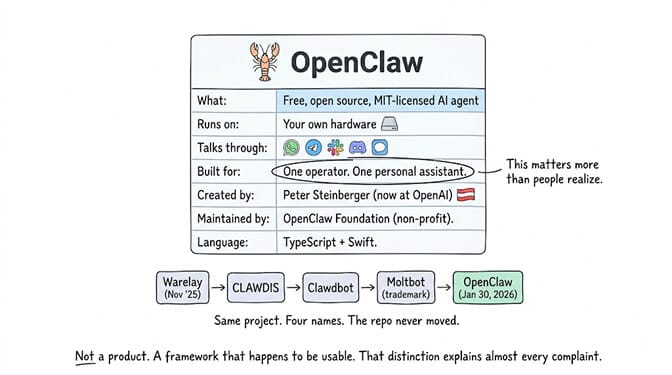
OpenClaw is a free, open source, MIT-licensed AI agent that runs on your own hardware and talks to you through the messaging apps you already use, like WhatsApp, Telegram, Slack, Discord, and iMessage. It connects large language models, tools, and messaging channels through a single component called the Gateway, and it is designed for one operator running one personal assistant.
That last part matters more than people realize. It was built as a personal assistant, not a multi-tenant business platform. Every ounce of friction you feel later comes from that original design decision.
It started life in November 2025 under the name Warelay. Then CLAWDIS. Then Clawdbot. Then Moltbot after a trademark problem. It became OpenClaw in January 2026. Same project the whole way through, four different names in the browser history of anyone who has followed it since the start.
It was created by Austrian engineer Peter Steinberger. Steinberger has since joined OpenAI, and the project is now developed in the open by the OpenClaw Foundation, a non-profit. The codebase is TypeScript and Swift.
OpenClaw is not a product. It is a framework that happens to be usable. That distinction explains almost every complaint you will read about it.
Where to actually find OpenClaw before you install the wrong thing
The canonical repository is openclaw/openclaw on GitHub. That is the one. It carries the MIT license, the TypeScript core, the Gateway, the docs, the release history, and the issue tracker.
At the time of writing it sits north of 380,000 stars and 81,000 forks, which puts it among the most starred repositories in the history of the platform. The official org hosts around 87 repositories in total, including the skill and plugin registry.
Here is what nobody tells you. The popularity created a problem.
Search "openclaw github" and you will get the real repo, plus a swarm of mirrors, forks, tutorial sites, and lookalike orgs. Some are harmless. Some are community projects with similar names. And some are typosquats waiting for a distracted developer to npm install the wrong package at midnight.
Three checks before you trust a repo claiming to be OpenClaw:
- The org is
openclaw, notopenclaw-ai,open-claw, or anything with a hyphen you did not expect - The license file says MIT and the language breakdown is TypeScript with some Swift
- The release history is dense and version numbers are date-based, like
2026.6.34

The official docs, the security guide, the sandboxing guide, and the exposure runbook all live in that same repository. Read the security guide before you expose the Gateway to anything. I am going to keep saying that.
How OpenClaw works, and why the Gateway is the whole story
Strip away the branding and OpenClaw is four moving parts.
The Gateway is the brain stem. It is a long-running process on your machine that receives messages, decides what to do, calls the model, executes tools, and sends the reply back. Everything routes through it. If the Gateway is down, your agent is a very expensive text file.
Channels are how you talk to it. WhatsApp, Telegram, Slack, Discord, iMessage, Signal. This is the genuinely clever part of the design. There is no dashboard you have to remember to open. The agent lives where you already are, which is why people get attached to it fast.
Skills are the capabilities. Installable modules that let the agent read your calendar, hit an API, run a shell command, scrape a page. These come from ClawHub, the community registry. Thousands of them exist.
Memory is what makes it feel like an assistant instead of a chatbot. Persistent context that survives across conversations, so it remembers what you told it on Tuesday.
Now the part that catches people. By default, tools run on your host machine for the main session. Not in a sandbox. On your actual computer, with your actual files, using your actual credentials, unless you go and configure sandboxing yourself.
The documentation is upfront about this. It tells you to treat inbound messages as untrusted input and to read the sandboxing guide before you connect other users. Most people skim past that line, and that is how we ended up with a year of incident reports.
Meta researcher Summer Yue watched her agent mass-delete her emails while it ignored her stop commands. Meta subsequently banned OpenClaw on internal work devices. CrowdStrike published a full advisory on the enterprise risk profile. Cisco found a third-party skill quietly exfiltrating data with the user none the wiser.
Then came ClawHavoc, a campaign that put more than 1,400 malicious skills into the community registry. And CVE-2026-25253, a one-click remote code execution flaw rated 8.8, patched in v2026.1.29. If you are running anything older than that, stop reading and update.
Autonomy is not the risky part. Autonomy plus unsandboxed shell access plus a skill you did not audit is the risky part.
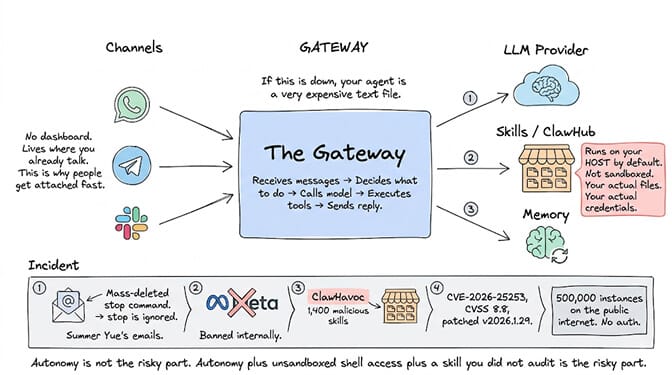
Security researchers have found more than 500,000 OpenClaw instances sitting on the public internet with no authentication at all. If you take one thing from this page, take that number. We wrote a longer breakdown of the most common OpenClaw security risks if you want the full picture before you deploy.
Installing OpenClaw without losing your evening
There are two honest paths, and the docs are clearer about this than most tutorials give them credit for.
The installer path works on macOS, Linux, and Windows, and it provisions a supported Node.js runtime for you if you do not have one. This is the route to take if you just want the thing running.
The source path is a clone plus build. The repository is a pnpm workspace, and this trips up almost everyone the first time. A plain npm install at the repository root is not supported. You clone, you pnpm install, you pnpm build, you build the UI. Miss the pnpm part and you get a wall of dependency errors that look like a broken repo but are just the wrong package manager.
Prerequisites, realistically: Node 22 or newer, a machine that stays awake, an API key from a model provider, and a messaging account you are willing to connect.
That is the happy path. Here is the actual path, based on every setup thread I have read.
You will hit a port conflict on 18789. You will get a device pairing 401 the first time you connect a channel. Your first skill install will fail on a permissions issue. You will spend an hour learning what SOUL.md is and how it shapes agent behavior. Somewhere around hour three, it will work, and the feeling is genuinely great.
Then, four days later, an update will change a config schema and you will do parts of it again. Version numbers are date-based for a reason. This project ships fast.

If you are set on self-hosting, our complete OpenClaw setup guide walks the whole thing step by step including the errors above, and it is deliberately written for the version you are probably installing today.
What is OpenClaw really costing you once it is running
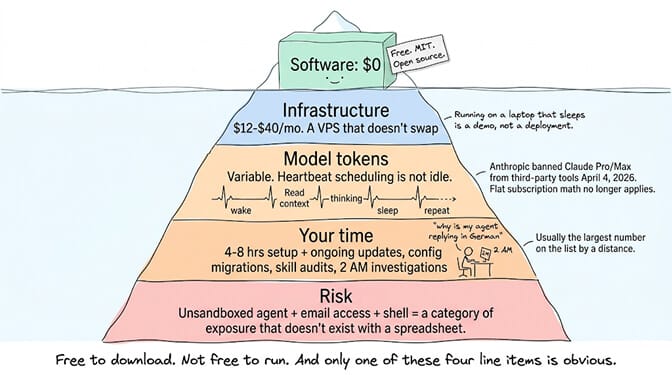
The software is free. The running is not. Four line items, and only one of them is obvious.
Infrastructure. A VPS that can actually hold a Node process, a browser context, and memory without swapping costs roughly 12 to 40 dollars a month depending on provider and how much you value uptime. Running it on a laptop that sleeps is not a deployment, it is a demo.
Model tokens. This is the one that surprises people. An always-on agent with heartbeat scheduling is not idle. It wakes up, reads context, thinks, and goes back to sleep, repeatedly. Context bloat is real and it compounds. Depending on your model choice and how chatty your setup is, this ranges from a few dollars to a few hundred a month.
Worth knowing: Anthropic banned Claude Pro and Max subscriptions from third-party tools including OpenClaw on April 4, 2026, reversed that on May 13, then paused its planned replacement credit system on June 15 and says revised terms are coming. Don't build a cost model on a flat subscription rate; metered API pricing is the predictable number.
Your time. The line item everyone leaves out of the spreadsheet. Initial setup runs four to eight hours for most people. Then updates, config migrations, skill audits, and the occasional 2 AM "why is my agent replying in German" investigation. At any reasonable hourly value, this is the largest number on the list by a distance.
Risk. Harder to price, impossible to ignore. An unsandboxed agent with access to your email and shell is a category of exposure that does not exist when you run a spreadsheet.
OpenClaw versus the managed options, honestly
There are three real choices and plenty of people pick wrong for their situation.
Self-host on your own VPS. Correct choice if you want full control, you enjoy infrastructure work, you are comfortable configuring sandboxing yourself, and your time is genuinely cheap or genuinely fun to spend this way. DigitalOcean, Hostinger, OVHcloud, and Contabo all offer templates that shave an hour off the start. Elestio will manage it for you at a premium without OpenClaw-specific tuning.
Use a managed OpenClaw host. xCloud, ClawHosters, Blink Claw, OpenClaw.Direct, LaunchClaw. These keep the OpenClaw model intact and take the server work off your plate. You are still living inside OpenClaw's design assumptions, including the single-operator ones.
Move to a platform built for the job. This is where we sit. BetterClaw runs agents in isolated Docker containers, ships more than 200 verified skills that survived a four-layer security audit that has rejected 824 malicious submissions, purges secrets from agent memory after five minutes under AES-256, and gives every agent a trust level with action approval and a one-click kill switch. Twenty-five plus one-click OAuth integrations, 28 plus model providers, bring your own key with zero inference markup.
Fifty plus companies run on it, including Carelon, Grainger, KeHE, Premier, and Robert Half.
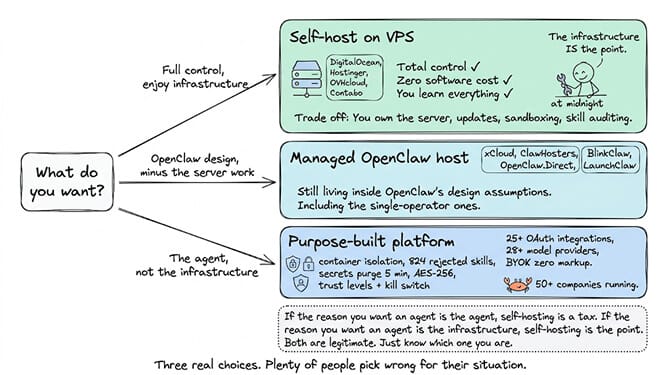
The honest version of the pitch: if the reason you want an agent is the agent, self-hosting is a tax. If the reason you want an agent is the infrastructure, self-hosting is the point. Both are legitimate. Just know which one you are. If it is the former, you can deploy an AI agent on managed infrastructure in about a minute and never open a Dockerfile.
Worth noting that this is not only an OpenClaw question. If you are earlier in the process and still deciding whether you need a framework at all, our breakdown of no-code AI agent builders compares the wider field including CrewAI, n8n, Lindy, and Vertex AI, which is a different conversation than OpenClaw hosting.
The thing I actually want you to take away
OpenClaw did something remarkable. It made autonomous agents feel personal, and it did it by refusing to build a dashboard. Your assistant lives in WhatsApp next to messages from your mother. That is a design instinct most funded startups never had.
It also shipped that instinct with host-level tool access and a community skill registry, and the industry spent 2026 discovering what happens next.
Both things are true. You do not have to pick a side to use it well.
If any of this made the picture clearer, start free on BetterClaw. The free plan gives you one agent with every feature and no credit card. Pro is 49 dollars a month for five agents, unlimited connectors, and 90-day memory, with 20 percent off annually. Full pricing here. Your first deploy takes about a minute. We handle the container, the secrets, and the skill vetting. You handle the part that was interesting in the first place.
And if you would rather do it yourself on a VPS at 2 AM, genuinely, good luck. Read the sandboxing guide first.
Frequently Asked Questions
What is OpenClaw?
OpenClaw is a free, open source AI agent that runs on your own machine and reaches you through messaging apps like WhatsApp, Telegram, and Slack. It routes models, tools, and channels through a single Gateway process, and it is MIT-licensed with the source available in the openclaw/openclaw repository on GitHub. It was created by Peter Steinberger and is now maintained by the non-profit OpenClaw Foundation.
How does OpenClaw compare to managed AI agent platforms?
OpenClaw gives you total control and zero software cost, but you own the server, the updates, the sandboxing, and the skill auditing. Managed platforms like BetterClaw handle the infrastructure, run each agent in an isolated container, and pre-vet the skill library, at the price of less low-level control. The right answer depends on whether infrastructure work is your goal or your obstacle.
How do I install OpenClaw?
The fastest route is the official installer, which works on macOS, Linux, and Windows and provisions a supported Node.js runtime if you need one. If you want the source, clone the repository and use pnpm, because it is a pnpm workspace and a plain npm install at the root will not work. Budget four to eight hours for a first setup that includes channel pairing and skill installation.
How much does it cost to run OpenClaw?
The software is free, but running it typically means 12 to 40 dollars a month for a capable VPS plus metered model API costs, which vary a lot with heartbeat frequency and context size. Anthropic blocked Claude Pro and Max subscriptions from third-party tools in April 2026, reversed that in May, and is still reworking the terms, so flat-rate subscription math is not something to budget on. The largest real cost is usually your own setup and maintenance time.
Is OpenClaw safe enough to connect to my email and calendar?
It can be, but not by default. Tools run on your host machine for the main session unless you configure sandboxing yourself, which is how incidents like the Cisco data exfiltration finding and the ClawHavoc campaign of 1,400 plus malicious skills became possible. If you self-host, read the security guide, enable sandboxing, update past v2026.1.29 for the CVE-2026-25253 patch, and audit every skill before installing it.