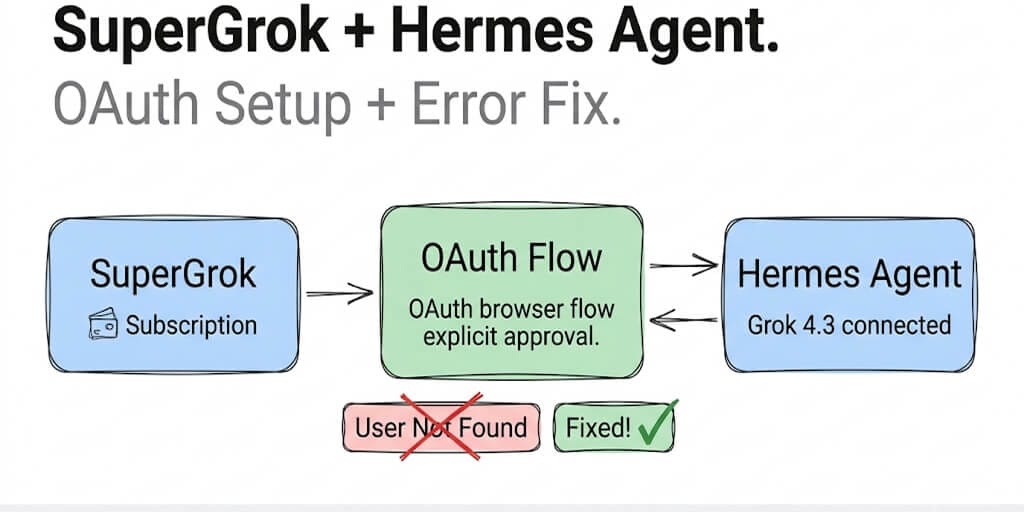
Your SuperGrok subscription already includes Grok 4.3, image gen, TTS, and X search. Here's how to use all of it through Hermes Agent with one OAuth login, and how to fix the "User Not Found" error that trips up most setups.
The error message read: AuthenticationError [HTTP 401] User not found. The API key was valid. The SuperGrok subscription was active. Everything worked in a browser. Just not in Hermes.
If you've hit this wall trying to connect SuperGrok to Hermes Agent, you're not alone. The "User Not Found" error is the most common failure in the SuperGrok OAuth setup, and the fix takes 30 seconds once you know what's happening.
Here's the complete setup, the error fix, and the gotcha about SuperGrok vs X Premium+ billing that trips people up silently.
The SuperGrok OAuth setup (5 minutes)
Hermes Agent added xAI Grok as a first-class OAuth provider in v0.14.0 (May 16, 2026). If you're on an older version, update first. The xAI OAuth option doesn't exist before v0.14.
# Update Hermes
hermes update

# Start the model selector
hermes model
Select "xAI Grok OAuth (SuperGrok / X Premium+)" from the provider list. Hermes opens your default browser to xAI's auth page. Approve access, pick a model (grok-4.3 is the one you want), and you're done.
If you want to skip the interactive picker:
hermes auth xai
Credentials save to ~/.hermes/auth.json and refresh automatically. No API key needed. No separate xAI bill. Your existing SuperGrok subscription covers everything: Grok 4.3 text with its 1M-token context window, text-to-speech, image generation, video generation, transcription, and X search.
For headless servers (VPS, Docker), Hermes detects the remote environment and prints the authorization URL instead of opening a browser. Copy the URL, open it on any device, approve, and the token flows back to your server.
Fixing the "User Not Found" error
This is the error that sends people searching. Here's what actually causes it.
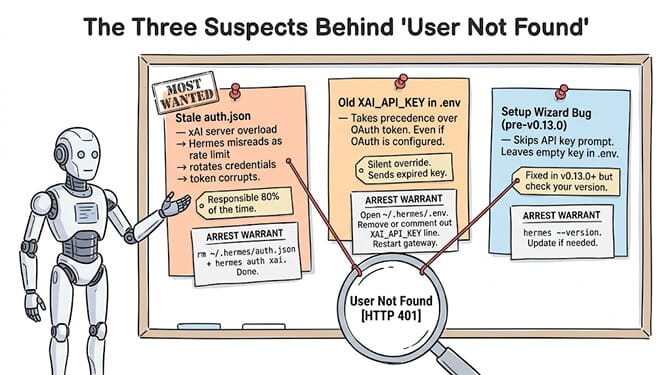
Cause 1: Stale auth.json
The most common trigger. When xAI's servers get overloaded, they sometimes return an error that Hermes misreads as a rate limit. Hermes then rotates your credentials, which corrupts the auth token. Your next attempt fails with "User Not Found" because the token is now invalid.
The fix:
rm ~/.hermes/auth.json
hermes auth xai
Delete the auth file and re-run the OAuth flow. Takes 30 seconds. This resolves the error about 80% of the time.
Cause 2: Old key in .env overriding OAuth
If you previously configured an xAI API key in ~/.hermes/.env, that key takes precedence over the OAuth token. Even after setting up OAuth, Hermes might still send the old (possibly expired) API key.
The fix: Open ~/.hermes/.env and remove or comment out any XAI_API_KEY line. Restart the gateway. Hermes will use the OAuth token from auth.json instead.
Cause 3: Setup wizard skipped the key prompt
A known bug in older Hermes versions: the setup wizard sometimes skips the API key prompt entirely, leaving a stale or empty key in .env. You think you entered the new key. You didn't. This was fixed in v0.13.0+, but check your version with hermes --version.
When you see "User Not Found" with SuperGrok, delete auth.json first. It's the fix 80% of the time. Check .env for a stale API key second.
The SuperGrok vs X Premium+ gotcha
Here's what nobody tells you. SuperGrok and X Premium+ both work with OAuth, but their billing scope differs, and this causes silent failures.
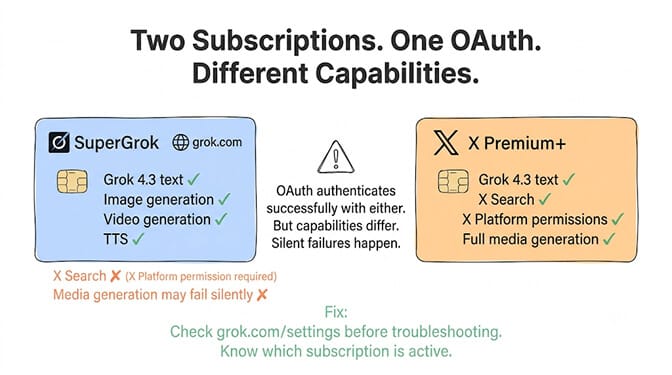
SuperGrok ties to your grok.com account. X Premium+ ties to your X (Twitter) account. If you've had both, or if your X Premium+ lapsed and you're on SuperGrok only, OAuth can authenticate successfully while certain capabilities fail silently.
Specifically: X search and media generation are tied to X platform permissions, not just model access. If your X Premium+ is inactive, the Grok 4.3 text model works fine through OAuth, but x_search calls return empty results and image generation requests fail without a clear error.
The fix: Check which subscription is active at grok.com/settings before troubleshooting. A valid token doesn't mean every capability is authorized.
For the full walkthrough of Hermes's model provider authentication and common auth errors, we have a separate guide covering six different auth failure modes across all providers.
What you get with the SuperGrok OAuth connection
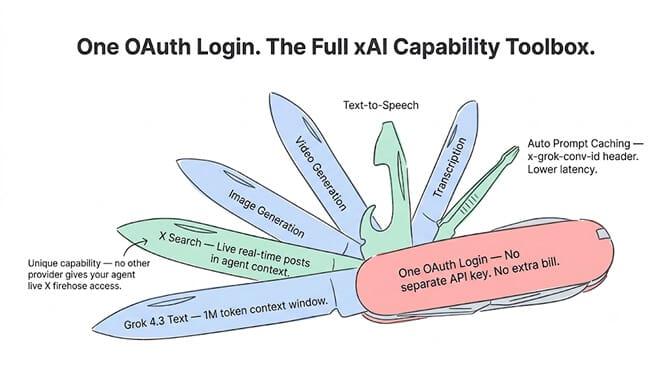
One OAuth login covers the full xAI capability surface in Hermes:
Grok 4.3 text with 1M-token context. X search pulling real-time posts into your agent's context. Image generation, video generation, and transcription through the same token. Text-to-speech. And automatic prompt caching via the x-grok-conv-id header, which routes follow-up requests to cached context, reducing latency and cost.
For agent builders who need real-time social media monitoring, X search through SuperGrok is a genuinely unique capability. No other model provider gives your agent live access to the X firehose through a single OAuth token.
If the OAuth setup, auth debugging, and subscription scope management feels like a lot of configuration for what should be "connect my AI agent to Grok," that's a fair reaction. BetterClaw supports xAI as one of 28+ model providers via BYOK. Paste your API key, select your model, and the platform handles the rest. No auth.json, no .env files, no OAuth routing. Free plan, $49/month for Pro. Pricing here.
When OAuth makes sense (and when it doesn't)
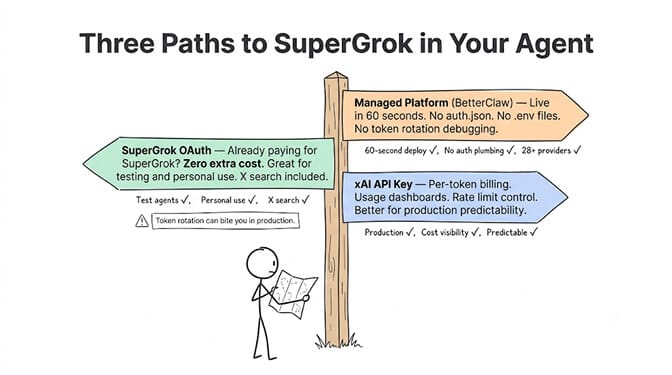
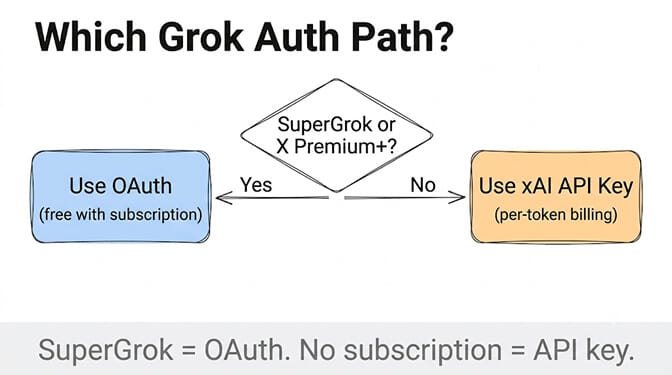
Use SuperGrok OAuth when: You already pay for SuperGrok or X Premium+ and want to test Grok as an agent backend at no extra cost. You need X search. You want all xAI media capabilities (TTS, images, video) through one login.
Use an xAI API key instead when: You need per-token billing and dashboards. You want programmatic control over rate limits. You're deploying to production and need predictable, documented pricing.
Use a managed platform when: You don't want to debug OAuth, key rotation, or subscription scope issues. You want your agent live in 60 seconds with Grok (or any other model) without managing auth infrastructure.
If any of this resonated, give BetterClaw a look. Free plan with 1 agent and 500 credits a month. $49/month for Pro. 28+ model providers including xAI, OpenAI, Anthropic, Google, MiniMax, and DeepSeek. Your first deploy takes about 60 seconds. We handle the auth plumbing. You handle the interesting part.
Start free here. | See full pricing.
Frequently Asked Questions
What is the SuperGrok Hermes Agent OAuth setup?
SuperGrok OAuth lets you use your existing SuperGrok or X Premium+ subscription as the model provider for Hermes Agent without creating a separate xAI API key. Run hermes model, select "xAI Grok OAuth (SuperGrok / X Premium+)," approve in your browser, and Hermes uses Grok 4.3 with text, image, video, TTS, and X search capabilities. Requires Hermes v0.14.0 or later.
How does SuperGrok OAuth compare to an xAI API key for Hermes?
SuperGrok OAuth uses your existing subscription with no additional cost, but you don't get per-token billing dashboards or programmatic rate limit control. An xAI API key gives you usage tracking and is billed separately per token. OAuth is better for testing and personal use. API keys are better for production deployments where cost visibility matters.
How do I fix the "User Not Found" error with SuperGrok and Hermes?
Delete ~/.hermes/auth.json and re-run hermes auth xai. This fixes the error about 80% of the time. The error usually occurs when xAI's servers return a transient error that Hermes misreads as a rate limit, corrupting the auth token. If that doesn't work, check ~/.hermes/.env for a stale XAI_API_KEY that might be overriding your OAuth token.
How much does using SuperGrok with Hermes Agent cost?
If you already have a SuperGrok subscription ($30/month as of 2026), using it through Hermes via OAuth costs nothing extra. No separate xAI API bill. No per-token charges. If you don't have SuperGrok, you'd need either a subscription or a pay-per-token xAI API key. BetterClaw's managed alternative supports xAI via BYOK at $0/month on the free plan or $49/month on Pro.
Is the SuperGrok OAuth connection reliable enough for production agents?
It's about 80% there. The OAuth flow works well for most use cases, but xAI server overloads can corrupt auth tokens (requiring manual auth.json deletion), and subscription scope mismatches between SuperGrok and X Premium+ can cause silent capability failures. For production deployments, an xAI API key is more predictable. BetterClaw adds platform-level auth handling with automatic credential management, secrets auto-purge, and no manual token rotation.