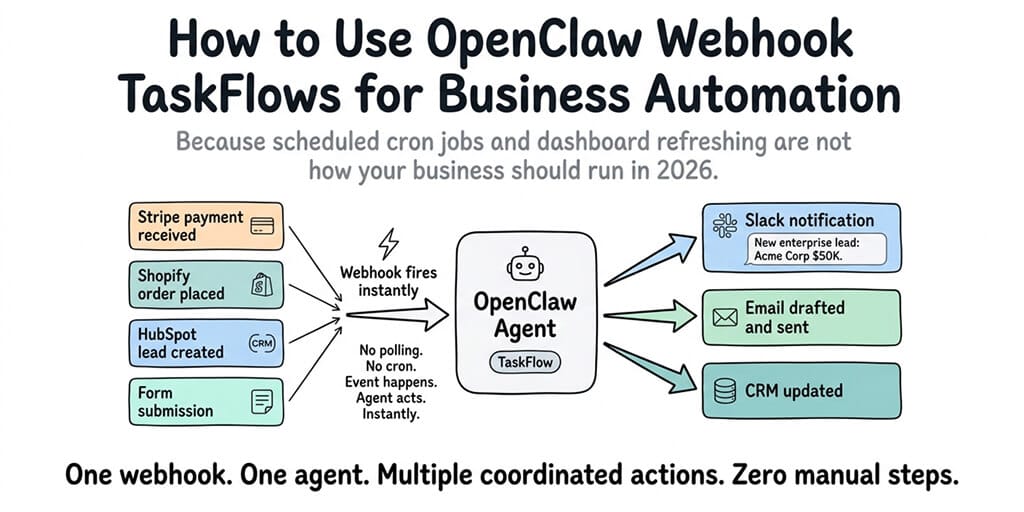
Because scheduled cron jobs and people refreshing dashboards are not what should be running your business in 2026.
3:47 AM. A customer's payment failed on Stripe.
By 3:47:02, our agent had pulled that customer's last three support tickets, cross-referenced their usage for the month, drafted a recovery email that apologized specifically for the API blip they hit on Tuesday, and dropped the whole thing into #customer-retention with a one-click approve button.
I watched it happen from bed. Didn't lift a finger.
The thing that made it work? A webhook.
What an OpenClaw webhook taskflow actually is, minus the vendor speak
Most people meet webhooks the same way. You're stitching two SaaS tools together, one of them asks for a "webhook URL," you shrug, paste something in, and hope for the best.
An OpenClaw webhook taskflow is the same idea pointed at an AI agent instead of a Zapier chain or a dead Slack channel.
When something happens in the outside world (a form fills, an invoice fails, a deal closes, a PR opens, a review lands), the tool that cares about that event fires an HTTP request to a URL. That URL belongs to your agent. The agent receives the payload, reads the context, and acts.
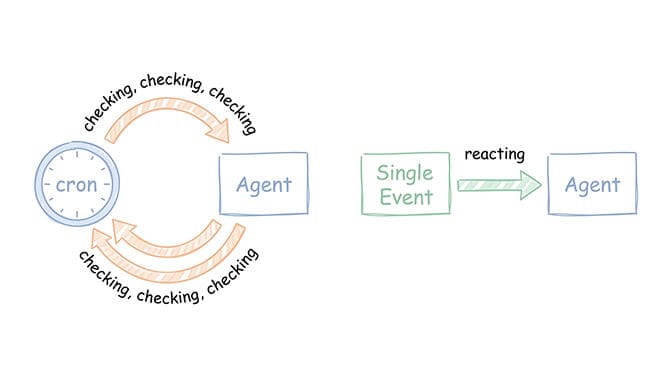
No polling. No cron job running every 5 minutes and mostly doing nothing. No human staring at a notification channel waiting to react.
Just: event happens, agent acts.
That's the whole pattern.
Why webhooks beat every other trigger you've tried
Before webhooks became a native trigger pattern, you basically had three ways to kick off an AI agent for business workflows.
Option 1: Tell it. Type something in Slack or Discord. Good for interactive work. Useless for anything that happens while you sleep.
Option 2: Schedule it. Run the agent every 15 minutes. Check Stripe. Check the CRM. Check email. Most of those runs find nothing and cost you tokens anyway.
Option 3: Build middleware. Spin up a tiny Express server, pipe events in, parse them, hand them off to the agent with the right context. This works. It also means you're now maintaining a separate service, which was the whole thing you were trying to avoid.
Webhook taskflows collapse all three. The agent is the endpoint. The event is the trigger. The response is the action.
There's a reason automation-heavy teams are moving this way. Polling wastes money. Scheduling introduces latency. Manual triggers don't scale past one person.
Event-driven scales. Everything else is someone staring at a screen.
The four parts of every webhook taskflow
Every webhook taskflow has four pieces. If you understand these, you understand the whole pattern.
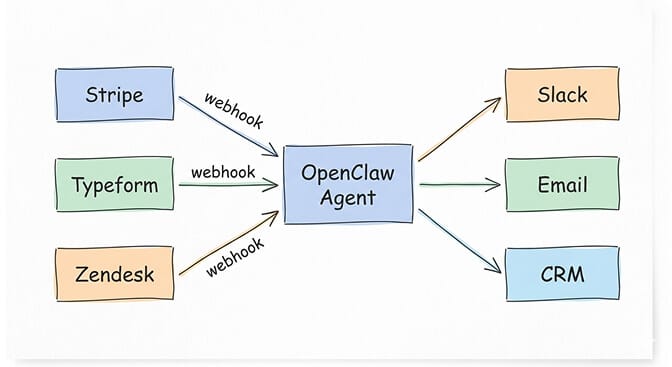
The source. The thing firing the event. Stripe, Shopify, GitHub, Typeform, Linear, Calendly, your own app, anything that speaks HTTP POST.
The endpoint. The URL your agent listens on. This is where the event lands.
The payload. The JSON body of the request. Customer ID, invoice amount, form answers, issue title, whatever the source thought you'd need.
The instructions. What you want the agent to do when an event of this shape arrives. This is where taste lives.
Here's the part that matters. The agent is not a fixed script. It's not a handler that does one thing when it sees one kind of event. You tell it to read the payload, figure out what's actually going on, pick from a set of possible actions, and escalate anything it isn't confident about.
That's the difference between a webhook wired into Zapier and a webhook wired into an agent.
Zapier does what you told it. An agent decides what to do.
Four automations people are actually running this way
Enough theory. Here's what real teams are shipping.
1. Failed payment recovery. Stripe fires on a failed invoice event. Agent pulls the customer's account age, support history, and usage. If they're a long-time user with no complaints, it drafts a personal email from a human and queues it for approval. If they're new or recently flagged, it routes to support instead. Nobody writes recovery emails manually anymore.
2. Support ticket triage. A ticket lands in Zendesk or Intercom. Webhook fires. Agent reads it, checks whether it's a known bug, a billing question, or a feature request. It drafts a response, assigns the right category, pings the right human in Slack, and moves on. A two-person support team now covers what used to need five.
3. Sales signal routing. Someone high-value fills out a Typeform. Webhook fires. Agent enriches the email, pulls job title context, scores the lead, and either books them straight into a sales rep's calendar or drops them into a nurture sequence. No lead rots in an inbox for three days.
4. Community and review follow-up. New Reddit comment on your brand, new review on G2, new DM on Instagram. Webhook fires. Agent reads sentiment, drafts a contextual response, and routes to the human whose voice matches the situation. Community managers stop losing their mornings to catch-up.
The common thread: none of these are cron-job work. They all need judgment. They all need to read context. They all need to decide what kind of event this actually is.
That's what separates event-driven agents from event-driven scripts.
The part people find out the hard way
Webhooks look simple from the outside. POST some JSON, trigger an agent, done.
Here's the weird part. Running this yourself means you're suddenly responsible for things that used to be somebody else's problem.
You need an endpoint that's publicly reachable. That means a domain, an SSL cert, a reverse proxy, and a service that stays up. You need to verify webhook signatures so nobody can POST garbage to your URL and trigger your agent to email customers. You need to queue events so two firing in the same second don't collide. You need idempotency so Stripe retrying a failed delivery three times doesn't send the same recovery email three times.
And that's before the stuff nobody warns you about. Like a misconfigured external tool getting stuck in a loop and your agent burning through API calls before anyone notices. Or your Docker container silently dropping requests because the process manager crashed and no one was alerting on it.
If you're tired of babysitting infrastructure and want webhook taskflows that just work, Better Claw handles the endpoint, signature verification, queueing, and de-duplication for you. $49/month for Pro, bring your own API keys.
Why self-hosting webhooks is harder than it looks
I'm not going to pretend self-hosting is impossible. People do it. But there's a gap between "I got a webhook to fire once on my laptop using ngrok" and "I have five production webhook taskflows running reliably across three business systems."
That gap usually looks like a weekend. Then two weekends. Then a Saturday at 2 AM trying to figure out why the same payment event processed four times.
Self-hosted OpenClaw gives you full control. It also gives you full responsibility. Every webhook that hits your server is your problem. Every signature you verify, every retry you make idempotent, every scaling issue when Typeform fires 400 events at once during a product launch.
This is one of those cases where managed infrastructure isn't a luxury. It's the thing that lets you ship in two hours instead of two weekends. For the full comparison of self-hosted versus managed tradeoffs, our hosting guide walks through the cost and time breakdown.
What to build first
If you're looking at webhook taskflows for the first time, don't try to automate everything on day one.
Pick one annoying recurring event. Something that breaks your flow when it happens. A failed payment. A high-value form submission. A ticket tagged urgent.
Wire up one webhook. Give the agent narrow instructions. Let it run for a week. See what it gets right, see where it needs guardrails, then add the next one.
I've watched teams try to ship six webhook taskflows on day one and spend a month debugging interactions between them. I've also watched teams ship one, nail it, and add a new one every Friday for three months. Guess which team ends up with more working automation at the end of the quarter.
You don't need a big-bang automation rollout. You need one webhook that works, then another, then another.
One last thing
If you've read this far, you already know which manual process in your business you want to kill first. The question isn't whether webhook taskflows work. They work. The question is whether you want to spend your Saturdays on the plumbing or on the actual automation.
If you've spent more time configuring infrastructure than actually using your agent, give Better Claw a try. $49/month for Pro, BYOK, webhook endpoints ready out of the box, first deploy takes about 60 seconds. We handle the queueing, the signatures, the retries. You handle the interesting part.
Agents are going to keep getting better at reading context and choosing actions. Your job, for the next year or two, is to figure out which events in your business deserve judgment and which ones just need a script. Webhook taskflows are where that distinction starts paying rent.
Frequently Asked Questions
What is an OpenClaw webhook taskflow?
A webhook taskflow is an OpenClaw workflow triggered by an incoming HTTP request instead of a schedule or a chat message. When an external system fires an event (Stripe, Typeform, Zendesk, GitHub, anything that sends HTTP POST), the taskflow receives the payload and the agent decides what to do with it. It's the difference between an agent that waits for you to ask and one that reacts to events in your business on its own.
How do OpenClaw webhook taskflows compare to cron-triggered workflows?
Cron runs on a schedule, whether there's work or not. Webhooks only run when something real actually happens. For most business events (payments, form fills, new tickets), webhooks are faster, cheaper, and more accurate. You save on token spend and you catch events in real time instead of up to 15 minutes later.
How do I set up a webhook taskflow to trigger from Stripe?
You create a webhook endpoint for your agent, register that URL inside your Stripe dashboard, choose the events you care about (like failed invoice payments), and write the instructions the agent should follow when that event arrives. On a managed platform, the endpoint and signature verification are handled for you. On self-hosted OpenClaw, the public URL, verification, and retry logic are on you.
Is it worth using a managed platform for webhook-triggered agents?
If you have one webhook and you already run a small server, maybe not. If you have three or more, or you care about reliability during traffic spikes, or you don't want to debug queueing at 2 AM, managed is cheaper than your time. $49/month for Pro is less than an hour of engineering work in most parts of the world.
Are OpenClaw webhook taskflows secure enough for production business data?
They can be, if you treat them like any other production endpoint. Verify signatures on every incoming request so only the real source can trigger your agent. Scope what the agent is allowed to touch. Log every execution. On BetterClaw, sandboxed execution and signature verification are built in. On self-hosted OpenClaw, all of that is your responsibility.
Related Reading
- OpenClaw Self-Hosting vs Managed — The full cost and time comparison
- OpenClaw Best Use Cases — What teams are actually automating with OpenClaw
- OpenClaw Agents for Ecommerce — Webhook triggers for Shopify stores
- OpenClaw Security Checklist — Hardening your webhook endpoints
- How to Update OpenClaw — Keep your webhook infrastructure patched