A practical walkthrough for developers who want to extend OpenClaw's capabilities and actually understand what each model choice costs them.
The first time I watched a custom OpenClaw skill I had written run end-to-end, I felt genuinely smug. The agent queried a live API, formatted the response, and dropped a clean summary into our Slack channel. Zero manual work. Pure automation joy.
Then I checked the API usage dashboard three days later.
Claude Opus. Every single call. Running on a polling interval I had set to 60 seconds. I had unknowingly built a very enthusiastic, very expensive skill that was making about 1,440 Opus calls per day.
If you are just starting OpenClaw skill development, this post will save you from that specific mistake and a few others. We will walk through building your first custom skill from scratch and, critically, show you exactly how model selection affects your OpenClaw API cost before you are staring at a bill that makes you question your life choices.
What OpenClaw Skills Actually Are (And Why You Want Custom Ones)
OpenClaw ships with a solid library of built-in skills. Web search, memory, calendar access, email reading. They cover the obvious use cases well.
But the built-in skills assume a general-purpose agent. The moment you want something specific to your workflow, your API, your business logic, you need to write your own.
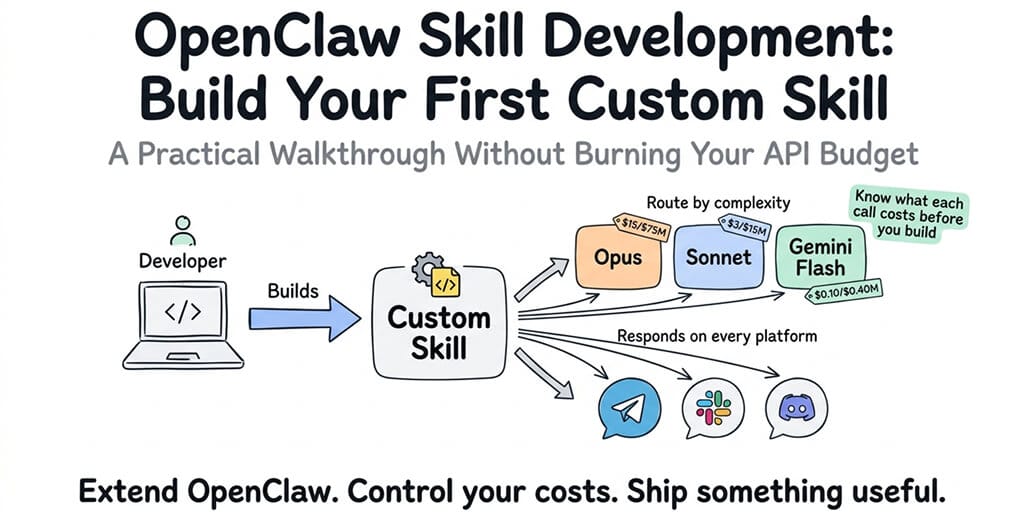
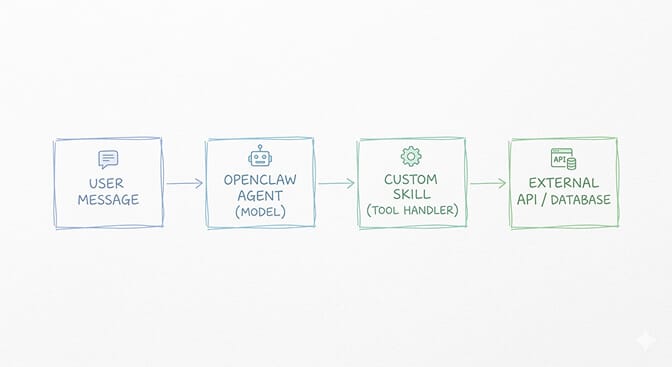
A skill in OpenClaw is essentially a TypeScript module that exposes a set of tools the agent can call. Each tool has a name, a description the model uses to decide when to invoke it, and a handler function with your actual logic.
The architecture is simpler than most people expect.
Setting Up Your Skill Development Environment
Before you write a single line of skill code, get your local environment right. OpenClaw skill development requires Node.js 18+ and the OpenClaw CLI.
npm install -g openclaw
openclaw --version
Create a new skill project:
mkdir my-first-skill
cd my-first-skill
npm init -y
npm install @openclaw/skill-sdk typescript ts-node
Add a tsconfig.json with "moduleResolution": "bundler" and "target": "ES2022". OpenClaw's skill runtime expects modern module syntax, and mismatched TypeScript configs are responsible for at least 40% of the "why is my skill not loading" questions in the OpenClaw community forums.
Here is the minimal skill scaffold:
import { Skill, ToolDefinition } from '@openclaw/skill-sdk';

const mySkill: Skill = {
  name: 'weather-lookup',
  description: 'Fetches current weather for a given city',
  tools: [
    {
      name: 'get_weather',
      description: 'Returns current temperature in Celsius and weather conditions for a given city name',
      parameters: {
        type: 'object',
        properties: {
          city: { type: 'string', description: 'City name' }
        },
        required: ['city']
      },
      handler: async ({ city }) => {
        const res = await fetch(`https://wttr.in/${city}?format=j1`);
        const data = await res.json();
        return {
          temp_c: data.current_condition[0].temp_C,
          description: data.current_condition[0].weatherDesc[0].value
        };
      }
    }
  ]
};

export default mySkill;
That is a complete, working skill. No boilerplate ceremony, no 200-line config file. The SDK keeps the surface area small.
The tool description field is the most important thing you will write. The model decides whether to call your tool based entirely on that string. Be specific. Be literal. "Returns current weather" will miss edge cases. "Returns current temperature in Celsius and weather conditions for a given city name" will not.
Here Is Where OpenClaw Gets Expensive If You Are Not Careful
Your skill's handler runs outside the model. That part is free. What costs money is every time the agent reasons about whether to call your skill, and every turn in the conversation where the model processes context that includes your skill's output.
This is where OpenClaw model pricing becomes the most important architectural decision you will make.
Let me give you the mental model.
OpenClaw sends the full conversation history plus all available skill descriptions to the model on every turn. If you are running Claude Opus, you are paying Opus prices for that context window on every single agent invocation. If your skill is called on a polling loop, that multiplies fast.
The OpenClaw community learned this the hard way. The Medium post "I Spent $178 on AI Agents in a Week" went viral for exactly this reason. The author was running Opus on an always-on agent with five custom skills, each with verbose descriptions.
Here is the practical breakdown of how to think about Sonnet vs Opus for skill-based agents:
Opus is justified when the agent needs deep multi-step reasoning to decide which skills to chain together and in what order. Complex research workflows. Agents that manage ambiguous, open-ended tasks.
Sonnet covers the vast majority of skill invocation patterns. If your agent is doing retrieval, formatting, and response generation, Sonnet handles it at roughly 60% of Opus's cost (40% on Sonnet 5). This is the right default for almost every production skill you build.
Gemini Flash via OpenClaw's model provider integration is worth serious consideration for high-frequency, low-complexity skill calls. Running a polling-style agent doing structured lookups? The cost delta versus Sonnet is substantial and the quality difference on tool-calling tasks is smaller than the benchmarks suggest.
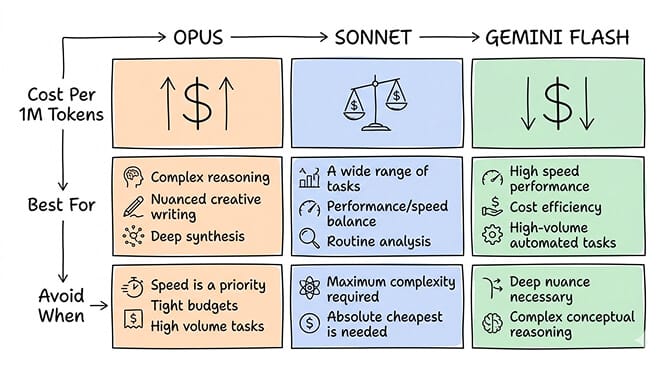
One concrete heuristic: if your skill is doing deterministic lookups (weather, stock price, database query), use Sonnet or Flash. If your skill requires the model to synthesize ambiguous information and make judgment calls, Sonnet is usually still sufficient. Reserve Opus for the agents where being wrong has a real cost.
For ChatGPT OAuth integrations (yes, OpenClaw supports OpenAI models via OAuth credential management), the same logic applies. GPT-4o is a capable tool-caller and sits in a similar cost range to Sonnet. GPT-4o-mini is the Flash equivalent for OpenAI users.
Testing Your Skill Locally Without Paying for API Calls
This part is underrated. Most developers jump straight to testing against live models, burning tokens on bugs that could have been caught offline.
OpenClaw's CLI includes a mock mode:
openclaw dev --skill ./my-first-skill --mock
In mock mode, the skill handler runs but model calls are intercepted and stubbed. You can validate that your tool definitions are well-formed, your handler returns the right shape, and your error paths work before you touch a real API.
Test the handler directly first:
// __tests__/weather.test.ts
import mySkill from '../index';

test('get_weather returns temp and description', async () => {
  const tool = mySkill.tools.find(t => t.name === 'get_weather');
  const result = await tool.handler({ city: 'Tokyo' });
  expect(result).toHaveProperty('temp_c');
  expect(result).toHaveProperty('description');
});
Free test. No model call. No cost. Run this until your handler is solid.
If you are managing secrets (API keys for the external services your skill calls), do not hardcode them. OpenClaw reads from environment variables in dev mode and from encrypted credential storage in production. The distinction matters because a skill that works locally with a hardcoded key and breaks in production with missing env vars is a rite of passage nobody needs to repeat twice.
Deploying Your Custom Skill to a Running Agent
Here is where the workflow splits depending on your setup.
If you are self-hosting OpenClaw, deploying a custom skill means copying your built skill into the skills directory, restarting the agent process, and praying that nothing in your Docker config changed since you last touched it. If you are on a Railway or DigitalOcean deployment, community reports confirm the self-update scripts are fragile and the skill-loading behavior after restarts is inconsistent.
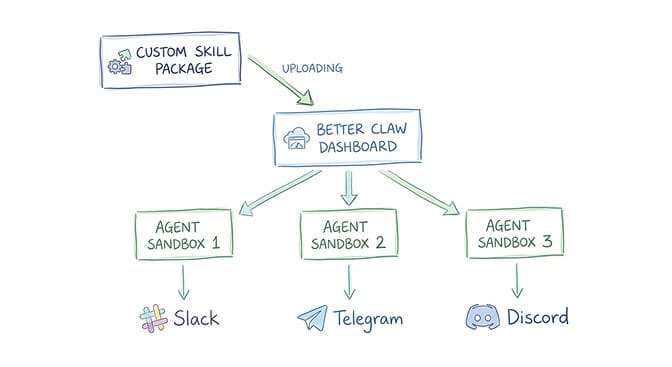
If you want to focus on actually writing skills instead of managing infrastructure, Better Claw handles all of this. You upload your skill package through the dashboard, select which agents should load it, and it is live. No SSH. No YAML. No 2 AM debugging sessions because your Docker volume permissions changed.
BetterClaw also sandboxes skill execution in isolated Docker containers per agent, which matters more than it sounds. If your skill has a dependency conflict or throws an unhandled exception, it cannot affect other agents or the host system. On a raw VPS, one broken skill can take down your entire agent setup.
The Model Pricing Decision You Make at Deployment Time
When you add a custom skill to an agent, you choose which model that agent runs on. This decision compounds.
If your skill is called 100 times a day and you pick the wrong model, you will notice it on your bill within a week. Here is a framework to reduce OpenClaw costs without sacrificing quality:
Start with Sonnet. Always. Upgrade to Opus only when you can point to specific failure cases where Sonnet's reasoning was insufficient.
Set a token budget per skill invocation. OpenClaw lets you configure max_tokens at the agent level. A skill that returns weather data does not need the model to write a 2,000-token analysis. Cap it.
Use caching for deterministic tool outputs. If your skill fetches data that does not change in the next 60 seconds, cache the response. The model still pays to process the conversation context, but your external API calls stay cheap.
Audit your skill descriptions for length. Every character in your skill definitions goes into the context window on every turn. A verbose 10-tool skill manifest with paragraph-long descriptions costs meaningfully more per call than a tight, precise one.
These are not theoretical optimizations. They are the difference between a cheap OpenClaw setup that actually stays cheap and one that quietly becomes expensive while you are focused on other things.
If you want a deeper look at how BetterClaw's built-in model routing helps automatically direct agent traffic to cost-efficient models based on task complexity, the OpenClaw hosting comparison breaks down exactly how that works versus managing model selection manually.
Debugging When Your Skill Is Not Getting Called
This happens to everyone. You write a skill, deploy it, send a message that should obviously trigger it, and the agent ignores it entirely.
Usually the problem is the tool description. The model is not calling your skill because the description does not match how users phrase their requests.
Test this by looking at the agent's reasoning trace. In development mode, OpenClaw logs which tools the model considered and why it rejected them. Read those logs. They will tell you exactly which phrase in your description is causing the mismatch.
The fix is almost always making the description more concrete and less clever. "Helps with weather-related queries" is too vague. "Use this when the user asks about current weather, temperature, or conditions in a specific city or location" is not.
Also check your parameter definitions. If a required parameter has an unclear name or no description, the model will sometimes skip the tool call rather than guess at what to pass. Name your parameters like you are writing documentation for a colleague who has no context.
What Nobody Tells You About Skill Security
Your skill handler runs with whatever permissions the OpenClaw process has. On a self-hosted setup, that often means broad filesystem access. A malicious skill dependency or a compromised npm package in your skill's node_modules has a real attack surface.
The OpenClaw ecosystem has already seen this play out. Cisco found a third-party skill performing data exfiltration without user awareness. The ClawHavoc campaign placed 824+ malicious skills on ClawHub, roughly 20% of the registry at the time.
This is not hypothetical risk. It is current history.
When you are evaluating where to deploy your OpenClaw agents securely, sandboxed execution is the feature that matters most for custom skills. If a skill goes wrong, the blast radius should be contained. On BetterClaw, every skill runs in a Docker-sandboxed environment with AES-256 encrypted credentials and workspace scoping. A broken or compromised skill cannot reach outside its container.
On a raw VPS or DO 1-click deploy, you do not get that by default. You build it yourself, or you accept the exposure. For the full security picture, our security risks guide covers every documented incident.
Your First Skill Is a Foundation, Not a Ceiling
The skill you build today is probably simple. A lookup, a formatter, a notification trigger. That is exactly right. Simple skills teach you the patterns. The parameter shaping. The description tuning. The cost tradeoffs.
Once those patterns are in your hands, the complexity ceiling goes up fast. Multi-step skill chains. Skills that call other APIs and process the results before returning. Skills with stateful context using OpenClaw's persistent memory layer.
The developers getting the most out of OpenClaw are the ones who built something small first, shipped it, watched it run, and then iterated. Not the ones who designed a five-skill orchestration system before writing a single handler.
Build the weather skill. Watch it work. Then build the next one.
If you are done debugging YAML and want to focus on actually writing skill logic, give Better Claw a try. It is $49/month for Pro, bring your own API keys, and your first deploy takes about 60 seconds. Pick from 200+ verified skills in the dashboard and your agent is live. We handle the Docker sandboxing, the credential encryption, the health monitoring. You handle the interesting part.
Frequently Asked Questions
What is OpenClaw skill development and how does it work?
OpenClaw skill development is the process of writing custom TypeScript modules that extend what an OpenClaw agent can do. Each skill exposes one or more tools with name, description, and handler functions. The agent's underlying model decides when to call each tool based on the description you write, then executes your handler and incorporates the result into its response.
How does Sonnet vs Opus affect skill development costs?
Opus costs roughly 1.7x more per token than Sonnet 4.6 (2.5x more than Sonnet 5), and every agent turn sends the full conversation context plus all skill descriptions to the model. For most skill invocation patterns (lookups, formatting, retrieval), Sonnet performs at equivalent quality for a fraction of the cost. Reserve Opus for agents doing genuinely complex multi-step reasoning where Sonnet demonstrably fails.
How do I reduce OpenClaw costs when running custom skills on a polling loop?
Three high-impact levers: switch from Opus to Sonnet or Gemini Flash for tool-calling agents, set a max_tokens cap appropriate to your skill's output, and cache deterministic tool results so repeat invocations do not trigger redundant external API calls. Tight tool description lengths also reduce context window size per call.
How much does it cost to run an agent with skills on BetterClaw?
BetterClaw charges $49/month for Pro on a bring-your-own-API-key model. You pay your model provider directly for token usage, and BetterClaw handles hosting, sandboxing, health monitoring, and multi-channel support. There is no per-skill fee. The infrastructure cost is flat regardless of how many skills you load onto an agent.
Is it safe to deploy third-party npm packages inside a custom OpenClaw skill?
With care. The OpenClaw ecosystem has seen real incidents including the ClawHavoc campaign (824+ malicious skills on ClawHub) and a Cisco-documented case of data exfiltration via a third-party skill. Audit your skill dependencies, pin versions, and ideally run your skills inside a sandboxed execution environment. BetterClaw isolates each skill in Docker containers with AES-256 encrypted credentials, which limits the blast radius if a dependency is compromised.