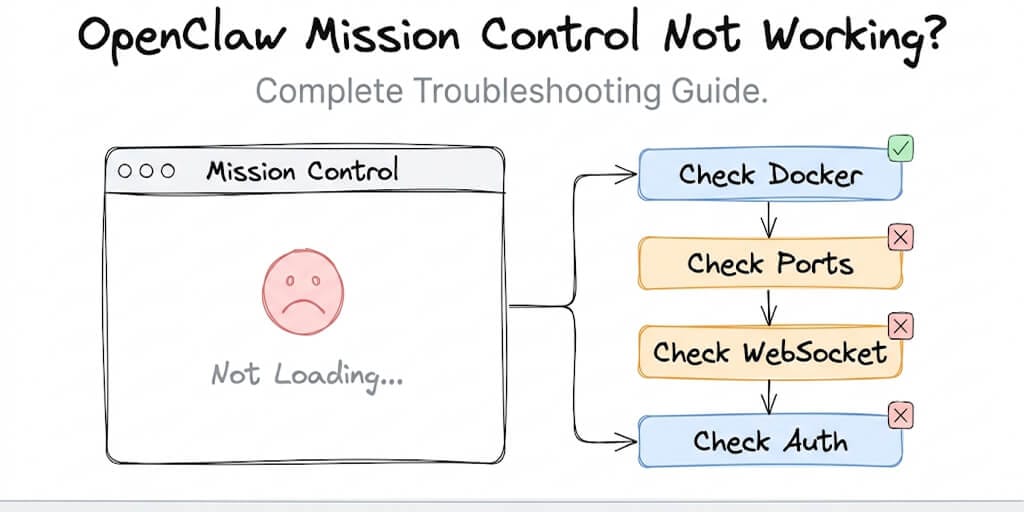
You deployed OpenClaw. Docker's running. The agent should be live. But Mission Control is showing you nothing but a blank screen and broken dreams. Here's every fix we know.
It's 11 PM on a Wednesday. You've spent four hours getting OpenClaw running on a fresh VPS. Docker Compose finally stopped throwing errors. The containers are up. You open your browser, type in the URL, and...
Nothing.
Mission Control either shows a blank white page, throws a connection error, or loads the UI but none of your agents appear. You check Docker logs. Everything looks fine. You restart the containers. Same result. You search GitHub issues and find 47 threads describing your exact problem, each with a different solution, and none of them work.
Sound familiar?
We've been there. Before building BetterClaw, our team spent more time debugging OpenClaw's Mission Control than actually building agent workflows. This guide is everything we learned, organized by the symptom you're actually seeing. Not a wall of Docker commands you have to guess your way through. Actual diagnosis, actual fixes.
How Mission Control Actually Works (And Why It Breaks)
Before you start randomly restarting containers, it helps to understand what Mission Control is doing under the hood.
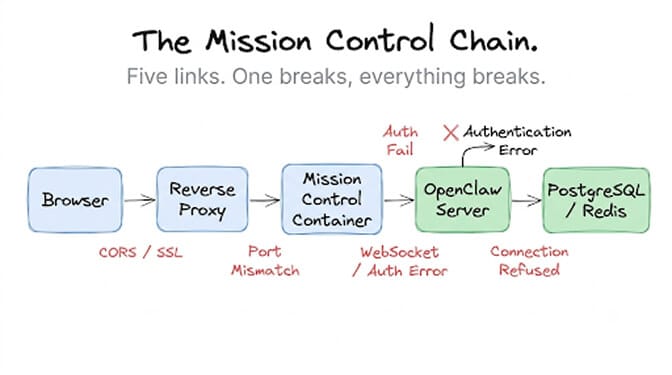
Mission Control is OpenClaw's web-based dashboard. It's a separate service that connects to the OpenClaw server process, the PostgreSQL database, and (in most setups) a Redis instance for real-time communication. When you open Mission Control in your browser, here's the chain of things that need to work:
Your browser hits the web server (usually Nginx or Caddy as a reverse proxy). The reverse proxy forwards to the Mission Control container. Mission Control establishes a WebSocket connection back to the OpenClaw server for live agent status updates. The OpenClaw server queries PostgreSQL for agent configs, skill data, and conversation history. Redis handles pub/sub for real-time events.
If any single link in that chain breaks, Mission Control either won't load or will load with missing data. That's the core insight. Most troubleshooting guides tell you to check Docker. But Docker being "up" doesn't mean all five layers of this stack are talking to each other correctly.
Blank Screen or Infinite Loading Spinner
This is the most common symptom, and it has the most possible causes. Work through these in order.
Check if the containers are actually running
Don't assume. Run docker ps and confirm that both the openclaw and openclaw-mission-control containers show a status of "Up" and not "Restarting."
If a container is in a restart loop, check its logs with docker logs openclaw-mission-control --tail 100. The most common culprits here are missing environment variables (especially DATABASE_URL and OPENCLAW_URL) or a port already being used by another service.
Check the port mapping
Mission Control defaults to port 3000 internally, but your docker-compose.yml might map it to something else. Verify the mapping with docker port openclaw-mission-control. If you see 3000/tcp -> 0.0.0.0:3001, then you should be hitting http://your-server:3001, not :3000.
Here's a mistake we've seen dozens of times: people configure Nginx to proxy to port 3000 while Docker is mapping to 3001. The logs show no errors because both services are running fine. They're just not talking to each other.
Clear the browser cache
This sounds obvious, but OpenClaw's frontend aggressively caches JavaScript bundles. After an update, your browser might be running a version of the UI that expects API endpoints that no longer exist. Hard refresh (Ctrl+Shift+R or Cmd+Shift+R) or open an incognito window.
If Mission Control loads in incognito but not in your regular browser, it's a caching issue. Clear site data entirely and reload.
Connection Refused When Accessing Mission Control
If your browser shows "Connection refused" or "This site can't be reached," the web server layer isn't responding at all. This is usually a network or Docker networking issue, not a Mission Control bug.
Firewall rules
Your VPS firewall (UFW on Ubuntu, firewalld on CentOS) might not have the port open. Run ufw status and verify the port is listed. On cloud providers like DigitalOcean or Hetzner, also check the cloud-level firewall rules in the provider's dashboard. These are separate from OS-level firewalls, and they catch people off guard constantly.
Docker network isolation
If your containers are on different Docker networks, they can't communicate. This happens when you run docker-compose up from different directories or with different project names, creating separate default networks.
Check with docker network ls and then docker network inspect <network_name> to confirm that both Mission Control and the OpenClaw server are on the same network. If they're not, either put them in the same docker-compose.yml or create a shared external network.
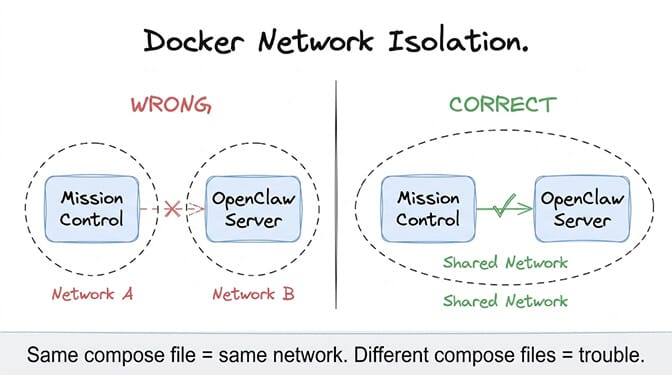
Ninety percent of "Mission Control not working" issues are actually Docker networking issues wearing a disguise. For the deeper Docker layer, see our OpenClaw Docker troubleshooting guide.
WebSocket Errors and Real-Time Updates Dying
Mission Control loads. You can see the UI. But agent statuses show as "unknown," real-time logs don't stream, and the dashboard feels frozen. This is almost always a WebSocket problem.
Reverse proxy WebSocket passthrough
Nginx doesn't forward WebSocket connections by default. You need explicit upgrade headers in your Nginx config:
location / {
    proxy_pass http://localhost:3000;
    proxy_http_version 1.1;
    proxy_set_header Upgrade $http_upgrade;
    proxy_set_header Connection "upgrade";
    proxy_set_header Host $host;
}
Missing those Upgrade and Connection headers is probably the single most common cause of "Mission Control loads but nothing works." The initial HTTP request succeeds (so the page renders), but the WebSocket handshake fails silently.
SSL termination issues
If you're running Mission Control behind SSL (and you should be), your WebSocket connections need to use wss:// instead of ws://. Some configurations terminate SSL at Nginx but then proxy to the backend over plain HTTP, which confuses the WebSocket upgrade.
Check your browser's developer console (F12, Network tab, filter by WS). If you see WebSocket connection attempts failing with a 400 or 502 status, it's almost certainly an SSL/WebSocket mismatch.
Cloudflare or CDN interference
If you're routing through Cloudflare, you need to enable WebSocket support in your Cloudflare dashboard (it's under Network settings). Cloudflare also has a default timeout of 100 seconds for idle WebSocket connections, which means your real-time agent updates will drop if there's no activity for about 90 seconds.
The fix is either to implement keep-alive pings on the server side or to increase the timeout in your Cloudflare settings if you're on a paid plan.
Login Loops and Authentication Failures
You hit the Mission Control URL. It redirects you to a login page. You enter credentials. It redirects you... back to the login page. Infinite loop.
This is usually a cookie or session problem.
If your Mission Control is on a different subdomain than your OpenClaw server (for example, mission.yourdomain.com and api.yourdomain.com), browser cookies won't be shared between them by default. You need to set the cookie domain to .yourdomain.com (note the leading dot) in your OpenClaw configuration.
Another common cause: your NEXTAUTH_URL or OPENCLAW_URL environment variable doesn't match the actual URL you're accessing. If Mission Control thinks it's running at http://localhost:3000 but you're accessing it at https://agents.mycompany.com, the auth redirect will break.
And if you recently changed your SECRET or ENCRYPTION_KEY environment variable, all existing sessions are invalidated. Users need to log in again, but sometimes the old session cookie prevents the new login from sticking. Clearing cookies for the domain fixes this.
When Mission Control Loads But Agents Aren't Showing Up
This is a different category entirely. The dashboard works, you're logged in, but your agent list is empty or agents show as offline when you know they should be running.
Database migration issues
After updating OpenClaw, the database schema might need migration. Check the server logs for migration errors with docker logs openclaw --tail 200 | grep -i migration. If migrations failed, your agents exist in the database but the new code can't read them because the schema doesn't match.
Running docker exec openclaw npx prisma migrate deploy (or the equivalent for your ORM) usually fixes this. Back up your database first.
Agent process crashes
An agent can appear in the database but not be running. Check if the agent's process is actually alive. In OpenClaw's architecture, agents run as child processes of the main server. If an agent's skill throws an unhandled exception, it can crash the agent process without taking down the server.
Look for the agent's ID in the server logs. If you see repeated crash and restart entries, the agent has a skill-level bug. Disable the last skill you added and see if the agent stabilizes.
This, by the way, is why verified skills with security audits matter so much. The ClawHavoc campaign exposed 1,400+ malicious skills on ClawHub. CrowdStrike and Cisco both published advisories about OpenClaw's skill supply chain risks. When your Mission Control shows agents crashing, the skill you installed last week might be the reason.
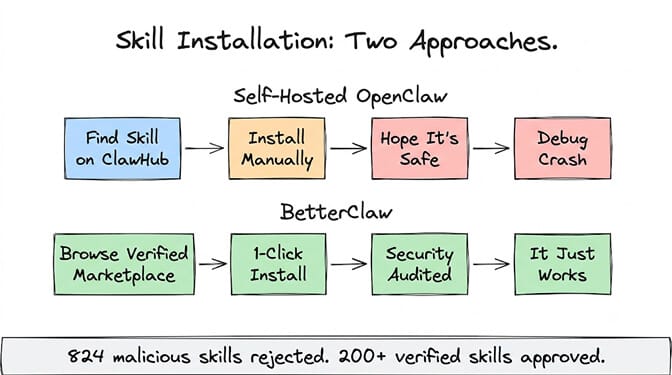
We built BetterClaw's skill marketplace with a 4-layer security audit specifically because of this. Every one of our 200+ skills is reviewed before it goes live. 824 submissions have been rejected. If you're spending more time debugging OpenClaw infrastructure than building actual agent workflows, BetterClaw's managed platform handles all of this. Free plan, $49/month for Pro, bring your own API keys with zero inference markup.
The Docker Compose File That Fixes 80% of Issues
Rather than debugging each variable individually, here's the pattern that works. These are the environment variables and configuration choices that eliminate the most common Mission Control failures:
Make sure your docker-compose.yml includes explicit depends_on with health checks so Mission Control doesn't try to connect before the database is ready. Set OPENCLAW_URL to the internal Docker service name (like http://openclaw:7860), not localhost. Use a named Docker network shared across all services. And set restart: unless-stopped on every container so transient failures self-heal.
If you're running behind a reverse proxy, keep all inter-container communication on HTTP (not HTTPS) and let the proxy handle SSL termination. Trying to run SSL inside the Docker network adds complexity for zero benefit.
The nuclear option: clean rebuild
If nothing else works, sometimes the fastest fix is a clean rebuild. Export your agent configurations from the database, nuke all containers and volumes with docker compose down -v, pull fresh images, and bring everything back up. This eliminates corrupted volumes, stale configs, and ghost processes.
It takes about 20 minutes. Which, honestly, is the fundamental problem with self-hosting OpenClaw. You can spend 20 minutes on a clean rebuild. Or you can spend 60 seconds deploying on a managed platform that handles all of this for you.
The Bigger Question: Is This the Right Use of Your Time?
We maintained a self-hosted OpenClaw instance for months before building BetterClaw. Every week brought a new issue. Docker updates breaking container networking. PostgreSQL running out of connections. WebSocket timeouts under load. Skills from ClawHub doing things we didn't authorize (Cisco documented a third-party skill performing data exfiltration without user awareness).
Then Anthropic banned Claude Pro and Max subscriptions from being used with third-party tools including OpenClaw on April 4, 2026. That meant one of the best LLM providers was suddenly off-limits for self-hosted OpenClaw users, or at least required BYOK API access instead of the consumer subscription they'd been relying on. Anthropic reversed the ban on May 13, 2026, but API keys remain the more predictable route.
The OpenClaw project has 7,900+ open issues on GitHub. That number has been climbing, not shrinking. The project moved to an open-source foundation after Peter Steinberger joined OpenAI. CVE-2026-25253 exposed a one-click remote code execution vulnerability with a CVSS score of 8.8. And 500,000+ OpenClaw instances sit on the public internet without authentication, according to security researchers.
None of this means OpenClaw is bad software. It's an incredible project with 230K+ stars for good reason. But running it in production means you're also running your own DevOps team, security team, and on-call rotation. For some organizations, that's fine. For most, it's not where the value is.
If any of this troubleshooting guide felt too familiar, give BetterClaw a look. Free plan with 1 agent and 100 credits a month included. $49/month for Pro with 5 agents, 12,000 credits a month, and all channels. Your first deploy takes about 60 seconds. No Docker, no Nginx configs, no WebSocket debugging. We handle the infrastructure. You handle the interesting part.
Start free here or see full pricing.
One Last Thing
If you do stick with self-hosted OpenClaw (and there are valid reasons to), bookmark this guide. Come back to it at 2 AM when Mission Control goes blank again. Work through the chain: Docker status, port mapping, network isolation, WebSocket headers, auth cookies, database migrations, skill crashes.
And if you ever get tired of the cycle, you know where to find us. We built BetterClaw for exactly the moment when you realize you'd rather build agents than babysit the platform they run on.
That moment comes for everyone eventually. The only question is how many Wednesday nights it takes.
Frequently Asked Questions
What does "OpenClaw Mission Control not working" usually mean?
It means the web dashboard (Mission Control) for managing your OpenClaw agents isn't loading, is showing errors, or is loading with missing data like agent statuses. The most common causes are Docker container issues, port misconfigurations, WebSocket failures behind reverse proxies, and authentication cookie problems. Work through the fixes by symptom rather than guessing randomly.
How does Mission Control compare to BetterClaw's dashboard?
Mission Control is a self-hosted dashboard that requires you to configure Docker, Nginx, PostgreSQL, and WebSocket connections yourself. BetterClaw's dashboard is fully managed with zero infrastructure setup. You get the same agent management capabilities (plus features like trust levels and one-click kill switches) without maintaining any of the underlying stack. BetterClaw also includes real-time health monitoring and auto-pause on anomalies, which Mission Control requires manual configuration to achieve.
How long does it take to fix Mission Control when it breaks?
It depends on the root cause. Simple issues like port mismatches or browser caching take 5 to 10 minutes. Docker networking problems typically take 30 to 60 minutes. WebSocket and SSL configuration issues can take hours, especially if you're unfamiliar with Nginx config syntax. A full clean rebuild (the nuclear option) takes about 20 minutes but requires re-importing your agent configurations.
Is self-hosting OpenClaw cheaper than using a managed platform?
Not usually, when you account for total cost. A VPS costs $10 to $50/month depending on specs. Add your time for setup (4 to 8 hours initially), ongoing maintenance (2 to 5 hours/month), and incident response. At a conservative $50/hour for developer time, self-hosting costs $150 to $300/month in combined expenses. BetterClaw's free plan costs $0, and Pro is $49/month with managed infrastructure, monitoring, and zero DevOps overhead.
Is OpenClaw Mission Control secure enough for production use?
It requires significant hardening. Out of the box, OpenClaw doesn't enforce authentication on Mission Control, which is why 500,000+ instances are exposed on the public internet. CVE-2026-25253 demonstrated a one-click RCE vulnerability. You need to configure authentication, firewall rules, SSL, and regular security updates yourself. BetterClaw handles all of this with isolated Docker containers per agent, AES-256 encrypted credentials, secrets auto-purge after 5 minutes, and a 4-layer security audit on every skill.