Your agent's memory directory is growing 2GB per month. Here's what's causing it, what Dreaming does about it, and the manual cleanup most people skip.
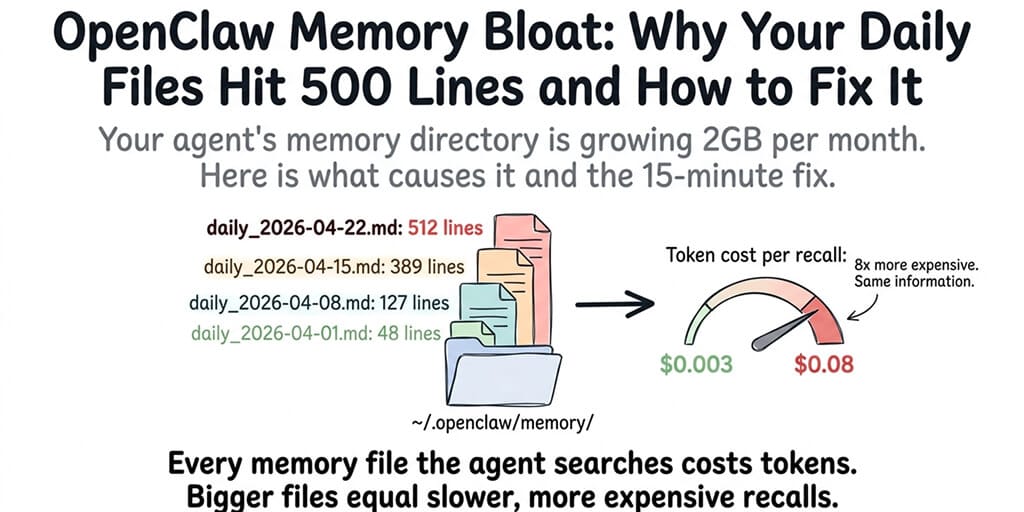
I checked my agent's memory directory after six weeks of daily use. 847 files. 2.1GB total. The daily log for April 15 alone was 512 lines.
The agent searched those files every time it recalled anything. Every memory query embedded the search text, scanned the vector index built from all 847 files, retrieved the top chunks, and injected them into the prompt. The search itself wasn't slow. But the injected chunks were eating 3,000-5,000 tokens per recall, and that happened 2-4 times per response.
My agent was spending more tokens on memory retrieval than on actually answering my questions.
This is OpenClaw memory bloat. It happens to everyone who uses their agent regularly and never curates the memory files. Here's what causes it, what the new Dreaming feature does about it, and the manual cleanup that fixes it in 15 minutes.
Why OpenClaw memory files grow so fast
OpenClaw's memory system writes to Markdown files in your workspace. MEMORY.md for explicit notes. Daily log files for conversation summaries. Memory-wiki entries (as of 2026.4.7) for structured claims.
The problem: the agent writes generously but never deletes. Every conversation that ends without /new generates a daily log entry. Cron jobs log their results. Heartbeats can trigger memory writes. Skills that save output to memory files add more content.
After a week of moderate use (30-50 messages per day), a daily file can reach 100-200 lines. After a month, the directory holds dozens of files, each containing summaries that range from genuinely useful ("Alice manages auth team") to redundant ("user asked about the weather again") to completely outdated ("project deadline is March 15" when it's now April 22).
The cost of bloat isn't disk space. It's tokens. Every memory recall injects retrieved chunks into the prompt. The more files the vector index contains, the more chunks get retrieved per query. More chunks mean more input tokens per response. More input tokens mean higher API costs and slower response times.
For the detailed explanation of how memory compaction manages the context window, our compaction guide covers the session-level memory management. This post covers the file-level bloat that compaction doesn't address.
The three types of bloat (not all are fixable the same way)
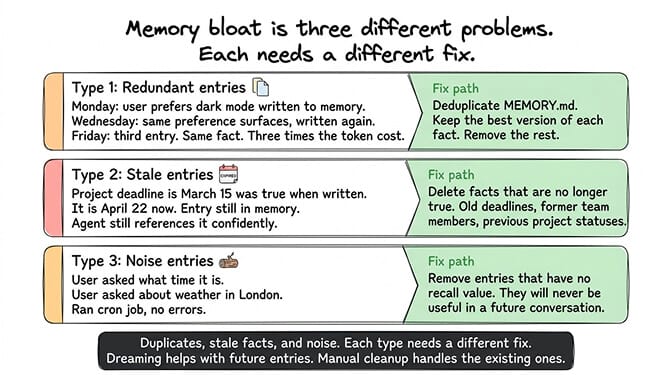
Redundant entries
The agent writes "user prefers dark mode" to memory on Monday. On Wednesday, the same preference surfaces in conversation and gets written again. By Friday, you have three entries saying the same thing. The vector search retrieves all three. Three entries, three times the token cost, same information.
Stale entries
"Project deadline is March 15" was true when written. It's April now. The deadline passed (or moved). The entry is still in memory, still gets retrieved, and the agent still references it confidently.
Low-value entries
"User asked what time it is." "User asked about the weather in London." "Ran cron job, no errors." These entries are technically accurate but have no recall value. They'll never be useful in a future conversation. They exist because the agent logs everything by default.
Memory bloat is three problems: duplicates (same fact written multiple times), stale facts (true when written, wrong now), and noise (logged but never useful again). Each needs a different fix.
What Dreaming does (and what it doesn't)
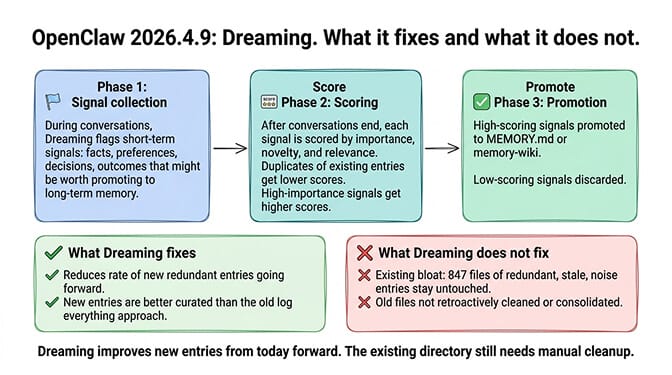
OpenClaw 2026.4.9 introduced Dreaming, a three-phase background memory consolidation system. Here's what it actually does.
Phase 1: Signal collection. During conversations, Dreaming flags "short-term signals" (facts, preferences, decisions, outcomes) that might be worth promoting to long-term memory.
Phase 2: Scoring. After conversations end, Dreaming scores each signal by importance, novelty, and relevance. Signals that duplicate existing memory entries get lower scores. Signals with high importance get higher scores.
Phase 3: Promotion. High-scoring signals get promoted to MEMORY.md or memory-wiki as structured entries. Low-scoring signals are discarded.
What Dreaming fixes: It reduces the rate of new redundant entries. If the agent already knows "user prefers dark mode," Dreaming's scoring should deprioritize writing it again. New entries are better curated than the old "log everything" approach.
What Dreaming doesn't fix: Existing bloat. If your memory directory already has 847 files of redundant, stale, and low-value entries, Dreaming won't clean them up. It only improves the quality of new entries going forward.
For the memory-wiki guide covering how structured claims work alongside Dreaming, our wiki post covers the new structured knowledge layer.
The 15-minute manual cleanup (do this once)
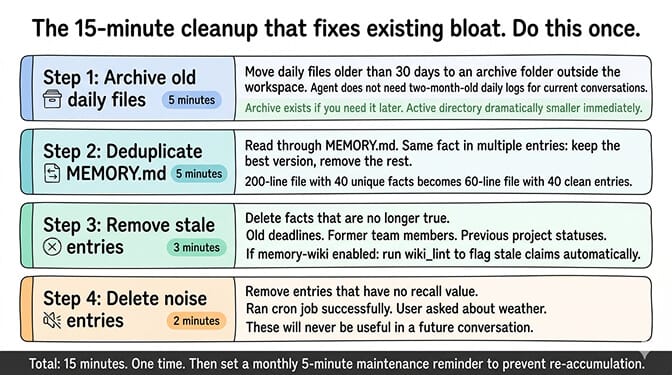
Here's the manual process that fixes existing bloat. It takes about 15 minutes.
Step 1: Archive old daily files (5 minutes). Move daily files older than 30 days to an archive folder outside the workspace. The agent doesn't need daily logs from two months ago for current conversations. If you need that information later, it's in the archive. For the memory fix guide covering search and recall troubleshooting, our troubleshooting post covers what to do if archiving removes something you still need.
Step 2: Deduplicate MEMORY.md (5 minutes). Read through MEMORY.md. If the same fact appears multiple times (even in slightly different wording), keep the best version and remove the rest. A 200-line MEMORY.md with 40 unique facts should become a 60-line file with 40 clean entries.
Step 3: Remove stale entries (3 minutes). Delete facts that are no longer true. Old deadlines. Former team members. Previous project statuses. If you have memory-wiki enabled, run wiki_lint to flag stale claims automatically.
Step 4: Delete noise entries (2 minutes). Remove entries that have no recall value. "Ran cron job successfully." "User asked about weather." These will never be useful in a future conversation.
If managing memory files, running cleanup cycles, and configuring Dreaming parameters sounds like more maintenance than you want, BetterClaw includes smart context management with hybrid vector plus keyword search that handles memory efficiency automatically. Free tier with 1 agent and BYOK. $29/month per agent for Pro. The memory layer is managed. You don't maintain the files.
After cleanup: keeping it clean
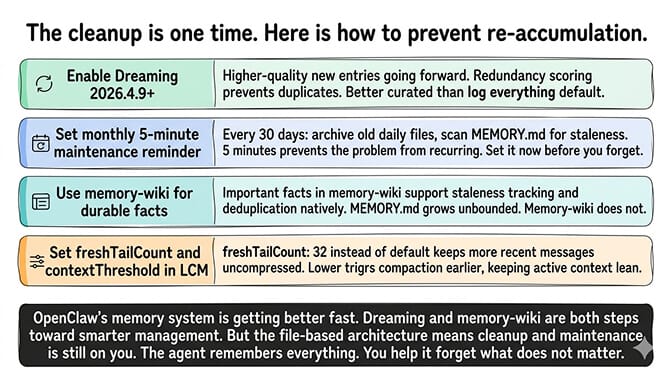
The cleanup is a one-time fix. Here's how to prevent re-accumulation.
Enable Dreaming (2026.4.9+). The consolidation system produces higher-quality new entries and reduces redundancy going forward.
Set a monthly reminder. Every 30 days, archive old daily files and scan MEMORY.md for staleness. 5 minutes per month prevents the problem from recurring.
Use memory-wiki for durable facts. Instead of writing important facts to MEMORY.md (which grows unbounded), use memory-wiki entries that support staleness tracking and deduplication natively. For the full comparison of memory plugins, our plugins guide covers which tools handle which parts of the memory stack.
Set freshTailCount and contextThreshold in LCM. Higher freshTailCount (32 instead of the default) keeps more recent messages uncompressed. Lower contextThreshold triggers compaction earlier, keeping the active context lean.
The honest reality: OpenClaw's memory system is getting better fast. Dreaming (2026.4.9) and memory-wiki (2026.4.7) are both steps toward smarter memory management. But the existing file-based architecture means the cleanup and maintenance is still on you. The agent remembers everything. It's your job to help it forget what doesn't matter.
If you want memory management handled by the platform instead of by you, give BetterClaw a try. Free tier with 1 agent and BYOK. $29/month per agent for Pro. Persistent memory with hybrid search is built in. Smart context management keeps the token overhead lean. You focus on what the agent remembers. We handle how it remembers.
Frequently Asked Questions
Why do OpenClaw memory files get so large?
OpenClaw's memory system writes generously but never deletes. Every conversation generates daily log entries. Cron jobs log results. Skills save output. After a month of moderate use, the memory directory can contain hundreds of files with redundant entries (same fact written multiple times), stale entries (facts that are no longer true), and noise entries (logged but never useful again). The bloat increases token costs because every memory recall injects retrieved chunks into the prompt.
What is Dreaming in OpenClaw?
Dreaming is a three-phase background memory consolidation system introduced in OpenClaw 2026.4.9. It collects signals from conversations, scores them by importance and novelty, and promotes high-value signals to long-term memory while discarding low-value ones. Dreaming reduces the rate of new redundant entries but doesn't clean up existing bloat. You still need to manually archive old files and deduplicate current ones.
How do I clean up OpenClaw memory files?
Four steps, about 15 minutes total: archive daily files older than 30 days to a folder outside the workspace, deduplicate MEMORY.md by removing repeat entries, delete stale facts (old deadlines, former team members), and remove noise entries (cron job logs, trivial questions). After cleanup, enable Dreaming (2026.4.9+) and set a monthly reminder to maintain the files.
Does memory bloat affect OpenClaw costs?
Yes, directly. Every memory recall injects retrieved chunks into the prompt as input tokens. Bloated memory files mean more chunks per recall, which means more input tokens per response. A clean 60-line MEMORY.md might inject 500 tokens per recall. A bloated 500-line file might inject 3,000-5,000 tokens. Over hundreds of daily messages, the cost difference is significant.
Does BetterClaw handle memory management automatically?
BetterClaw includes persistent memory with hybrid vector plus keyword search, managed at the platform level. Smart context management prevents the token bloat that accumulates in raw OpenClaw. You don't maintain memory files manually. Free tier with 1 agent and BYOK. $29/month per agent for Pro.