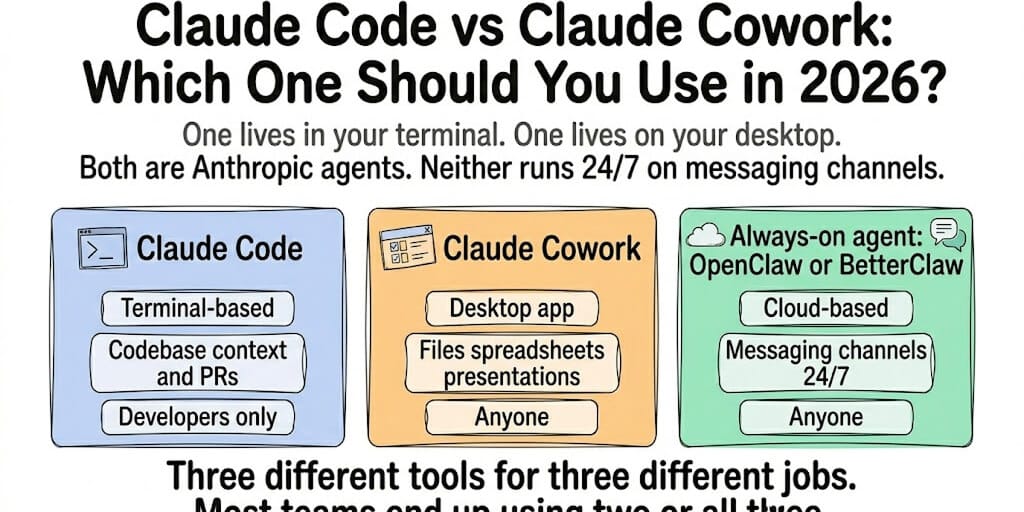
One lives in your terminal. One lives on your desktop. Both are Anthropic agents. Neither runs 24/7 on messaging channels. Here's when to use which, and what fills the gap they both leave open.
A founder in our community asked the question everyone's asking: "I'm paying for Claude Pro. Should I use Code or Cowork? Or both? Or neither?"
She was using Claude Code to refactor her startup's backend. She heard Cowork could "do things on her computer." She assumed they were the same product with different interfaces.
They're not even close to the same product.
Claude Code is a terminal-based coding agent that understands your codebase, creates PRs, and runs tests. Claude Cowork is a desktop agent that organizes files, builds spreadsheets, and creates presentations. They share the same underlying Claude model. They solve completely different problems.
Here's the honest comparison, when to use each, and the use case neither one covers.
Claude Code: The Developer's Tool (Terminal Only)
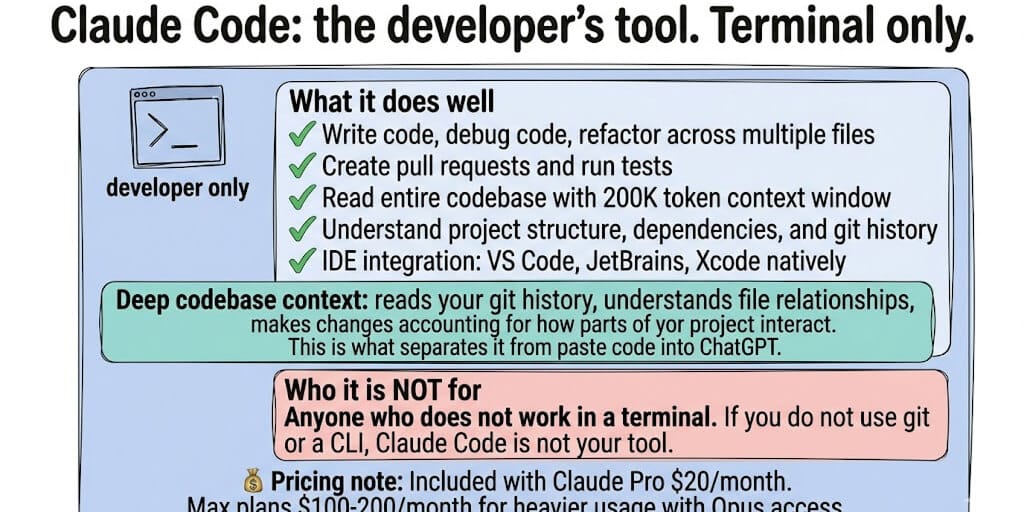
What it is: Anthropic's CLI agent for software development. Lives in your terminal. Integrates with VS Code, JetBrains, and Xcode. Reads your entire codebase with a 200K-token context window.
What it does well: Write code. Debug code. Refactor across multiple files. Create pull requests. Run tests. Understand project structure and dependencies. Generate diff views of changes.
Who it's for: Developers. Period. If you don't work in a terminal, Claude Code isn't for you.
Pricing: Included with Claude Pro ($20/month). Max plans ($100-200/month) for heavier usage with Opus access. Or BYOK through the API.
The key differentiator: Deep codebase context. Claude Code doesn't just generate code. It reads your git history, understands file relationships, and makes changes that account for how different parts of your project interact. This is what separates it from "paste code into ChatGPT."
Claude Cowork: The Knowledge Worker's Tool (Desktop App)
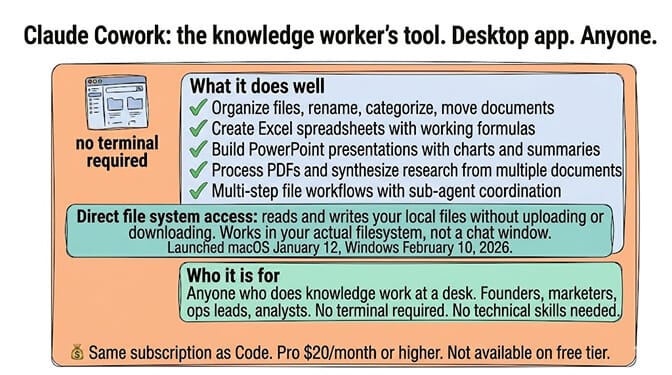
What it is: An autonomous desktop agent inside Claude Desktop. Works on your local files. Runs in an isolated VM on your machine. Launched macOS January 12, 2026. Windows February 10, 2026.
What it does well: Organize files. Create Excel spreadsheets with working formulas. Build PowerPoint presentations. Process PDFs. Synthesize research from multiple documents. Multi-step file workflows with sub-agent coordination.
Who it's for: Anyone who does knowledge work at a desk. Founders, marketers, ops leads, analysts. No terminal required. No technical skills needed.
Pricing: Same subscription. Pro ($20/month), Max ($100-200/month), Team, or Enterprise. Not available on the free tier.
The key differentiator: Direct file system access. Cowork reads and writes your local files without uploading or downloading. It works in your actual filesystem, not a chat window. New to it? Our how to use Claude Cowork beginner guide covers your first task, scheduled automation, and the limits nobody warns you about.
For the detailed Cowork Windows setup guide, our post covers the three requirements nobody mentions upfront.
The Comparison That Actually Matters (Use Cases, Not Features)
Here's where most people get it wrong.
Feature tables between Code and Cowork imply you should choose one. You shouldn't. They solve different problems. The question is which problems you have.
- Refactoring a React component: Claude Code. It reads your project structure, understands the component's dependencies, and creates a PR.
- Creating a quarterly sales deck: Claude Cowork. It reads your sales CSV, identifies trends, and builds a presentation with charts and summaries.
- Debugging a production error at 2 AM: Claude Code. It reads the stack trace, finds the relevant code, and suggests a fix.
- Organizing 200 PDFs into categorized folders: Claude Cowork. It reads file names and content, creates a folder structure, and moves files.
- Writing a database migration: Claude Code. It understands your schema, generates the migration, and tests it.
- Drafting a board report from multiple data sources: Claude Cowork. It reads your spreadsheets, CRM exports, and notes, then produces a formatted document.
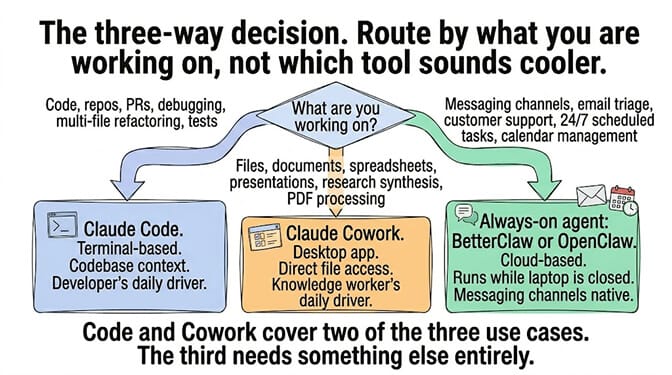
The pattern: If it involves code and a git repo, use Claude Code. If it involves files and documents on your desktop, use Claude Cowork. If it involves neither, keep reading.
The Gap Neither One Fills (the Always-On Problem)
Here's what nobody tells you about both Claude Code and Claude Cowork.
Neither runs when you're not at your computer.
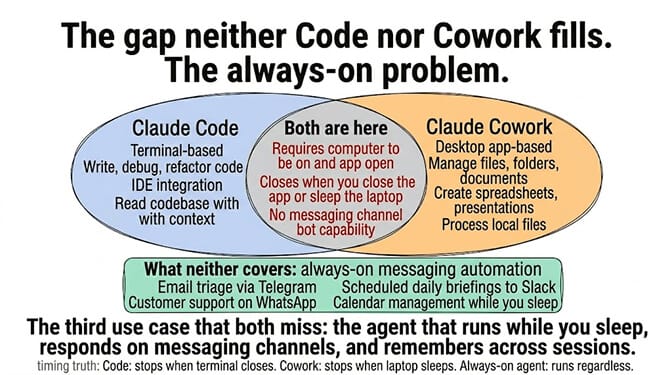
Claude Code requires an open terminal session. Close it, and Code stops. Claude Cowork requires the desktop app to be running and your computer awake. Close the laptop, and Cowork stops. (On Windows that desktop dependency also brings its own headaches — see Claude Cowork not working on Windows for the common failure modes.)
Neither connects to messaging platforms as a bot. No WhatsApp. No Telegram. No Slack (as a responding agent). No Discord. Code is a terminal tool. Cowork is a desktop tool. Neither is a messaging agent.
Neither has persistent memory across sessions. Code resets between sessions. Cowork has memory within projects but not across standalone sessions. Neither remembers what you told it last week. And Cowork's project memory is a separate store from the memory Claude builds in chat — the two do not sync, so teaching Claude your business in a conversation does not carry into a Cowork task.
The third use case that both miss: always-on automation across messaging channels. Email triage via Telegram. Customer support on WhatsApp. Scheduled daily briefings to Slack. Calendar management. Task delegation. The agent that runs while you sleep.
If the gap between "desktop agent that works when I'm at my computer" and "always-on agent that runs when I'm not" is the gap you need filled, BetterClaw covers the always-on messaging use case. 15+ chat channels. Persistent memory across all sessions. 24/7 operation in the cloud. No desktop required. No terminal required. Free tier with 1 agent and BYOK. $49/month for Pro.
The "Use All Three" Strategy (What Power Users Actually Do)
Stay with me here.
- Claude Code for coding. Terminal. Codebase context. PRs. The developer's daily driver.
- Claude Cowork for desktop knowledge work. File organization. Spreadsheets. Presentations. Research synthesis. The knowledge worker's daily driver.
- BetterClaw for always-on messaging automation. Email triage. Customer support. Scheduled tasks. Calendar management. The agent that works while the other two are closed.
The monthly cost: Claude Pro ($20/month) gives you both Code and Cowork. BetterClaw free tier gives you 1 always-on agent with BYOK. Total: $20/month for the full coverage. Add BetterClaw Pro ($49/month) when you need more agents or more credits. Total: $69/month for everything.
Who actually does this: Startup founders who code, create decks, AND need their Telegram bot answering customer questions at 3 AM. The code happens in Claude Code. The deck happens in Cowork. The 3 AM response happens in BetterClaw. Three tools, three use cases, zero overlap.
For the detailed comparison of how OpenClaw stacks up as a Claude alternative, our comparison covers the always-on agent use case in depth.
The Honest Recommendation (Pick by Your Biggest Bottleneck)
Here's the take.
If your bottleneck is coding productivity: Claude Code. Start there. It's included in your Claude subscription. The codebase context alone saves hours per week.
If your bottleneck is document/file work: Claude Cowork. Also included. The direct file access and multi-step workflows turn 2-hour document tasks into 10-minute delegations.
If your bottleneck is communication and scheduling: Neither Code nor Cowork. You need an always-on messaging agent. OpenClaw if you want to self-host (230K+ stars, Docker required, security responsibility is yours). BetterClaw if you want it managed ($49/month for Pro, 60-second deploy, 15+ channels).
Most people have two bottlenecks. Some have all three. The tools exist for all of them. The question is which bottleneck to fix first.
If the always-on messaging agent is your priority, give BetterClaw a try. Free tier with 1 agent and BYOK. $49/month for Pro. Pair it with Claude Code and Cowork. The three tools together cover code, desktop, and messaging. No overlap. No gap. $20-69/month total.
Frequently Asked Questions
What is the difference between Claude Code and Claude Cowork?
Claude Code is a terminal-based coding agent with deep codebase context (200K tokens), IDE integration, and PR creation. Claude Cowork is a desktop agent that works on local files: organizing documents, creating spreadsheets, building presentations, and multi-step file operations. Code is for developers. Cowork is for anyone who does knowledge work. Both require a paid Claude subscription ($20/month Pro minimum).
Can Claude Code replace Claude Cowork?
No. They solve different problems. Code can't organize your Documents folder, create PowerPoint presentations, or process a stack of PDFs. Cowork can't read your git history, understand codebase dependencies, or create pull requests. They complement each other. Most users who try both end up using both regularly.
Can Claude Cowork replace Claude Code for coding?
Not effectively. Cowork can write code files, but it lacks Code's deep codebase context (200K token project awareness), IDE integration (VS Code, JetBrains), diff views, and git history understanding. For real software engineering with multi-file awareness, Claude Code is purpose-built. Cowork is for document and file work.
How much do Claude Code and Cowork cost together?
Both are included in your Claude subscription. Pro ($20/month) gives you access to both Code and Cowork. Max plans ($100-200/month) provide more usage and Opus model access. There's no separate charge for either tool. Adding BetterClaw for always-on messaging: $0 (free tier) or $49/month (Pro). Total for all three: $20-69/month.
Do Claude Code and Cowork run 24/7?
No. Claude Code requires an open terminal session. Claude Cowork requires the desktop app running and your computer awake. Close either app and the work stops. For 24/7 always-on automation, you need a cloud-based agent like BetterClaw (runs on managed infrastructure, no desktop required) or self-hosted OpenClaw (runs on your VPS/Mac Mini 24/7).