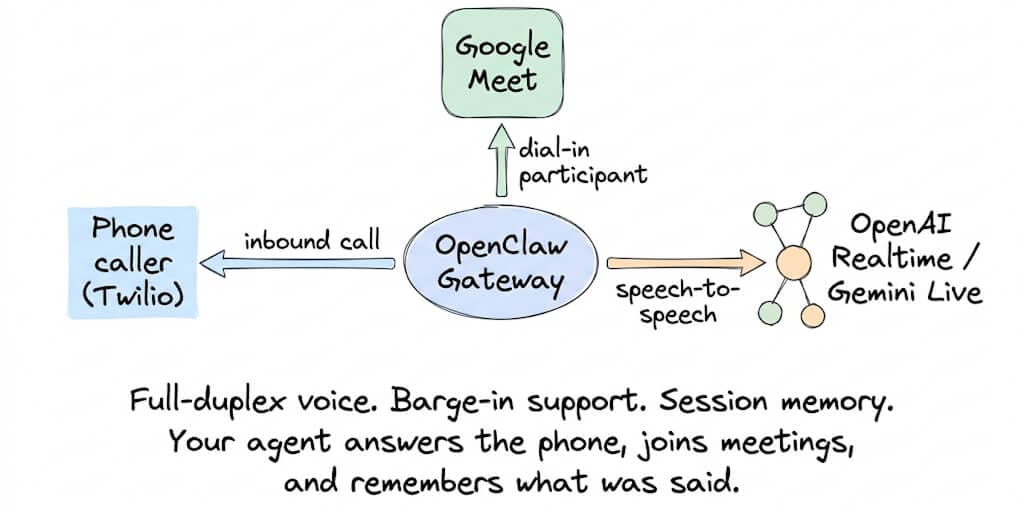
Your OpenClaw agent can now answer phone calls, join Google Meet meetings, and have full-duplex voice conversations with callers. The Voice Call plugin shipped in v2026.4.24. Here's how it works, what it costs, and the 3 things that break first.
A community member posted a demo last month: their OpenClaw agent answered a Twilio phone call, looked up the caller's order in a database, quoted the delivery date, and asked if they needed anything else. The entire interaction took 14 seconds. The caller didn't know they were talking to an AI.
Then the agent joined their next Google Meet standup and took meeting notes.
Same agent. Same gateway. Phone calls and video meetings. This isn't a future roadmap item. It shipped in v2026.4.24 (April 24, 2026) and was refined in v2026.5.4.
Here's how the Voice Call plugin works, how to set it up with Twilio, how to connect to Google Meet, and the three things that will break if you don't configure them correctly.
What the Voice Call plugin actually does
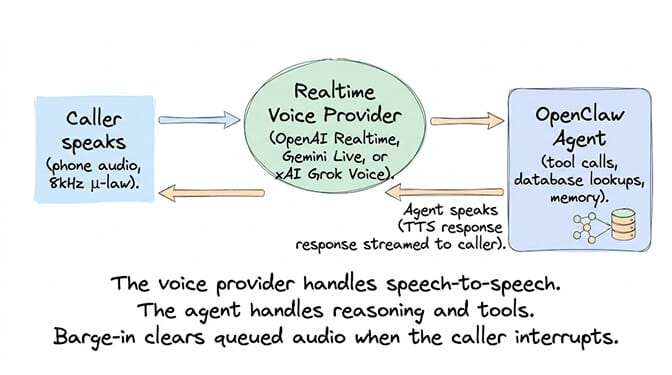
The Voice Call plugin runs inside the OpenClaw Gateway process. It handles outbound notifications (agent calls you), multi-turn conversations (caller talks back and forth with the agent), full-duplex realtime voice, streaming transcription, and inbound calls with allowlist policies.
Four telephony providers supported: Twilio (Programmable Voice + Media Streams), Telnyx (Call Control v2), Plivo (Voice API), and a mock provider for local development.
Three realtime voice backends:
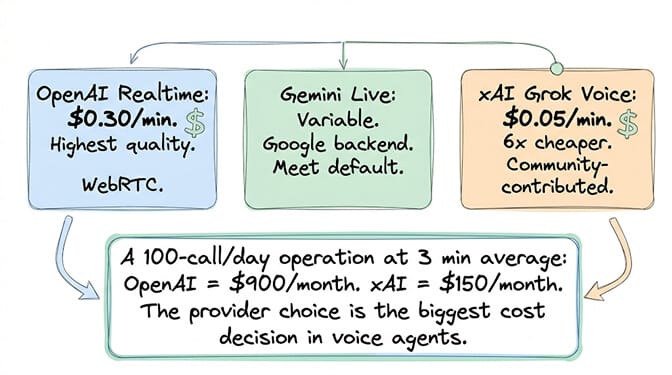
OpenAI Realtime (gpt-realtime-1.5): ~$0.30/minute. Highest quality. WebRTC-backed. The Control UI's "Talk" button uses this for browser-based voice.
Gemini Live: Google's realtime voice provider. Bidirectional audio + function calling. The default for Google Meet dial-in joins since v2026.5.4. Paced audio streaming with backpressure-aware buffering.
xAI Grok Voice (grok-voice-think-fast-1.0): ~$0.05/minute. 6x cheaper than OpenAI Realtime. Community-contributed support (GitHub issue #79980). Currently working with Twilio μ-law 8kHz, voices "ara" and "eve" confirmed.
The cost comparison that matters: OpenAI Realtime at $0.30/minute means a 5-minute phone call costs $1.50. xAI Grok Voice at $0.05/minute means the same call costs $0.25. For high-volume use cases (customer support, appointment booking), the provider choice determines whether voice agents are viable or ruinously expensive.
How to set up Twilio voice calls (the practical guide)
Step 1: Install the Voice Call plugin.
openclaw plugins install npm:@openclaw/voice-call
Restart the gateway to load the plugin.
Step 2: Run the setup wizard.
openclaw voicecall setup
This walks you through Twilio credentials (Account SID, Auth Token, phone number), voice provider selection (OpenAI Realtime, Gemini Live, or xAI), and inbound call policies.
Step 3: Smoke test before going live.
openclaw voicecall smoke --to "+15555550123"
This dry-runs a call to verify Twilio connectivity, webhook routing, and audio streaming without actually completing a call. Always smoke test first.
Step 4: Configure your Twilio webhook. Point your Twilio phone number's voice webhook to your gateway's public URL. If running locally, use ngrok (dev only) or Tailscale Funnel (production).
For the complete OpenClaw setup and configuration guide, our best practices post covers the gateway configuration that Voice Call depends on.
How Google Meet integration works (your agent joins meetings)
Here's where it gets interesting.
The Google Meet plugin (also shipped in v2026.4.24) lets your agent join meetings as a participant. It uses the Voice Call plugin's Twilio infrastructure to dial into Google Meet via the meeting's phone number.
The flow: Google Meet starts the Twilio phone leg → Voice Call handles the audio bridge → Gemini Live processes speech-to-speech → OpenClaw agent has full tool access during the call.
What the agent can do in a meeting: Take notes. Summarize discussions. Answer questions from its knowledge base. Create action items. Post the summary to Slack after the call. Export attendance records, recordings, and transcripts.
The DTMF sequence gotcha: Google Meet dial-in requires entering a PIN via touch tones. The plugin handles this automatically with a configurable delay (voiceCall.dtmfDelayMs, default 12 seconds) because Meet prompts can arrive late. If your agent dials in but never joins, the PIN timing is usually the problem.
The 3 things that break first
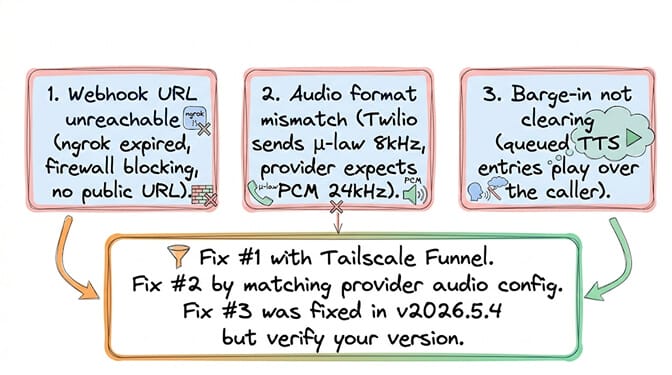
Break 1: Webhook URL not reachable
Twilio needs to reach your gateway via a public URL. If you're on a VPS, this is your server's IP. If you're local, you need a tunnel. Ngrok free tier URLs change and can show interstitial pages that break Twilio signature validation.
The fix: Use Tailscale Funnel for stable, authenticated tunneling. Or deploy on a VPS with a static IP and proper DNS.
Break 2: Audio format mismatch
Twilio sends μ-law audio at 8kHz. OpenAI Realtime expects this. But xAI Grok Voice defaults to PCM at 24kHz. If you point the OpenAI provider at xAI's endpoint without changing the audio format schema, you get static in both directions.
The fix: Use the nested audio format schema for xAI: "audio": { "input": { "format": { "type": "audio/pcmu" } } } instead of the flat schema.
Break 3: Stale calls hanging
If a Twilio media stream disconnects, the call can hang indefinitely without being terminated. v2026.5.4 added a 2-second grace period: if the stream doesn't reconnect, the call auto-ends. If you're on an older version, upgrade or configure staleCallReaperSeconds manually.
If managing Twilio webhooks, audio format schemas, ngrok tunnels, DTMF sequences, barge-in queues, and stale call reapers sounds like more telephony infrastructure than agent building, BetterClaw is exploring voice agent support on the managed platform. In the meantime, our text-based agents handle 15+ messaging channels with zero infrastructure. Free tier with 1 agent and BYOK. $49/month for Pro.
Five use cases that are working in production right now
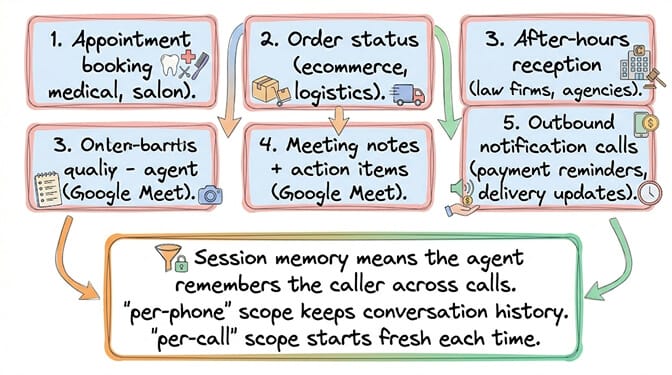
- Appointment booking. Caller dials. Agent checks availability via database/API. Books the slot. Sends confirmation SMS. 14-second average call duration for routine bookings.
- Order status lookup. "Where's my order?" Agent queries the order database. Quotes the status and delivery date. No human needed for the 70% of support calls that are status checks.
- After-hours reception. Calls outside business hours go to the voice agent. It takes messages, answers FAQs from the knowledge base, and schedules callbacks for the next business day.
- Google Meet notes. Agent joins the meeting. Transcribes in real time. Generates a summary with action items. Posts to Slack. Exports attendance. For the comparison of managed versus self-hosted agent deployment, our comparison covers which approach fits voice use cases.
- Outbound notifications. Payment reminders. Delivery updates. Appointment confirmations. The agent calls the customer, delivers the message, and handles responses ("Can you reschedule?").
The honest assessment (is this production-ready?)
Here's the take.
For appointment booking, order lookups, and outbound notifications: yes. These are structured, predictable conversations with limited branching. The agent has a clear task, a database to query, and a finite set of outcomes.
For complex customer support with emotional nuance: not yet. Voice agents still struggle with sarcasm, frustration, and edge cases that require genuine empathy. The latency (600ms for OpenAI Realtime, 450ms for Vapi-optimized setups) is noticeable compared to human response time.
For Google Meet notes: surprisingly good. The transcription quality is high. The summary quality depends on the model. The action item extraction works well for structured meetings and poorly for freeform brainstorming.
The voice agent space is moving fast. xAI Grok Voice at $0.05/minute makes high-volume voice viable. Speech-to-speech models like Qwen3.5-Omni are collapsing the three-stage pipeline (STT → LLM → TTS) into a single pass. By the end of 2026, voice agents will be indistinguishable from human receptionists for routine calls.
If you want to start with text-based agents while voice matures, give BetterClaw a try. Free tier with 1 agent and BYOK. $49/month for Pro. 15+ messaging channels. Persistent memory. 60-second deploy. When voice support arrives on the platform, your agent workflows transfer directly.
Frequently Asked Questions
Can OpenClaw make and receive phone calls?
Yes, since v2026.4.24. The Voice Call plugin supports inbound and outbound calls through Twilio, Telnyx, and Plivo. It handles full-duplex realtime voice, streaming transcription, multi-turn conversations, and barge-in (caller can interrupt the agent). Session memory keeps conversation context across multiple calls from the same number.
How much does an OpenClaw voice agent cost per minute?
Depends on the voice provider. OpenAI Realtime: $0.30/minute. xAI Grok Voice: $0.05/minute (6x cheaper). Gemini Live: pricing varies by usage tier. Plus Twilio costs (~$0.013/minute for inbound, $0.014/minute for outbound). A 5-minute call costs $0.32-1.57 depending on provider choice. High-volume users should use xAI Grok Voice or wait for local speech-to-speech models.
Can OpenClaw join Google Meet calls?
Yes. The Google Meet plugin (v2026.4.24) lets your agent join meetings as a dial-in participant via Twilio. The agent can transcribe the meeting, take notes, extract action items, and export attendance records. It uses Gemini Live for the voice bridge since v2026.5.4. Requires personal Google auth and a Twilio phone number.
What voice providers does OpenClaw support?
Three realtime voice backends: OpenAI Realtime (gpt-realtime-1.5), Gemini Live (Google), and xAI Grok Voice (community-contributed). For telephony: Twilio (most popular), Telnyx, and Plivo. A mock provider is available for local development without network calls. The plugin runs inside the OpenClaw Gateway process.
Does BetterClaw support voice agents?
BetterClaw is exploring voice agent support on the managed platform. Currently, BetterClaw handles text-based agents on 15+ messaging channels with zero infrastructure management. Voice support will transfer existing agent workflows when it launches. In the meantime, the text channels (WhatsApp, Telegram, Slack, Discord) handle most communication use cases. Free tier with 1 agent and BYOK. $49/month for Pro.