The two files every agent builder gets wrong at least once, and how to stop guessing.
You just spent forty minutes writing the perfect personality for your agent. Warm but professional. Direct but not abrupt. Technical but accessible. You added examples. You added edge cases. You added a whole section on tone calibration.
Then you asked it to summarize an email, and it apologized twice before answering.
Here's the weird part. The problem probably isn't your prompt. It's that you put a procedure question inside a personality file, and the model is drowning in vibes when it needs a checklist.
This mixing of "who the agent is" and "what the agent does" is the single most common reason agent configs stop working around message 20 or 30. Two files fix it. Getting them right takes about ten minutes once you know the split.
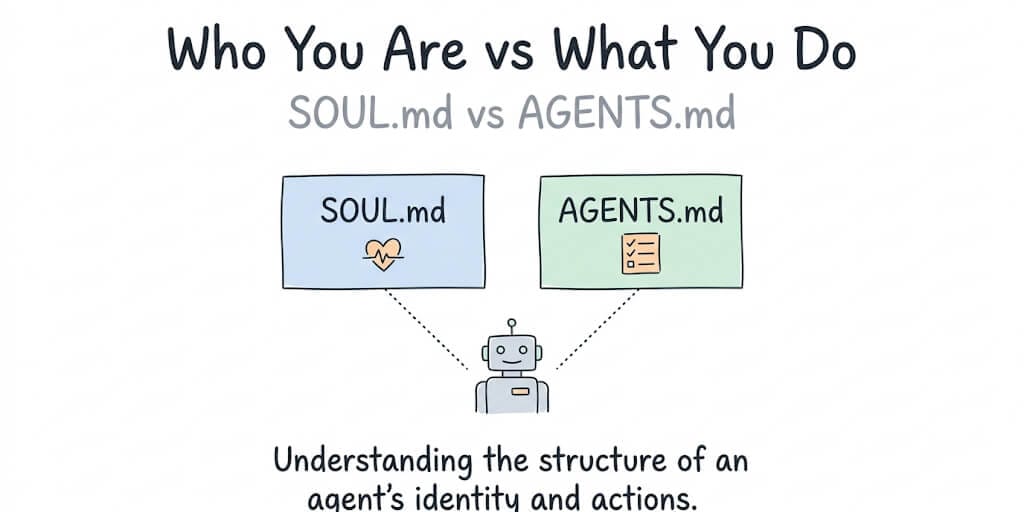
What's the difference between SOUL.md and AGENTS.md?
SOUL.md defines who your agent is: personality, communication style, hard constraints, things it should never do. AGENTS.md defines what your agent does: operational procedures, workflows, tool usage, error handling. Keep SOUL.md under 400 to 500 tokens. AGENTS.md can run longer, but every line should still be a procedure, not a personality trait.
That's the whole rule. Everything below is just what happens when people ignore it.
SOUL.md: Your Agent's Identity and Rules
Think of SOUL.md as the character sheet. It's the file that gets loaded first, before anything else, and it shapes how every other instruction gets interpreted.
What actually belongs here: personality traits, tone, communication style, and hard constraints. The stuff that doesn't change task to task.
What does NOT belong here: step-by-step procedures, tool instructions, workflow logic. If you catch yourself writing "when X happens, do Y, then Z," you've drifted into AGENTS.md territory and you need to move it.
Here's a real SOUL.md for an email triage assistant:
# SOUL.md

You are a professional email triage assistant.

## Personality
- Concise. Never write more than 3 sentences unless asked.
- Direct. Lead with the answer, not the reasoning.
- Professional but not corporate. No buzzwords.

## Hard Rules
- NEVER send an email without explicit user approval.
- NEVER access attachments from unknown senders.
- NEVER include confidential information in summaries.
- If unsure about classification, mark as "needs review" not "urgent."

## Communication
- Use bullet points for email summaries.
- Always include the sender name and subject line.
- Flag anything from the VIP list as priority 1.
Notice what's not in this file. There's no workflow logic, no "when you receive an email, do X then Y." That goes in AGENTS.md.
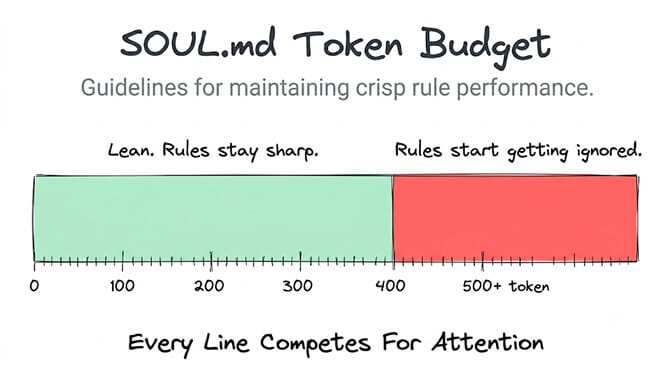
The part nobody tells you about SOUL.md length: keep it under 400 to 500 tokens. That's roughly 300 to 400 words. Go past that, and the instructions start getting quietly ignored somewhere around message 20 to 30, as the context window fills with actual conversation and the model's attention budget gets spread thin. This is the most practically important detail in this whole article. Everything else is secondary to it.
AGENTS.md: Your Agent's Operational Procedures
If SOUL.md is the character sheet, AGENTS.md is the operations manual. It's where you tell the agent exactly what to do, in what order, and what to do when things break.
What belongs here: step-by-step workflows, tool usage instructions, conditional logic, error handling. Anything that reads like "first do this, then check that, if this fails do the other thing."
Here's a real AGENTS.md for the same email triage assistant:
# AGENTS.md

## Email Triage Workflow
1. Check inbox every 15 minutes.
2. For each new email:
   a. Check sender against VIP list. If match, classify as Priority 1.
   b. Check subject for keywords: "urgent," "ASAP," "deadline." If found, classify as Priority 2.
   c. Check if sender is in contacts. If not, classify as "Unknown sender, needs review."
   d. Everything else: classify as Normal.
3. For Priority 1 and 2 emails: generate a 1-sentence summary and send to Slack #urgent channel.
4. For Normal emails: batch summaries every 2 hours to Slack #email-digest.

## Error Handling
- If Gmail connection fails: retry 3 times with 30-second intervals. If still failing, send alert to Slack #errors.
- If classification is uncertain (confidence below 70%): mark as "needs review" and include the raw subject line.

## Tools
- Gmail: read-only access. Never send, reply, or delete.
- Slack: post to #urgent, #email-digest, #errors only.
How it's different from SOUL.md, in one line: SOUL.md is who you are, AGENTS.md is what you do.
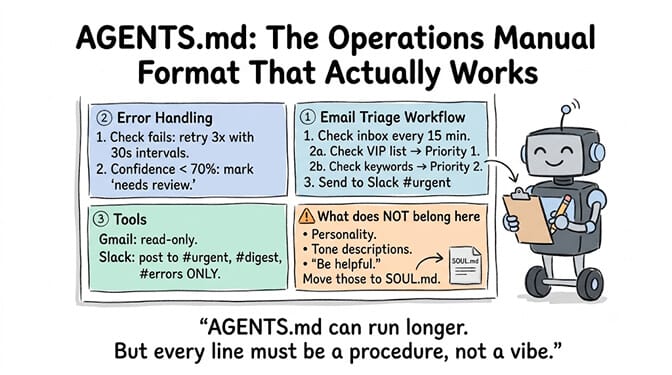
AGENTS.md can run longer than SOUL.md, and it usually should. But "longer" doesn't mean "unstructured." Break it into clear sections with headings. The moment it turns into a wall of prose, the agent starts missing steps.
This isn't just an OpenClaw convention either. The most effective AGENTS.md files lead with commands rather than explanations, setup first, testing second, deployment third, debugging last, which is basically the same instinct: procedures need structure, not storytelling.
How Long Should SOUL.md and AGENTS.md Be?
This is the question that actually shows up in search consoles and Slack threads at 2 AM, so here's the direct version.
SOUL.md: 400 to 500 tokens max. That's roughly 300 to 400 words. Past that ceiling, the agent starts treating parts of it as background noise once the conversation runs long. Cut ruthlessly. Every line has to earn its place, or it's just competing with your actual rules for attention.
AGENTS.md: 800 to 1,200 tokens is the sweet spot for most single-agent use cases. You can go longer for complex, multi-tool workflows, but test carefully as you grow it. A longer file means more tokens consumed on every single message, which is both a cost problem and a context-space problem.
Combined: try to keep SOUL.md plus AGENTS.md under 1,500 tokens total. That leaves real room for conversation history and tool responses instead of your instructions eating the whole budget before the conversation even starts.
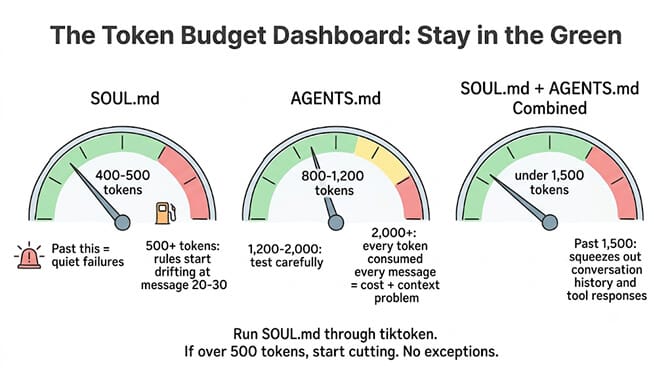
If you're not sure whether something is too long, run your SOUL.md through a token counter. tiktoken or the OpenAI tokenizer tool both work. If it's over 500 tokens, start cutting.
This isn't unique to OpenClaw-style agents. Codex-based tooling enforces something similar structurally. Different tools have varying token limits, and OpenAI Codex offers 128k to 192k tokens of total context, but that's the ceiling for the whole session, not an invitation to spend it all on instructions. Codex enforces a 32 KiB cap on its instruction files and silently truncates beyond it, and shorter files performed better in independent research because agents spent less time parsing instructions and more time on the actual task. Same lesson, different file format.
5 Mistakes That Break Your SOUL.md and AGENTS.md
- Putting procedures in SOUL.md. This clutters the identity file and the workflow logic gets ignored because it's competing with tone instructions for attention it was never designed to hold.
- Writing aspirational rules instead of negative constraints. "Be helpful" is vague and unenforceable. "Never send an email without approval" is a rule the model can actually check itself against.
- Making SOUL.md too long. Past 500 tokens, rules start drifting after message 20 to 30. This is the same failure mode as mistake 1, just caused by volume instead of misplaced content.
- Not using numbered steps in AGENTS.md. Agents follow numbered sequences noticeably better than prose paragraphs. If your workflow reads like a paragraph instead of a list, that's usually where the agent starts skipping steps.
- Forgetting error handling in AGENTS.md. Your agent needs to know what to do when the Gmail connection drops or a classification comes back uncertain, not just what to do when everything works. Happy-path-only instructions are the reason agents freeze or hallucinate a next step when something breaks.
Stay with me here, because that last one deserves an extra sentence: an agent without error handling doesn't fail gracefully. It fails confidently, which is worse.
SOUL.md and AGENTS.md on Different Platforms
OpenClaw and Hermes: SOUL.md sits in the agent's workspace root directory, AGENTS.md sits alongside it. SOUL.md is where your agent's voice lives, and OpenClaw injects it into normal sessions so it carries real weight, meaning if your agent sounds bland or corporate, that's usually the file to fix. Both files get referenced automatically on agent startup, no manual loading required.
Claude Code and OpenAI Codex: AGENTS.md lives in the repository root and gets read automatically (Claude Code reads it only when the project has no CLAUDE.md). For the template and the mistakes to avoid in a coding repo, see our guide to AGENTS.md best practices. Codex reads AGENTS.md files before doing any work, and builds an instruction chain by walking from your Codex home directory down through the project root to your current working directory, which means nested AGENTS.md files can override broader ones the deeper you go. Codex doesn't use a separate SOUL.md convention. It folds personality and behavioral preference into the same instruction chain.
BetterClaw: if this whole two-file mental model sounds like exactly the kind of thing that shouldn't require editing raw markdown by hand, that's basically why we built the visual editor. Configuration happens through the "Agent Instructions" field, which is the SOUL.md equivalent, no file paths, no token-counting scripts, no wondering whether you nested a directory correctly. You still get the same underlying separation between identity and procedure. You just don't manage it in a text editor.
We built it this way because we'd personally lost enough evenings to a bloated system prompt that quietly stopped working around message 25 and took an hour to diagnose. If the idea of writing and version-controlling your own workspace files sounds like the wrong use of your weekend, BetterClaw's free plan gets you a working agent with 100 credits a month, no credit card, in about 60 seconds.
For teams running multi-tool workflows where AGENTS.md tends to sprawl the fastest, the same discipline applies whether you're hand-editing files or using a visual builder: every skill and every integration you connect adds to what the agent has to hold in context, so it's worth understanding how much token budget your skills are actually consuming before you add a tenth integration "just in case."
If you're already deep in a self-hosted OpenClaw or Hermes setup and running into context problems that look like truncated or cut-off responses, that's frequently a symptom of the exact SOUL.md and AGENTS.md bloat covered here. Our guide to fixing truncated Hermes responses walks through the diagnosis in more detail.
The takeaway that actually matters
Every agent config problem that looks mysterious usually isn't. It's a file with two jobs stuffed into one, or a file that grew past the point where the model can actually hold all of it at once.
Split identity from procedure. Keep the identity file lean enough that it survives a long conversation instead of dissolving into it. Give the procedure file structure instead of prose. That's it. That's the whole system, and it works whether you're hand-writing markdown at 1 AM or filling out a form in a visual builder.
If you'd rather skip the file management entirely and just describe what you want your agent to be and do, give BetterClaw a try. Free plan with one agent and 100 credits a month. $49 a month for Pro when you're ready to scale past that. Your first deploy takes about 60 seconds. We handle where the instructions live. You handle deciding what they should say.
Frequently Asked Questions
What is SOUL.md?
SOUL.md is the file that defines your agent's identity: personality, tone, communication style, and hard constraints on what it should never do. It's loaded first and shapes how every other instruction gets interpreted. Keep it under 400 to 500 tokens so it doesn't start getting ignored in longer conversations.
What is AGENTS.md?
AGENTS.md is the file that defines your agent's operational procedures: step-by-step workflows, tool usage instructions, and error handling. Where SOUL.md answers "who is this agent," AGENTS.md answers "what does it do and how." It's read automatically by OpenClaw, Hermes, Claude Code, and OpenAI Codex.
How long should SOUL.md be?
SOUL.md should stay under 400 to 500 tokens, which is roughly 300 to 400 words. Past that point, instructions tend to get quietly deprioritized as a conversation grows longer and the context window fills up. If you're unsure, run it through a token counter like tiktoken and start cutting if it's over 500.
What's the difference between SOUL.md and AGENTS.md?
SOUL.md handles identity, personality, and hard rules. AGENTS.md handles procedures, workflows, and tool instructions. Mixing the two is the most common reason agent behavior degrades over a long session, since procedural content clutters the identity file and competes for attention with the rules that actually need to stay sharp.
Do I need both SOUL.md and AGENTS.md?
For any agent doing more than a single, simple task, yes. SOUL.md without AGENTS.md gives you a consistent personality with no reliable process to follow. AGENTS.md without SOUL.md gives you a procedural checklist with no consistent tone or hard boundaries. Most production agent setups on OpenClaw, Hermes, and similar frameworks use both together.
How many tokens should AGENTS.md be?
Most single-agent use cases work well between 800 and 1,200 tokens. Complex, multi-tool workflows can go longer, but test carefully as the file grows, since every additional token gets consumed on every message. Combined with SOUL.md, aim to stay under roughly 1,500 tokens total so there's still room left for actual conversation.