Your OpenClaw memory files are already Markdown. Obsidian reads Markdown. Here's how to connect them so you can see, search, and curate everything your agent knows.
I was three weeks into using OpenClaw when I realized I had no idea what my agent actually remembered. MEMORY.md had 200 lines. Fourteen daily log files sat in the memory directory. The new memory-wiki had a dozen claim files. Everything was Markdown. All of it was invisible unless I SSH'd into the server and opened files in nano.
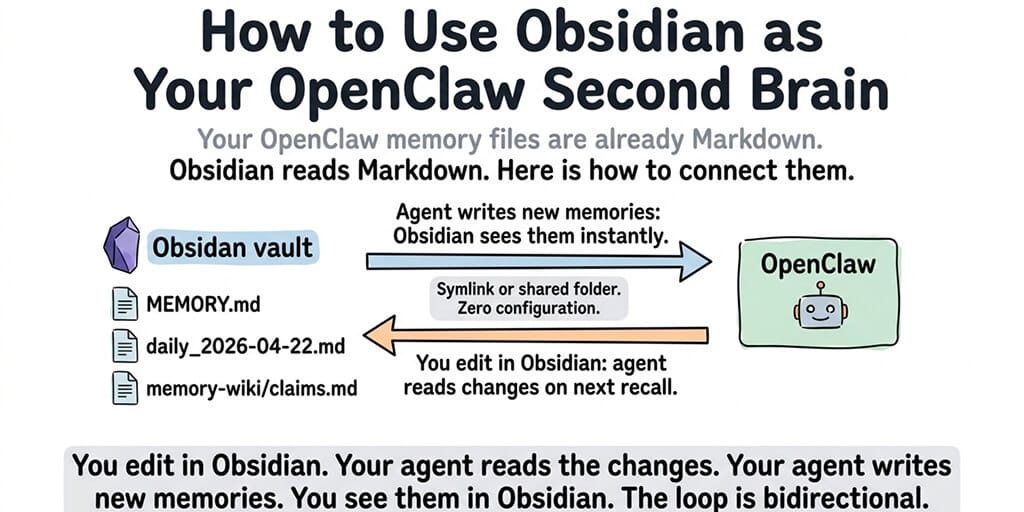
Then it clicked. OpenClaw's entire memory system is Markdown files in a folder. Obsidian is a Markdown editor that works on folders. Point Obsidian at the OpenClaw workspace directory and you can see, search, edit, and graph everything your agent knows.
No plugins needed. No special configuration. Just a symlink and five minutes.
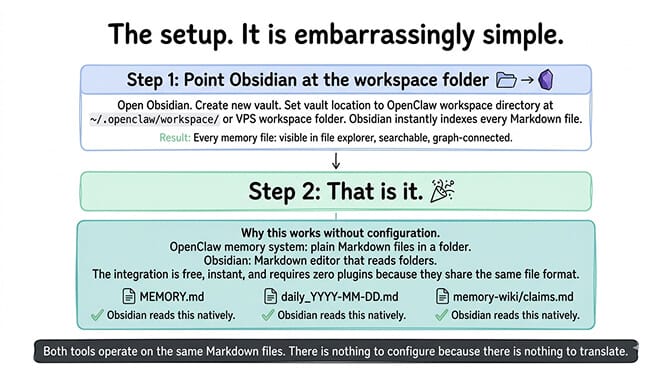
The setup (it's embarrassingly simple)
OpenClaw stores its memory in your workspace directory, typically at ~/.openclaw/workspace/ on your local machine or in the workspace folder on your VPS. The memory files are plain Markdown: MEMORY.md, daily log files (daily_YYYY-MM-DD.md), and memory-wiki claim files (our OpenClaw Memory Wiki guide covers how that layer is configured).
Step 1: Point Obsidian at the workspace folder. Open Obsidian. Create a new vault. Set the vault location to your OpenClaw workspace directory (or a parent directory that contains it). Obsidian instantly indexes every Markdown file in the directory.
Step 2: That's it. There is no step 2.
Every memory file your agent has ever written is now visible in Obsidian's file explorer, searchable through Obsidian's search, and connected through Obsidian's graph view. When your agent writes a new daily log or updates MEMORY.md, Obsidian picks up the change automatically.
When you edit a file in Obsidian (fix a stale entry, add context, remove noise), your agent reads the updated file on its next memory recall. The connection is bidirectional because both tools operate on the same Markdown files.
OpenClaw's memory system is a folder of Markdown files. Obsidian is a Markdown editor that reads folders. The integration is free, instant, and requires zero configuration because they share the same format.
What Obsidian actually gives you (that the terminal doesn't)
Here's where most people get it wrong. They know the memory files exist. They just never look at them because opening files in a terminal is tedious. Obsidian makes looking at them effortless.
Visual graph of your agent's knowledge
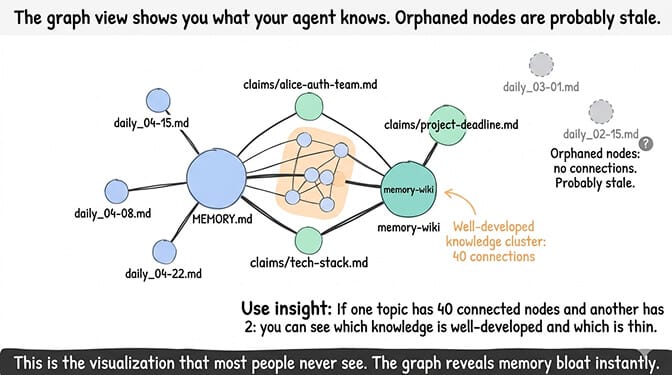
Obsidian's graph view shows connections between files based on internal links. If your MEMORY.md mentions a project name that also appears in a daily log, the graph connects them. You can see clusters of related knowledge, orphaned facts that connect to nothing, and the overall shape of what your agent knows.
This is surprisingly useful for identifying memory bloat. If one topic has 40 connected nodes and another has 2, you can see which areas of knowledge are well-developed and which are thin.
Full-text search across all memory
Obsidian's search is instantaneous across every file. Search for a person's name and find every daily log and memory entry that mentions them. Search for a project and see every conversation summary that referenced it.
This is the feature that makes Obsidian essential for memory curation. You can audit what your agent remembers in 30 seconds instead of grepping through files in a terminal.
For the complete guide to OpenClaw memory management and bloat prevention, our memory guide covers the maintenance that Obsidian makes visual.
Templates for structured memory entries
Create Obsidian templates for the types of information you want your agent to remember. A "person" template with fields for name, role, team, communication preferences. A "project" template with deadline, status, tech stack, owner. A "decision" template with date, participants, outcome, rationale.
When you manually add information to your agent's memory, the template ensures consistency. Your agent retrieves more accurate results because the entries follow predictable patterns.
The three Obsidian workflows that actually matter
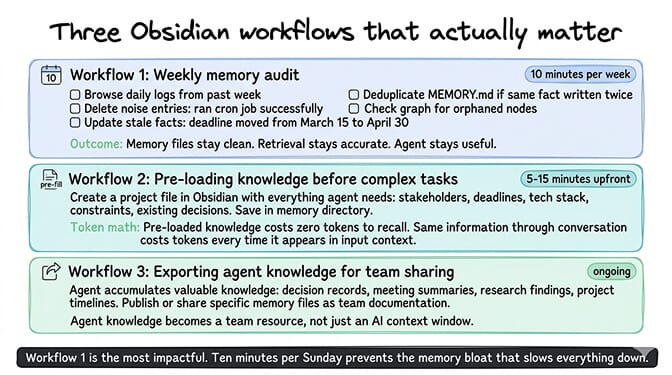
Workflow 1: Weekly memory audit (10 minutes)
Every Sunday, open Obsidian. Browse the daily logs from the past week. Check what your agent wrote. Delete noise entries ("ran cron job successfully"). Update stale facts ("deadline moved from March 15 to April 30"). Deduplicate MEMORY.md if the agent wrote the same fact twice.
This is the single most impactful thing you can do for your agent's recall quality. Ten minutes per week keeps the memory files clean, which keeps the retrieval accurate, which keeps the agent useful.
For the memory bloat prevention guide, our troubleshooting post covers what happens when you skip this maintenance.
Workflow 2: Pre-loading knowledge before complex tasks
About to start a new project? Create a project file in Obsidian with everything your agent needs to know: stakeholders, deadlines, tech stack, constraints, existing decisions. Save it in the memory directory. Your agent has full context on the next interaction without you spending 20 minutes explaining background in conversation (which burns tokens and gets compressed away by LCM).
Pre-loaded knowledge costs zero tokens to recall because it's already in the memory files. Information shared through conversation costs tokens every time it's sent as input context.
Workflow 3: Exporting agent knowledge for team sharing
Your agent accumulates knowledge that's valuable beyond the agent itself. Decision records. Meeting summaries. Project timelines. Research findings. With Obsidian, you can publish or share specific memory files as documentation. The agent's knowledge becomes a team resource, not just an AI context window.
If managing memory files, weekly audits, and knowledge pre-loading sounds like the right approach but you'd rather have the memory layer managed for you, BetterClaw includes persistent memory with hybrid search built into the platform. Free tier with 1 agent and BYOK. $49/month for Pro (5 agents included). Smart context management keeps the memory efficient automatically. The Obsidian workflow still works if you want the visual layer on top.
The limitation you should know about
Here's what nobody tells you about the OpenClaw Obsidian integration.
It only works for local or SSH-accessible setups. If your OpenClaw workspace is on a VPS, you need to sync the workspace folder to your local machine (rsync, Syncthing, or similar) for Obsidian to read it. If your workspace is on a managed platform, you may not have direct file system access to the memory directory.
The Obsidian integration is strongest for local OpenClaw installations (your laptop, Mini PC, Mac Mini) where the workspace folder is already on your file system. For remote deployments, you need a sync layer.
Also worth noting: edits in Obsidian are immediate. If you delete a memory entry, the agent loses that knowledge on its next recall. There's no undo at the agent level. Be deliberate about deletions. Archive instead of deleting when you're unsure.
The honest take
The best thing about the OpenClaw Obsidian integration is that it reveals the thing most users never see: what their agent actually knows. Most people interact with their agent through conversation and never look at the memory files. They don't know what's in there. They don't know what's stale. They don't know what's duplicated.
Obsidian turns the invisible into visible. And once you can see what your agent knows, you can shape it deliberately instead of hoping the automatic systems get it right.
For the broader view of memory management tools including QMD, Mem0, and Cognee, our memory plugins guide covers the automated solutions. Obsidian is the manual, visual layer that complements all of them.
If you want the memory management handled automatically with the option to use Obsidian on top, give BetterClaw a try. Free tier with 1 agent and BYOK. $49/month for Pro (5 agents included). Persistent memory with hybrid search built in. 60-second deploy. The memory layer is managed. Obsidian is optional, not required.
Frequently Asked Questions
How do I connect Obsidian to OpenClaw?
Point Obsidian at your OpenClaw workspace directory (typically ~/.openclaw/workspace/) as a vault. No plugins needed. Obsidian reads the Markdown memory files (MEMORY.md, daily logs, memory-wiki claims) instantly. When your agent writes new memories, Obsidian sees them. When you edit files in Obsidian, your agent reads the changes on its next recall. The connection is bidirectional through shared Markdown files.
What can I do with OpenClaw memory files in Obsidian?
Three practical workflows: weekly memory audit (browse daily logs, delete noise, fix stale facts, deduplicate, 10 minutes/week), pre-loading knowledge (create project files directly in memory so the agent has context without burning conversation tokens), and team knowledge sharing (publish agent-accumulated knowledge as documentation). The graph view also visualizes connections between memory entries and identifies orphaned or stale nodes.
Does the Obsidian integration work with a VPS or managed hosting?
For local installations, it works immediately (Obsidian reads the workspace folder directly). For VPS deployments, you need a sync tool (rsync, Syncthing) to mirror the workspace directory to your local machine. For managed platforms like BetterClaw, direct file system access to memory files depends on the platform. BetterClaw's persistent memory is managed through the platform interface rather than raw Markdown files.
Is Obsidian free to use with OpenClaw?
Yes. Obsidian is free for personal use. The integration with OpenClaw requires no paid plugins or add-ons. You're simply opening a folder of Markdown files as an Obsidian vault. Obsidian Publish and Obsidian Sync are paid features but aren't required for the OpenClaw integration.
Will editing memory files in Obsidian break my OpenClaw agent?
No, as long as you maintain valid Markdown formatting. OpenClaw reads the files on each recall, so edits take effect on the next interaction. The risk: deleting a memory entry is permanent at the agent level. There's no undo. Archive entries to a separate folder instead of deleting when unsure. Adding structured entries (using templates for people, projects, decisions) actually improves recall quality because the agent retrieves more consistent chunks.