| Who it's for | |
|---|---|
| LM Studio | People choosing which model to run, who want an in-app Hugging Face browser, concurrent requests to one model and a built-in MCP client, with a headless daemon (llmster) when they move to serving. |
| Ollama | People wiring a local model into agents, IDEs and pipelines, who want the backend most tools test against first, a GPU Docker image, several models loaded at once and, on Apple Silicon, MLX by default. |
| llama.cpp | People who want the engine itself: the newest model support first, every inference flag, and llama-server as a lean OpenAI- and Anthropic-compatible endpoint with no app on top. |
Last month I watched a teammate spend 45 minutes trying to work out why his local LLM wasn't responding. He'd installed LM Studio, downloaded a 70B model, and started chatting. Worked perfectly. Then he tried to connect it to our agent pipeline.
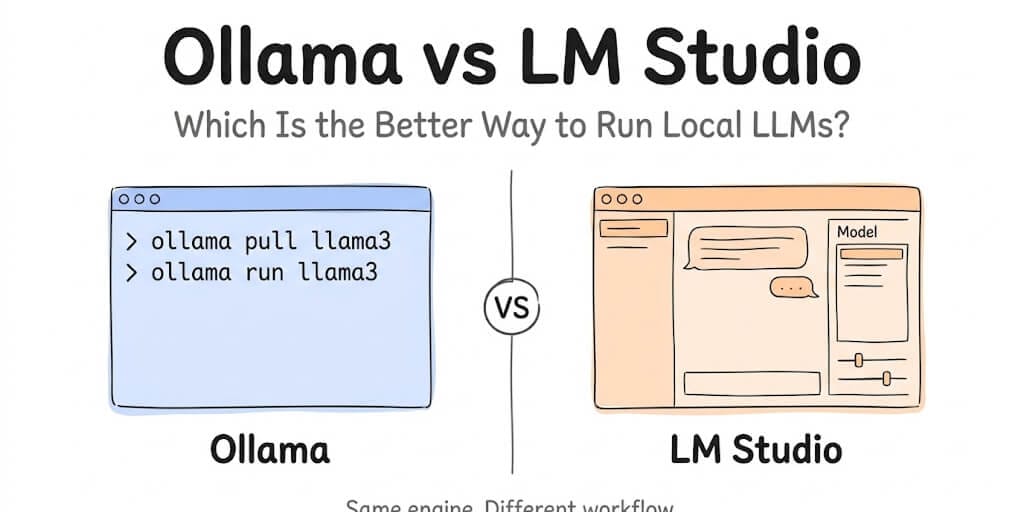
He needed an API endpoint. LM Studio has one, but at the time he was hunting for a toggle in a settings panel rather than typing a command. I opened a terminal, typed ollama pull llama3 then ollama run llama3, pointed the pipeline at localhost:11434/v1/chat/completions, and we were working in under two minutes.
That story is the reason half the internet still says LM Studio can't serve. It's a story about discoverability, not capability, and in 2026 it isn't even a good story about discoverability any more. Both projects have moved, in opposite directions, and almost every "LM Studio vs Ollama" article you'll find is describing a world that no longer exists.
So let's fix that.
What actually changed in 2026
Two things, and they matter more than any tokens-per-second benchmark.
1. LM Studio got a real daemon
LM Studio 0.4.0 landed on 28 January 2026. The headline is llmster, which LM Studio describes as "the core of the LM Studio desktop app, but packaged to be server-native, without reliance on the GUI." You install it with a shell script on Linux and macOS (curl -fsSL https://lmstudio.ai/install.sh | bash) or PowerShell on Windows, and start it with lms daemon up. No desktop environment, no display, no logged-in user.
LM Studio's own docs walk you through running it as a systemd unit on Linux: create /etc/systemd/system/lmstudio.service with ExecStartPre=.../lms daemon up, ExecStart=.../lms server start and ExecStop=.../lms daemon down, then systemctl enable. That is the exact deployment shape people have been recommending Ollama for since 2023. One caveat: the desktop app and llmster manage overlapping runtime resources and are not meant to run on the same machine at the same time. Pick one per machine.
0.4.0 also brought concurrent inference requests to the same model: continuous batching, with a "Max Concurrent Predictions" setting and a unified KV cache that's on by default, replacing the old behaviour where requests queued. And a new stateful /v1/chat REST endpoint that returns a response_id you pass back as previous_response_id, which can also expose your locally configured MCP servers, gated by permission keys. (Parallel requests on the MLX engine were still listed as in progress at release.)
Two corrections to the version history, because the internet has garbled this too: headless mode and JIT model loading are not new in 0.4.0. They shipped in LM Studio 0.3.5 back in October 2024, as "Local LLM Service". And MCP support arrived in 0.3.17 in mid-2025. What 0.4.0 changed is that you no longer need the desktop app installed at all.
Don't confuse any of this with LM Studio Bionic, which launched on 16 July 2026. Bionic is an agent app for open models (coding, documents, optional paid cloud inference), and LM Studio is explicit that it is "a new, separate app from LM Studio." The LM Studio app, lms CLI and llmster daemon compared here carry on alongside it.
2. Ollama went back to llama.cpp
The other half of the old comparison has flipped twice, so most articles have it wrong in one direction or the other.
In May 2025, Ollama announced its own engine for multimodal models, built directly on the GGML tensor library rather than on llama.cpp. For a year, "Ollama is just a llama.cpp wrapper" was out of date.
Then it reversed. Ollama 0.30 (May 2026) announced "improved compatibility and performance using llama.cpp", including GGUF models straight from Hugging Face. On 29 May 2026, pull request #16031 removed the vendored GGML backend and the Go model implementations so that Ollama would "use llama-server exclusively for GGML models". By September, Ollama's own commit log described the MLX runner as "the only Go inference runner left". Ollama 0.40.2 (8 October) even upgrades models pulled with older versions in the background "for better performance and compatibility when running on llama.cpp".
On Apple hardware Ollama went the other way: Ollama on Apple Silicon is now built on MLX (30 March 2026, previewed in 0.19), and Ollama 0.40.0 made MLX the automatic runtime on Apple Silicon for supported architectures. The GitHub release is dated 25 September 2026, and it was the stable line by the time 0.40.1 shipped on 7 October.
So as of 27 October 2026: Ollama runs llama.cpp's llama-server for GGUF models, plus MLX on Macs. LM Studio runs llama.cpp and Apple MLX. Jan runs llama.cpp. "Same engine, same speed" is closer to true again, but not exactly: each app ships its own llama.cpp build on its own schedule, with its own defaults for context length, batching and GPU offload. If you benchmark, benchmark. Don't assume.
llama.cpp: the engine under both
llama.cpp is the open-source (MIT) C/C++ inference engine that most local LLM tools sit on. It reads GGUF model files and runs them on CPUs and on GPUs through CUDA, HIP (AMD), Vulkan, SYCL and Metal. Its README calls Apple silicon "a first-class citizen". It ships a new numbered build several times a day (b11925 on 27 October 2026), and the latest tagged release is v0.7.0 (15 October 2026).
The part that matters for this comparison is llama-server, its built-in HTTP server. Per the server README, checked 27 October 2026, it offers:
- OpenAI-compatible chat completions, responses and embeddings routes, plus Anthropic Messages API compatibility
- Parallel decoding with multiple slots (
-np) and continuous batching, on by default - Function calling for most models
- A router mode (
--models-dir) that loads models on demand, up to 4 at once by default - Experimental MCP support: stdio MCP servers declared in a Cursor-style JSON file with
--mcp-servers-config - Official Docker images, including a CUDA build
Since v0.7.0 the default port is 9931 (it used to be 8080), and the quick start is now llama serve -hf <repo> to download a model from Hugging Face and serve it in one step.
Why Ollama and LM Studio both build on it. New model architectures usually land in llama.cpp first, and GGUF is the format most open-weight models are published in. Building on llama.cpp gives both apps that model coverage for free. What they add on top is the product: Ollama's registry, ollama pull and app integrations; LM Studio's model browser, chat UI, MCP client and llmster daemon.
When to use llama.cpp directly:
- A model you want was added to llama.cpp days ago and your app's bundled build hasn't caught up.
- You need a flag the apps don't expose (split modes across GPUs, speculative decoding settings, KV cache types, the new MoE expert cache).
- You want the smallest possible footprint on a server: one binary, one port, no daemon managing models for you.
- You want to see exactly what's running, without an app's defaults in between.
The cost is convenience. There's no curated registry, no GUI model browser and no background service that manages downloads and unloading for you, so you script that yourself or use the router mode.
Ollama vs LM Studio vs llama.cpp at a glance
Checked 27 October 2026 against GitHub releases and each project's docs (Ollama 0.40.11, LM Studio 0.4.26, llama.cpp v0.7.0).
| Ollama | LM Studio | llama.cpp | |
|---|---|---|---|
| What it is | Model runner and server with a curated registry | Desktop app plus lms CLI and llmster daemon | The inference engine, with llama cli and llama serve (llama-server) |
| Licence | MIT | Proprietary, free (including at work) | MIT |
| Engine | llama.cpp (llama-server) for GGUF; MLX on Apple Silicon for supported models | llama.cpp and Apple MLX; Splash on M3 or newer with macOS 26.4+ | Itself (CPU, CUDA, HIP, Vulkan, SYCL, Metal) |
| Default API | localhost:11434/v1 | localhost:1234/v1 | Port 9931 since v0.7.0 (was 8080) |
| Anthropic-compatible API | Yes | Yes (/v1/messages) | Yes |
| GUI | Simple desktop app; the core is CLI and API | Yes, full model browser | Built-in web UI with a models manager |
| Concurrent requests, one model | OLLAMA_NUM_PARALLEL, default 1 | Yes, continuous batching since 0.4.0 | Yes, parallel slots plus continuous batching (on by default) |
| Several models loaded | OLLAMA_MAX_LOADED_MODELS, default 3 per GPU | Yes, with JIT auto-evict off or lms load | Router mode, up to 4 by default |
| Built-in MCP client | No | Yes | Experimental (stdio servers) |
| Official Docker image | Yes, GPU on Linux and WSL2 | CPU-only x86 technical preview | Yes, including CUDA |
| Best for | Agent and IDE integrations | Picking models, then serving them | Newest models, full control, minimal servers |
LM Studio vs Ollama vs llama.cpp on a Mac
On Apple Silicon the real question is which engine runs your model: Apple's MLX framework, or llama.cpp on Metal.
Ollama. Since 0.40.0 (GitHub release dated 25 September 2026), any model whose architecture the MLX runtime supports runs on MLX automatically. You don't pull a separate -mlx tag or flip a setting. At release that covered:
qwen3.8gemma4qwen3.6qwen3.5- decision models
embeddinggemma-2
Models outside that list run on llama.cpp with Metal. Ollama has kept shipping MLX work since: the current stable release is 0.40.11 (24 October), and the 0.40.12 release candidate (27 October) bumps MLX for faster prompt processing on Gemma and adds DFlash2 support on MLX.
LM Studio. LM Studio runs both llama.cpp and MLX, and the engine follows the model format, so you can download the MLX or GGUF build of the same model and compare. Its MLX engine is open source (MIT). In June 2026, mlx-engine v1.8.5 added KV cache checkpointing aimed at repeated long-context agent work. LM Studio 0.4.25 (19 September 2026) also added the Splash engine on Apple Silicon M3 or newer running macOS 26.4 or newer.
llama.cpp. Metal only, no MLX. That's not a weakness for GGUF models, and it's what Ollama falls back to for anything outside its MLX list.
This changes one line in the old comparison. "LM Studio has native MLX, Ollama doesn't" was a fair reason to pick LM Studio on a Mac. For the model families above, both runners now use MLX on Apple Silicon. LM Studio's real Mac advantage is back to what it always was: the model browser, the choice of MLX or GGUF builds, and the MCP client. For how much memory each model size needs and how Macs compare with NVIDIA cards, see our notes on Apple Silicon vs NVIDIA.
Also new in October
LM Studio 0.4.26 (13 October) added /v1/systemone and /v1/decisions endpoints, CUDA 13 on Windows ARM and llama.cpp runtime 2.50.0. Ollama has served "decision models" through /v1/systemone since 0.35.0 (28 September), and since 0.35.1 those models report only a decision capability, so agent clients won't offer them for tool calls. If you're building an agent, keep using a normal tool-capable chat model as the backend.
On Windows: both LM Studio and OpenClaw are already integrated with Microsoft Execution Containers, which reached general availability on 7 October 2026 and provide policy-driven containment for AI agents.
The "Friends Don't Let Friends Use Ollama" argument
You will run into this piece if you spend any time in local-LLM communities, and it's worth reading before you commit to a stack.
"Friends Don't Let Friends Use Ollama" was published by Zetaphor on Sleeping Robots on 15 April 2026. It is an opinion piece, and an unambiguously hostile one, but its factual spine is checkable, which is why it landed so hard. The argument, in summary:
- Ollama's README went a long time without crediting llama.cpp, and an MIT licence-notice compliance issue sat open for more than 400 days.
- The mid-2025 move to a custom GGML backend reintroduced bugs llama.cpp had already fixed, and the author cites benchmarks showing llama.cpp running roughly 1.8x faster than Ollama on the same hardware.
- Ollama listed DeepSeek's R1 distillations as "DeepSeek-R1", which confused a lot of people about what they were actually running.
- The July 2025 desktop app was developed privately without public source or clear licensing.
- The late-2025 pivot to cloud-hosted models came with unclear data handling, and a token-exfiltration vulnerability (CVE-2025-51471).
The author's recommended alternatives are llama.cpp directly, llamafile, LM Studio, Jan, koboldcpp and ramalama.
My honest read: the licensing and attribution history is a genuine governance criticism and you should weigh it. The performance claim is one benchmark on one configuration, not a law of nature. And the custom-backend complaint has largely been overtaken by events: since Ollama 0.30 (May 2026), GGUF models run on llama.cpp's own llama-server, the engine the author recommended. The model-naming complaint is fair and still worth knowing when you ollama pull anything with a familiar name. None of it means Ollama stops working on your machine tomorrow. It does mean "Ollama is the obvious default" deserves a second look, which is more or less the point of this article.
Where Jan fits
Jan is the third name that keeps coming up, and it earns its place on a different axis.
Jan is a desktop app (chat, models, MCP connectors and a local API server) released under AGPLv3, so the whole codebase is auditable. It runs models through a built-in llama.cpp engine with no internet connection required, and its local API server is OpenAI-compatible at http://127.0.0.1:1337/v1/chat/completions, with an optional bearer-token API key. You start it from Settings → Local API Server → Start Server.
One thing I need to correct, because we got it wrong in an earlier version of this comparison and so does most of the internet: the telemetry story is not "Jan has none and LM Studio has some." Read the primary sources and it's closer to the reverse of how it's usually told.
- Jan's privacy docs say Jan collects zero data until you opt in, that you choose tracking preferences at first launch, and that analytics are handled by PostHog EU. Chats, chat settings and model choices are never collected either way.
- LM Studio's privacy policy states the app "does not include telemetry or user-specific tracking" and that what little it processes is anonymous and short-lived.
Both are strong positions. The real difference is verifiability: Jan's claim is checkable because the source is AGPLv3, and LM Studio's is a policy you have to take on trust because the app is proprietary. If your compliance reviewer wants to read the code, that distinction is the whole ballgame. If they want a signed policy, it isn't.
The caveat on Jan, unchanged: if your workload leans hard on OpenAI-style function calling, test that path before you commit. Ollama and LM Studio are the better-trodden ground for tool-heavy work.
The full comparison table, with Jan
Every cell here is from primary documentation, re-checked on 28 September 2026 (LM Studio 0.4.25, Ollama 0.34.4, Jan 0.8.4). The inference-engine row was updated on 27 October 2026 for Ollama 0.40.11 and LM Studio 0.4.26.
| Ollama | LM Studio | Jan | |
|---|---|---|---|
| Licence | MIT, open source | Proprietary, free, including at work since July 2025 | AGPLv3, open source |
| Inference engine | llama.cpp's llama-server for GGUF models since 0.30 (May 2026); MLX by default on Apple Silicon for supported architectures since 0.40.0 | llama.cpp + Apple MLX | llama.cpp |
| Default API | localhost:11434/v1 | localhost:1234/v1 | 127.0.0.1:1337/v1 |
| GUI | Basic desktop chat app (since July 2025); the core is CLI and API | Yes | Yes |
| Runs with no GUI | Yes, daemon by design | Yes: llmster (0.4.0) or desktop service mode (0.3.5) | Server is started from the app UI |
| systemd unit documented | Yes | Yes (lmstudio.service) | Not documented |
| Official Docker image | Yes; GPU on Linux and Windows/WSL2 | lmstudio/llmster-preview: technical preview, CPU-only, x86 | No official image |
| Concurrent requests, one model | OLLAMA_NUM_PARALLEL, default 1 | Yes since 0.4.0 (continuous batching) | Not documented |
| Multiple models in memory | OLLAMA_MAX_LOADED_MODELS, default 3 per GPU | Yes; JIT auto-evict (on by default) keeps 1, turn it off or use lms load for more | Not documented |
| Idle unload | keep_alive, default 5 minutes | JIT TTL, default 60 minutes | Not documented |
| Default context window | Set by VRAM: 4K under 24 GiB, 32K at 24-48 GiB, 256K at 48 GiB+ | Set per model at load | Set per model |
| Tool calling | Yes, model-dependent | Yes, model-dependent | Yes, model-dependent; test it |
| Built-in MCP client | No: it's a model server; use a bridge | Yes, since 0.3.17; exposed over the 0.4.0 REST API | Yes, MCP connectors |
| Visual model browser | No (CLI + website) | Yes, Hugging Face search in-app | Yes |
| Telemetry | Open source, auditable | Policy: no telemetry or user-specific tracking | Opt-in only, PostHog EU; never chats or models |
The row that used to decide this argument, "headless: Ollama yes, LM Studio no", is now a tie. The rows that actually separate them in 2026 are the Docker image, multi-model routing, concurrency and the MCP client.
Ollama vs LM Studio on Windows
Both install natively on Windows, no WSL required. Checked against each project's docs for LM Studio 0.4.26 and Ollama 0.40.3.
Ollama ships as OllamaSetup.exe, needs Windows 10 22H2 or newer and installs into your home folder without admin rights. After that it runs in the background, and the ollama command works from PowerShell or cmd with the API on localhost:11434. On NVIDIA it needs driver 551.61 or newer. On AMD it uses ROCm v7 (the Radeon RX 7000 and PRO W7000 cards on its list) or Vulkan, which is on by default. Ollama's Windows docs flag two caveats: some RX 6000 cards don't support ROCm v7, so Vulkan is the fallback, and on laptops with both an iGPU and a discrete GPU, Vulkan can pick the wrong one until you set GGML_VK_VISIBLE_DEVICES.
LM Studio is a desktop installer. The download page offers an x64 build, and its system requirements cover x64 and ARM (Snapdragon X Elite) machines. x64 CPUs must support AVX2. Its llama.cpp engines come in CPU, CUDA and Vulkan builds, and 0.4.26 added CUDA 13 on Windows ARM. Tick "run the LLM server on login" and closing the app minimises it to the system tray with the server still running. For no GUI at all, install llmster from PowerShell with irm https://lmstudio.ai/install.ps1 | iex, then run lms daemon up.
So which one do you actually install?
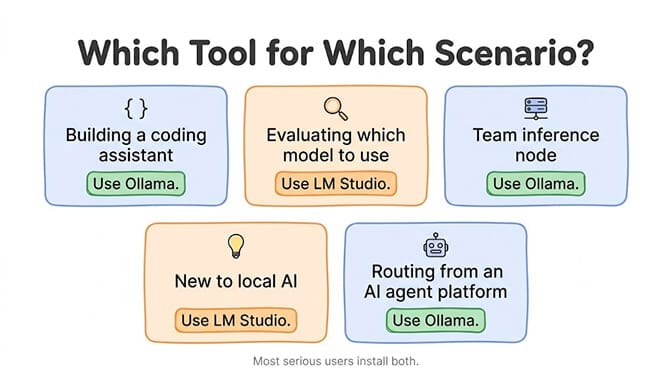
Scenario 1: You're wiring a local model into VS Code, an agent framework, or a RAG pipeline. Still Ollama, but for ecosystem reasons rather than architectural ones. If a project says "works with local models", it almost certainly tested against Ollama first. That self-reinforcing default is worth real money in debugging time. Our full Ollama setup guide walks through wiring it into an agent runtime end to end.
Scenario 2: You're deciding which model to run at all. LM Studio. In-app Hugging Face search, visible quant sizes, parameter sliders, side-by-side comparison. Nothing else is close, and now you don't have to abandon it when you move to serving.
Scenario 3: You're standing up a shared inference node on a GPU server. Ollama is still the smoother path, because its Docker image does GPU on Linux and WSL2 and LM Studio's official container image is an x86 CPU-only technical preview. If you're installing on the metal rather than in a container, llmster plus a systemd unit is now a real contender, and LM Studio's continuous batching means a single loaded model serves concurrent users properly, which on Ollama means raising OLLAMA_NUM_PARALLEL from its default of 1.
Scenario 4: You need to hand a compliance reviewer something they can audit. Jan. AGPLv3, opt-in analytics, no chat collection. If you need the full provider-by-provider picture, we checked 21 providers against their own terms, local runners included.
Scenario 5: You want your local model to use tools over MCP without writing a bridge. LM Studio or Jan. (llama-server can now launch stdio MCP servers too, but it's flagged experimental.) Ollama does tool calling natively in its API, but it isn't an MCP client: you put an MCP-aware orchestrator in front of it. If your models are throwing "does not support tools", that's a per-model capability issue and we mapped it out in Ollama tool-calling support.
Scenario 6: You're routing inference from an agent platform. Any of them: they all speak OpenAI-compatible HTTP. Point the agent's model config at the right port and the calls run on your hardware. This works with any platform that supports custom endpoints, including BetterClaw's BYOK setup. The next section covers what separates them once an agent is the client.
Scenario 7: A model came out this week and you want it now, or you want every knob. llama.cpp directly. llama serve -hf <repo> pulls the GGUF from Hugging Face and serves it, and you aren't waiting for an app to ship a newer bundled build.
LM Studio vs Ollama as an AI agent backend
I set up a support triage agent last year. Local model, zero API costs, privacy-first: read incoming emails, classify them, route them to the right team. I started with LM Studio, because the GUI really is the nicest way to pick a model. Then I closed the laptop lid and the agent stopped classifying anything at 2am. I moved to Ollama behind a systemd unit and it ran for four weeks without me touching it.
That's the story behind every "use Ollama for agents" article on the internet. It's now the wrong reason to reach that conclusion, because llmster fixed that specific failure at the source. Boot persistence and restart-on-failure are a systemd config question on both sides. Three things actually matter for an agent backend in 2026.
1. Concurrent requests to one model
This is the one people miss, and for a multi-step agent it matters more than uptime.
LM Studio 0.4.0 added continuous batching for concurrent requests to the same model. Before 0.4.0, requests queued. Ollama has had OLLAMA_NUM_PARALLEL for a while, but its default is 1, and Ollama's FAQ notes that required RAM scales by OLLAMA_NUM_PARALLEL × OLLAMA_CONTEXT_LENGTH, so raising it is a memory decision, not a free win. If your agent fans out sub-tasks in parallel, or you're serving more than one agent from one box, set this deliberately on either tool.
2. Model lifecycle and cold starts
Both load on demand and unload when idle, with very different defaults:
- Ollama: models stay in memory for 5 minutes by default, tunable per request with
keep_alive(a negative value keeps it loaded indefinitely,0unloads immediately).OLLAMA_MAX_LOADED_MODELSdefaults to 3 per GPU, so several models can be resident and routed between: classification on a small model, generation on a large one, same host. - LM Studio: JIT-loaded models have a TTL of 60 minutes by default. Auto-Evict is on by default, which unloads the previously JIT-loaded model before loading a new one, so you effectively get one JIT model at a time until you turn it off. Models loaded explicitly with
lms loadhave no TTL and stay until you unload them.
For a scheduled agent that fires once an hour, Ollama's 5-minute default means a cold load on every run. That's a config line, not a flaw, but it's the single most common "why is my first request so slow" on local agent setups.
3. Tools: native tool calling vs an MCP client
Both expose OpenAI-style tool calling on /v1/chat/completions, and in both cases whether it works depends on the model, not the server. The difference is MCP: LM Studio can hold the MCP connections itself (over the /v1/chat endpoint, gated by permission keys), while Ollama expects your agent framework to translate tool calls into MCP invocations. That's normal and it's what most frameworks already do, but if you want the runner to own the MCP connections, only one of these does that.
One config trap to know first: Ollama's default context window is set by available VRAM (4K tokens under 24 GiB, 32K at 24-48 GiB, 256K at 48 GiB and up), and Ollama recommends at least 64,000 tokens for agents and coding tools. Past the window it truncates from the front of the prompt while still returning HTTP 200, so on a consumer GPU a long agent system prompt can silently disappear. We wrote up the num_ctx and OLLAMA_CONTEXT_LENGTH fixes. For Docker networking and the /v1 endpoint requirement when connecting Ollama to an agent, see our troubleshooting decision tree.
Use Ollama as the agent backend when: it runs in a GPU container or on Kubernetes; you route between several models on one host; or you want the backend your agent framework's docs were written against.
Use LM Studio as the agent backend when: you want concurrent requests to a single model without a memory-multiplying config change; you want the runner itself to hold MCP connections; or you're deploying on bare metal where llmster plus systemd is as robust as anything else.
LM Studio vs Ollama vs llama.cpp for coding agents
Coding agents are the hardest local workload: long system prompts, big files in context, and dozens of tool calls per task. Three things matter more than raw speed.
1. An Anthropic-compatible endpoint. Claude Code and several other coding agents speak the Anthropic Messages API. All three runners now serve it. Ollama goes furthest: ollama launch sets up a coding agent against your local models in one command, and its integration docs cover Claude Code, OpenCode, Codex and more (ollama launch claude). LM Studio documented using its models in Claude Code on 30 January 2026, and 0.4.22 (28 August 2026) added tool-returned images to /v1/messages. llama-server lists Anthropic Messages compatibility in its README.
2. Context length. Ollama's docs say agents and coding tools should get at least 64,000 tokens, but its VRAM-based default is 4K under 24 GiB. Set OLLAMA_CONTEXT_LENGTH (or num_ctx) before you blame the model. On LM Studio and llama.cpp you set the context when you load the model. Bigger context costs memory on all three.
3. Tool calling that survives a long session. Whether tool calls work depends on the model and its chat template more than on the runner. If a model throws "does not support tools", that's a per-model capability, which we mapped out in Ollama tool-calling support. For which open models are worth running for agent work in the first place, see our guide to local AI in 2026.
Which to pick: Ollama if you want the shortest path from install to a working coding agent. LM Studio if you're still comparing models and want to see quant sizes and memory use before you commit. llama.cpp if a new coding model has just landed and you want it today, or you want to tune speculative decoding yourself.
A note on vLLM
If you're comparing Ollama with vLLM, you're usually comparing two different jobs. vLLM (Apache-2.0, v0.32.0 released 18 October 2026) is a high-throughput serving engine built around PagedAttention and continuous batching, with OpenAI- and Anthropic-compatible APIs. It targets NVIDIA, AMD and Intel GPUs and data-centre accelerators, with Apple Silicon handled through a hardware plugin. Reach for it when one GPU server has to serve many users or agents at once. For one developer on a laptop or a single workstation, Ollama, LM Studio or llama.cpp is simpler to run.
What each one still does better
Ollama's remaining moat. One-command model pulls against a curated registry. A GPU-capable official Docker image, which is what makes Kubernetes, CI and edge deployments straightforward. Multiple models loaded at once with OLLAMA_MAX_LOADED_MODELS. And an ecosystem where being the default backend is itself the feature.
LM Studio's remaining moat. The discovery experience, still unmatched. Native Apple MLX (though Ollama now runs MLX too, so this is no longer exclusive; see our notes on Apple Silicon vs NVIDIA). A built-in MCP client, so a local model can use tools with no bridge code. Continuous batching for concurrent requests to one model. And a daemon, which means the tool you explored in is the tool you can deploy.
llama.cpp's remaining moat. It's the engine. New architectures and inference features usually arrive here before they reach the apps built on it, and every setting is a flag you can see.
Jan's remaining moat. Source you can read. That's the whole pitch and it's a good one.
When local isn't the right answer
Here's my honest take after running all three.
Local inference has constraints no runner can fix. For a single chat turn, a slower local response is fine. For an agent chaining 10-15 inference calls per task, latency compounds: a workflow that takes seconds against a hosted API can take minutes on a laptop.
You're also limited to open-weight models. Verified local options are good now: qwen3.8:27b is on Ollama at 18GB with a 256K context window, and Gemma 4 ships at 12B (7.6GB) and 31B (20GB). But there's no local Claude Opus and no local GPT. (For what each tier of hardware can actually run, see our guide to local AI in 2026. For a head-to-head on the strongest local agent models, we compared Gemma 4 and Qwen.)
And the practical gap: an agent that reads your email, checks your CRM, drafts a reply and updates your project board needs more than a model. It needs OAuth connections, persistent memory, tool integrations, error handling, retries and monitoring. Ollama, LM Studio and Jan provide inference. The rest is on you.
The answer for most production agents is hybrid: local for development and privacy-sensitive tasks, a hosted API for the paths that need speed or a frontier model, switched by configuration rather than a rewrite.
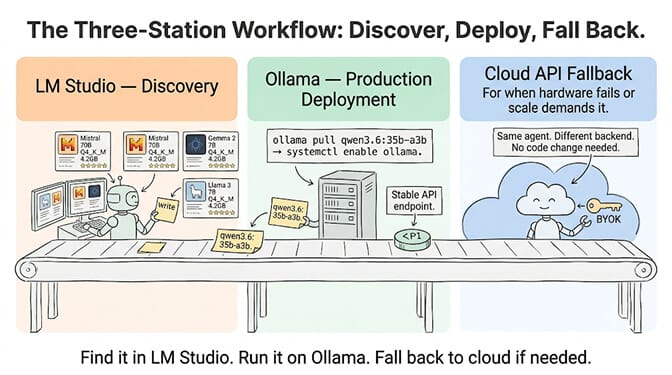
That's the gap a managed agent platform fills. We built BetterClaw to handle the infrastructure so you can focus on what the agent does. Connect a cloud API key for speed, or point at your local endpoint for privacy. Free plan with 1 agent and 100 credits a month; Starter is $19/month, and Pro is $49/month for 5 agents. 28+ model providers including local endpoints, zero inference markup. For how that compares to writing the orchestration yourself, our BetterClaw vs CrewAI comparison has the no-code vs code-first breakdown.
The setup I'd actually recommend
Install two of them.
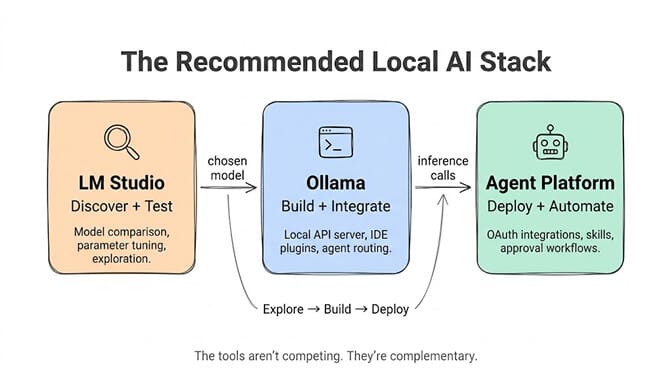
Use LM Studio when you're in discovery mode: trying a new model family, checking whether a 12B is enough before you reach for a 31B, comparing quantisations, tuning parameters. Use Ollama when you're in build mode and you want the backend that every other tool in your stack already expects. Find the model in LM Studio, note the exact tag, pull it on Ollama.
The difference from a year ago is that this is now a preference, not a constraint. If you'd rather stay in one tool, llmster will serve your agent perfectly well on a Linux box. And if what you're optimising for is auditability rather than convenience, Jan does the same job with source you can read.
The tools aren't competing so much as occupying different corners. None of them replaces an agent platform if you want AI that does things beyond answering prompts.
If you're ready to put local inference to work, give BetterClaw a look. Use cloud APIs, your local models, or both: the free BetterClaw desktop app works with Ollama, LM Studio and llama.cpp, and connects them to your agents with no ports to open.
Frequently Asked Questions
What is the difference between LM Studio and Ollama?
Ollama is a CLI-and-API-first local inference server; LM Studio is a desktop app with a model browser, chat UI and parameter sliders that also ships a server. The old distinction, that only Ollama could run without a GUI, ended with LM Studio 0.4.0 in January 2026, which added llmster, a standalone daemon you install and run from the terminal with no desktop app. Both are free on macOS, Windows and Linux. The differences that remain are Ollama's GPU Docker image and multi-model routing versus LM Studio's model browser, built-in MCP client and concurrent requests to a single model.
Is Ollama or LM Studio better for AI agents?
Neither is a blanket winner any more. Before LM Studio 0.4.0 (January 2026), only Ollama could run without a desktop session, which settled the argument. Now both ship a GUI-free daemon with a documented systemd unit. Choose Ollama if your backend runs in a GPU container, if you route between several models on one host, or if you want the backend your agent framework tested against. Choose LM Studio if you need concurrent requests to a single model, or you want the runner itself to act as an MCP client.
Does LM Studio have a headless mode?
Yes, two of them. Since 0.3.5 (October 2024) the desktop app has had a "Local LLM Service" mode that runs the server without the GUI and can start on login. Since 0.4.0 (January 2026) there's llmster, a separate GUI-free daemon for Linux, macOS and Windows, started with lms daemon up. LM Studio documents running it as a systemd service on Linux, and publishes an official lmstudio/llmster-preview Docker image, though that image is a technical preview and is CPU-only on x86. Don't run the desktop app and llmster on the same machine at once.
Which handles concurrent agent requests better?
LM Studio, out of the box. Version 0.4.0 added continuous batching so one loaded model serves concurrent requests, with a Max Concurrent Predictions setting and a unified KV cache on by default. Ollama's OLLAMA_NUM_PARALLEL defaults to 1, and Ollama's own FAQ notes RAM scales by OLLAMA_NUM_PARALLEL × OLLAMA_CONTEXT_LENGTH, so raising it is a memory trade you should make deliberately rather than a free upgrade.
Is Ollama faster than LM Studio?
Not by default, and not reliably the other way round either. As of 27 October 2026 both build on llama.cpp: Ollama has run GGUF models on llama.cpp's llama-server since 0.30 (May 2026), after a year on its own GGML-based engine, and LM Studio and Jan run llama.cpp too. On Apple Silicon both Ollama (since 0.40.0, for supported architectures such as qwen3.8, gemma4 and qwen3.5) and LM Studio can run MLX instead. Differences now come from bundled llama.cpp versions and defaults such as context length and parallelism. Benchmark your model at your quantisation on your hardware; published numbers, including the 1.8x figure cited in "Friends Don't Let Friends Use Ollama", are single configurations, and that one predates Ollama's return to llama.cpp.
Should I use llama.cpp directly instead of Ollama or LM Studio?
Use llama.cpp directly when you need a model that was added to llama.cpp before your app's bundled build caught up, a flag the apps don't expose, or the leanest possible server. llama serve -hf <repo> downloads a GGUF from Hugging Face and serves an OpenAI- and Anthropic-compatible API, on port 9931 since v0.7.0 (15 October 2026). Stick with Ollama or LM Studio if you want a model registry or browser, automatic loading and unloading, and integrations that work out of the box.
Which is best on a Mac: LM Studio, Ollama or llama.cpp?
For supported model families, Ollama and LM Studio both run Apple MLX on Apple Silicon (Ollama by default since 0.40.0), so the engine is no longer the tiebreaker. Pick LM Studio if you want to browse models, compare MLX and GGUF builds and use its built-in MCP client; it also added the Splash engine for M3 or newer on macOS 26.4+ in 0.4.25. Pick Ollama if your agents and IDE tools expect it. llama.cpp uses Metal rather than MLX, which is fine for GGUF models.
Which is better for coding agents?
Ollama is the shortest path: ollama launch connects coding agents such as Claude Code, OpenCode and Codex to local models, and it serves an Anthropic-compatible API. LM Studio and llama-server also serve Anthropic-compatible endpoints. Whichever you use, raise the context window to at least 64,000 tokens (Ollama's own recommendation for coding tools) and pick a model that supports tool calling.
Ollama vs vLLM: which should I use?
Ollama for local development and single-user machines; vLLM (v0.32.0, 18 October 2026) for GPU servers that must serve many concurrent users or agents, where its PagedAttention memory management and continuous batching pay off. Both expose OpenAI-compatible APIs, so you can develop against Ollama and deploy on vLLM by changing the endpoint.
Can I run Ollama and LM Studio at the same time?
Yes, they default to different ports (11434 and 1234), so they won't conflict on the network. The real constraint is memory: two loaded models consume two models' worth of VRAM. The one combination to avoid is LM Studio's desktop app and llmster on the same machine, since they manage overlapping runtime resources.
What is LM Studio Bionic?
A separate app LM Studio launched on 16 July 2026: an AI agent for open models that does coding and document work, with local models or paid open-model inference on LM Studio's cloud. It does not replace LM Studio. The LM Studio app, the lms CLI and the llmster daemon (the parts this comparison covers) continue alongside it.
What is "Friends Don't Let Friends Use Ollama"?
An opinion piece by Zetaphor, published on Sleeping Robots on 15 April 2026, arguing that people should move off Ollama. Its main points are Ollama's slow crediting of llama.cpp and a 400-plus-day MIT licence-notice compliance issue, performance regressions from the custom GGML backend, listing DeepSeek-R1 distillations under the base model's name, a closed-source desktop app, and a cloud pivot with unclear data handling plus CVE-2025-51471. It recommends llama.cpp, llamafile, LM Studio, Jan, koboldcpp and ramalama instead. It's worth reading as a governance critique; treat the benchmark numbers as one configuration rather than a general law.
How do I switch between Ollama, LM Studio and Jan without breaking my setup?
All three expose OpenAI-compatible APIs, so mostly you change the port: Ollama on 11434, LM Studio on 1234, Jan on 1337, each with a /v1 prefix. Download the same model at the same quantisation to keep output comparable, and copy your system prompt and sampling settings over manually, since those live inside each app. Watch two defaults that differ: Ollama unloads an idle model after 5 minutes, LM Studio's JIT TTL is 60 minutes.
Are Ollama, LM Studio and Jan free?
Yes, all three, with no subscriptions or per-token fees. Ollama is MIT-licensed open source. Jan is AGPLv3 open source. LM Studio is proprietary but free, and since July 2025 that includes use at work: the previous commercial-licence requirement was removed. Your only cost is hardware and electricity.
Should I use local inference or a hosted API for agents?
Local is best for development, privacy-sensitive workloads and zero-marginal-cost personal agents. Hosted APIs win on latency across multi-step workflows, on access to frontier models there's no local equivalent for, and on not making you the operator of your own uptime. Most production setups run both: local for development and sensitive tasks, hosted APIs for speed-critical and customer-facing work, switched by configuration rather than by rewriting the agent.