"Non-retryable client error (HTTP 400). Aborting." Six words that tell you nothing about what's actually wrong. Here are the eight real causes, sourced from GitHub issues, with a copy-paste fix for each.
A user filed GitHub issue #26161 three days ago. Hermes v0.13.0. Gemini provider. First message: "hello." Response: GeminiAPIError [HTTP 400] Bad Request.
The model existed. The API key worked. Curl to the endpoint returned a valid response. But Hermes returned 400 on every attempt.
The error message gave zero diagnostic information. Just "HTTP 400" and "Bad Request." The user had to upload debug logs, agent logs, and gateway logs before anyone could help.
This is the most common runtime error in Hermes Agent. The official FAQ confirms it: "Setup completes fine, but the first chat attempt fails with HTTP 400." And the error message is always the same regardless of cause.
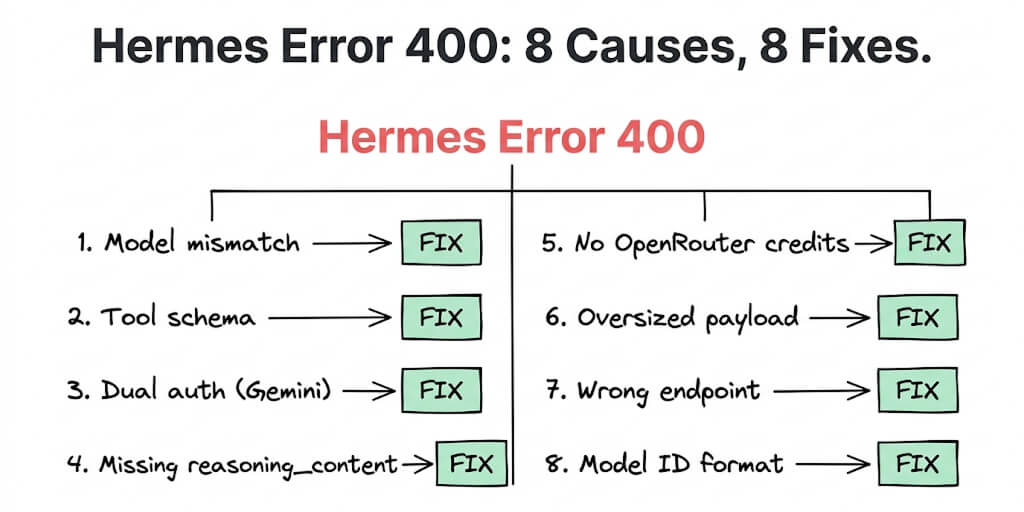
Here are the eight real causes of Hermes Agent error 400, ranked by how often they appear in GitHub issues, with copy-paste fixes for each.
Cause 1: Model name mismatch (the #1 cause)
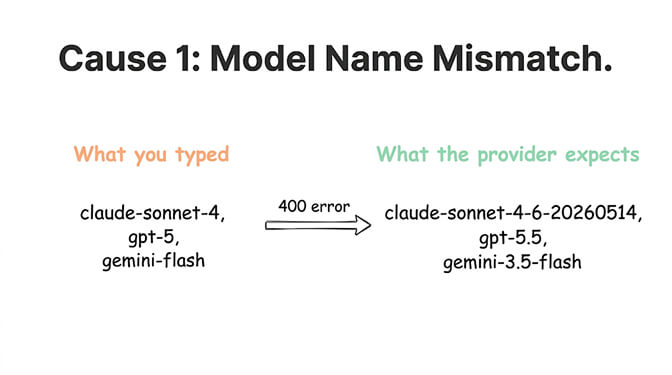
What happens: The model ID in your config doesn't match what the provider expects. Hermes sends the request. The provider says "I don't know that model." Returns 400.
How to diagnose:
hermes config show | head -20
Check the model.id field. Common mismatches: claude-sonnet-4 instead of claude-sonnet-4-20260514, gpt-5 instead of gpt-5.5, gemini-flash instead of gemini-3.5-flash.
Copy-paste fix:
# Re-run model selection
hermes model

# Or test with a known-good model
hermes chat -q "hello" --model anthropic/claude-sonnet-4-6-20260514
If the known-good model works, your original model ID was wrong. Check your provider's model list for the exact ID.
Cause 2: Tool schema incompatibility with OpenRouter
What happens: Hermes sends 28 tool definitions by default. Some models on OpenRouter can't parse all 28 schemas. Every API call returns 400 regardless of the model you select. GitHub issue #13927: all three tested models (Claude Sonnet, GPT-4o Mini, Gemini Flash) failed with the same 400.
How to diagnose: If EVERY model fails with 400 on OpenRouter but the same API key works via curl, it's tool schemas.
Copy-paste fix:
# Disable tools temporarily to confirm the diagnosis
hermes chat -q "hello" --no-tools

# If that works, the issue is tool schemas.
# Update Hermes to the latest version (schema fixes ship frequently)
hermes update
If updating doesn't fix it, reduce the number of enabled tools. 28 default tools is aggressive. Disable tools you don't use in your config.
Cause 3: Dual authentication headers on Gemini
What happens: Hermes's gemini provider injects an x-goog-api-key header. Simultaneously, the OpenAI Python SDK injects an Authorization: Bearer header. Google's API rejects requests with both headers. GitHub issue #7893 documents this exactly.
How to diagnose: The error message includes "Multiple authentication credentials received."
Copy-paste fix:
# Generate a standard Google Cloud API key (starts with AIza...)
# NOT a Vertex AI key (starts with AQ.Ab8...)

# Add to your env
echo 'GEMINI_API_KEY=AIzaSy...' >> ~/.hermes/.env

# Verify
hermes chat -q "hello"
The Vertex AI key format triggers the dual-header bug. Use a standard Google Cloud API key. It must start with AIza.
Cause 4: Missing reasoning_content for thinking models
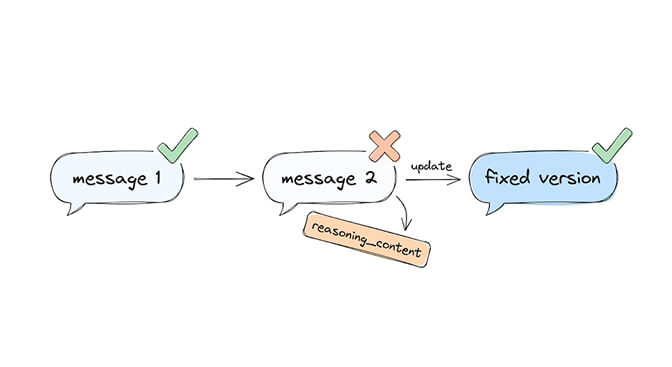
What happens: Models with thinking mode (Kimi K2.6, DeepSeek V4 Flash) return reasoning_content in their responses. Hermes doesn't pass it back in subsequent messages. The provider rejects the request because the conversation history is malformed. GitHub issues #13848 (Kimi) and #15717 (DeepSeek) document this.
How to diagnose: The 400 happens after the SECOND message, not the first. First message works. Second message fails with "reasoning_content is missing."
Copy-paste fix:
# Update to latest Hermes (reasoning_content handling was fixed in recent versions)
hermes update

# If still failing, disable thinking mode for the provider.
# In ~/.hermes/config.yaml, add under your model:
#   thinking: false
This is a known issue with Kimi and DeepSeek providers. The fix ships in Hermes updates. If you're on an older version, updating resolves it.
Cause 5: Insufficient OpenRouter credits
What happens: Your OpenRouter API key is valid but has no credits. OpenRouter returns 400 instead of a more helpful error code.
How to diagnose:
# Test your key directly
curl https://openrouter.ai/api/v1/auth/key \
  -H "Authorization: Bearer sk-or-your-key-here"
If the response shows "limit_remaining": 0 or similar, you need credits.
Copy-paste fix: Add credits on OpenRouter's dashboard. If using the free tier, some models require a paid plan. Switch to a model that works on free tier, or add $5 in credits.
If you'd rather not debug provider-specific error codes, BetterClaw handles provider errors at the platform level. You never see raw HTTP status codes. 28+ providers via BYOK. Smart error handling included. Free plan with every feature. $19/month per agent on Pro.
Cause 6: Oversized request payload
What happens: Your conversation history, system prompt, and tool definitions exceed the provider's request size limit. The provider returns 400 because the payload is too large.
How to diagnose: The 400 starts appearing mid-conversation, not at the start. Earlier messages worked fine. The conversation grew too long.
Copy-paste fix:
# Start a new session (clears conversation history)
hermes chat --new

# Or reduce context window in config.
# In ~/.hermes/config.yaml:
#   context_window: 32768
For long-running agents, implement session management. Our context window management guide covers how to prevent payload bloat.
Cause 7: Wrong Gemini endpoint version
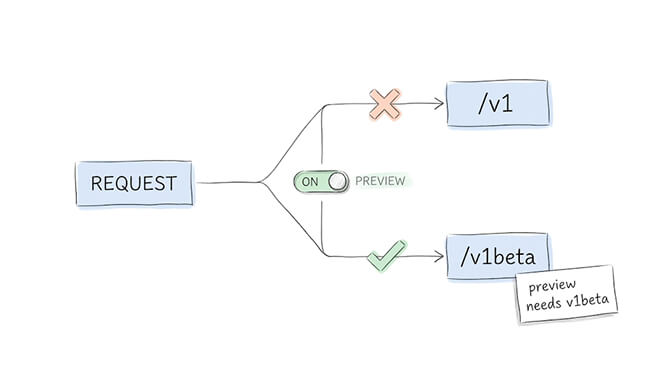
What happens: Hermes sends requests to /v1 but some Gemini models require /v1beta. Or vice versa. The endpoint doesn't recognize the model and returns 400.
How to diagnose: The error includes Error 400 (Bad Request)!!1 (the HTML error page from Google, not a JSON error). This HTML response is distinctive.
Copy-paste fix:
# In ~/.hermes/.env, try switching the endpoint
GEMINI_API_BASE=https://generativelanguage.googleapis.com/v1beta/openai

# Or if you were using v1beta, try v1:
GEMINI_API_BASE=https://generativelanguage.googleapis.com/v1/openai
The correct endpoint depends on the model. Preview models (like gemini-3-flash-preview) typically need /v1beta. Stable models work on /v1.
Cause 8: Model ID format mismatch (dots vs hyphens)
What happens: Some providers use dots in model IDs (minimax-m2.5-free). Hermes's config parser converts dots to hyphens (minimax-m2-5-free). The provider doesn't recognize the hyphenated version. GitHub issue #7710 documents this with OpenCode Zen.
How to diagnose: Run hermes config show and compare the model.id against the provider's documentation. If dots were converted to hyphens, that's the cause.
Copy-paste fix:
# Edit config directly to use the exact model ID.
# In ~/.hermes/config.yaml, wrap the model ID in quotes:
model:
  id: "minimax-m2.5-free"
Quoting the model ID preserves the dots. Without quotes, YAML interprets dots as nested keys.
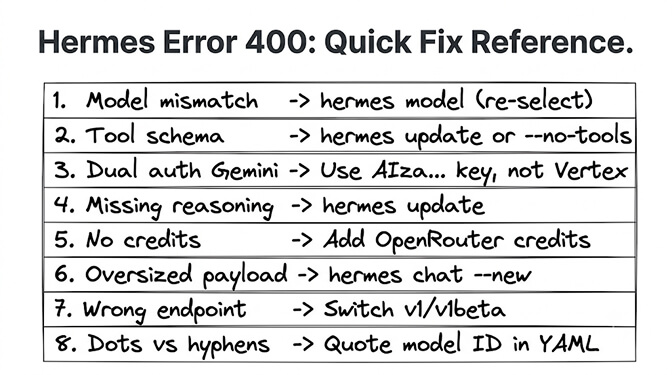
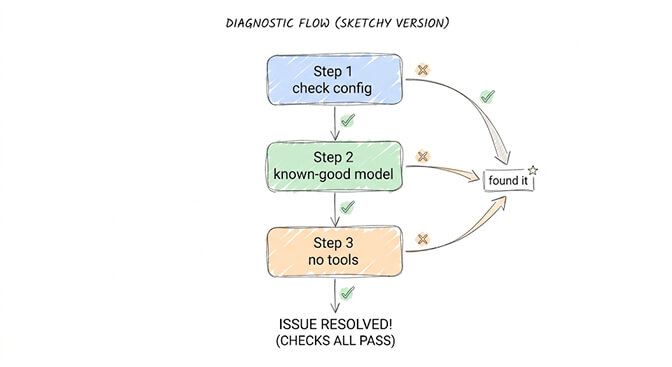
The diagnostic sequence (run this first)
Before trying all eight fixes, run this three-step diagnostic.
Step 1: Verify your model and provider.
hermes config show | head -20
Step 2: Test with a known-good model.
hermes chat -q "hello" --model anthropic/claude-sonnet-4-6-20260514
If this works, the problem is model-specific (Causes 1, 4, 7, 8). If this also fails, the problem is provider-wide (Causes 2, 3, 5, 6).
Step 3: Test without tools.
hermes chat -q "hello" --no-tools
If this works, the problem is tool schemas (Cause 2). If it still fails, the problem is authentication or payload (Causes 3, 5, 6).
This sequence narrows eight possible causes to two in about 30 seconds. Not sure which error you're staring at? Paste it into our agent error decoder to match the message to a cause and fix.
The honest truth about Hermes error 400: the error message is useless. "HTTP 400 Bad Request" tells you nothing about which of eight different causes is responsible. Every fix above was sourced from real GitHub issues where users spent hours diagnosing problems that should take seconds.
This is the core tradeoff of self-hosted agent frameworks. Maximum control. Maximum debugging.
Give BetterClaw a look if you'd rather build agents than debug HTTP status codes. Provider errors are handled at the platform level. 200+ verified skills. 25+ OAuth integrations. Free plan with 1 agent and every feature. $19/month per agent for Pro. We handle the provider compatibility. You handle the agent logic.
Frequently Asked Questions
What causes Hermes Agent error 400?
Hermes error 400 means the API provider rejected the request as malformed. The eight most common causes: model name mismatch (most frequent), tool schema incompatibility with OpenRouter, dual authentication headers on Gemini, missing reasoning_content for thinking models (Kimi, DeepSeek), insufficient OpenRouter credits, oversized request payload, wrong Gemini endpoint version (/v1 vs /v1beta), and model ID format mismatch (dots vs hyphens in YAML). The error message is always the same regardless of cause.
How do I fix Hermes error 400 with Gemini?
Gemini-specific 400 errors have two common causes. First: dual authentication headers. Hermes injects both x-goog-api-key and Authorization: Bearer headers. Fix: use a standard Google Cloud API key starting with AIza... (not a Vertex AI key). Second: wrong endpoint version. Preview models need /v1beta, stable models need /v1. Set GEMINI_API_BASE in your ~/.hermes/.env to the correct endpoint.
Why does Hermes error 400 happen on the second message but not the first?
Two causes trigger 400 on the second message: missing reasoning_content (thinking models like Kimi K2.6 and DeepSeek V4 Flash return reasoning tokens that Hermes doesn't pass back in subsequent turns) and oversized payload (conversation history grows too large after the first exchange). Fix reasoning_content with hermes update. Fix payload with hermes chat --new to start a fresh session.
Does Hermes error 400 mean my API key is wrong?
Usually not. Error 400 means "bad request," not "bad credentials" (that would be 401). In most cases, the API key is valid but the request is malformed due to model name mismatches, incompatible tool schemas, or provider-specific format requirements. Test your key with curl to confirm it works independently, then follow the three-step diagnostic sequence in this guide.
How do I avoid Hermes error 400 entirely?
Keep Hermes updated (hermes update). Use exact model IDs from your provider's documentation. Limit enabled tools to what you actually need. Use standard API keys (not Vertex AI keys for Gemini). Monitor conversation length and start new sessions before hitting payload limits. Or use a managed platform like BetterClaw ($0 free, $19/month Pro) where provider errors are handled at the platform level and you never see raw HTTP status codes.