A SaaS company processing 500+ tickets daily cut first-response time from 4 hours to 22 minutes. The agent handles the repetitive 70%. Your team handles the 30% that actually needs a human. Here's how to set it up without the disasters.
A SaaS company on TLDL's OpenClaw use case report was processing 500+ support tickets daily. Average first-response time: 4 hours. Customer satisfaction: declining. Support team: drowning.
They deployed an OpenClaw agent for initial classification and routing. Not for replying to customers. Not for closing tickets. Just for reading each ticket, determining the category, assessing urgency, and putting it in front of the right person.
First-response time dropped to 22 minutes. Not because the agent replied faster. Because the right human saw the right ticket 10x sooner.
That's the story of OpenClaw in customer support. It's not a chatbot that pretends to be human. It's a triage system that makes your human team dramatically faster.
What "70% automated" actually means (and what it doesn't)
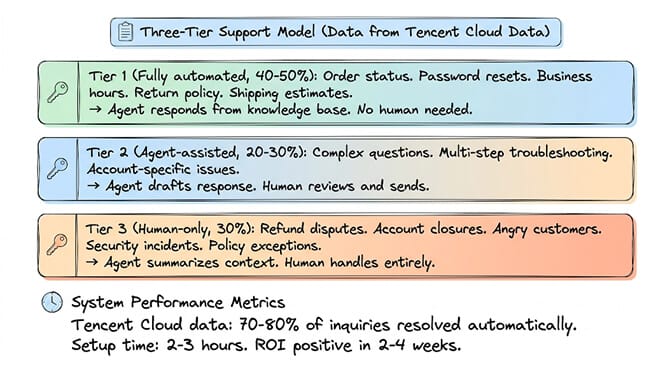
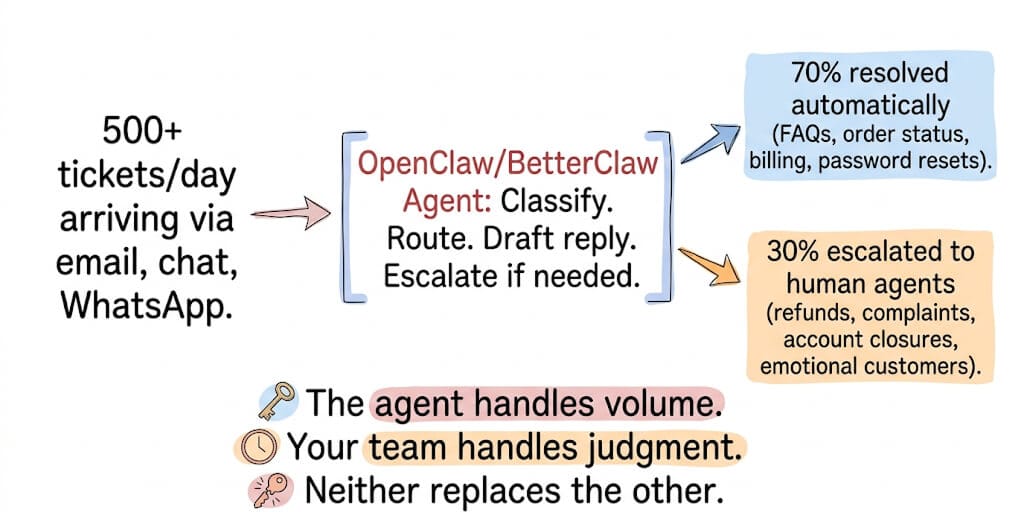
Tencent Cloud's analysis of OpenClaw support deployments found 70-80% of inquiries resolved automatically when the agent has access to a comprehensive knowledge base. The remaining 20-30% get escalated to human agents with full context already attached.
Here's what nobody tells you about that 70% number.
It's not 70% of all tickets. It's 70% of routine tickets. Order status checks. Password resets. "What are your hours?" "How do I return this?" These are the tickets that consume your team's time without requiring their judgment. The agent handles volume. Your team handles complexity.
The three-tier model that works:
Tier 1 (automate): Tickets with clear answers in your knowledge base. The agent responds directly. No human involvement. This is 40-50% of total volume.
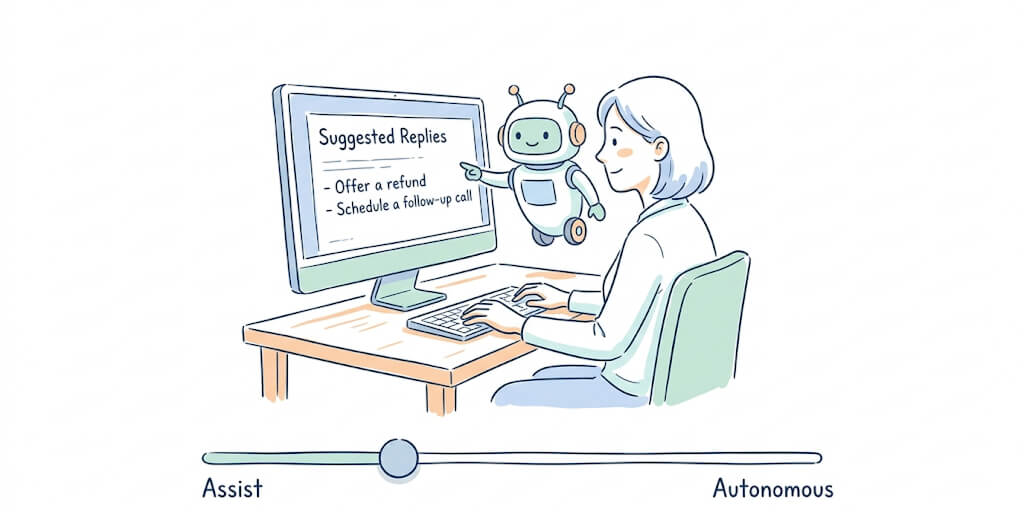
Tier 2 (assist): Tickets that need context. The agent pulls account history, summarizes the conversation, drafts a response, and presents it for human review. The human edits and sends. This is 20-30%.
Tier 3 (escalate): Tickets that need judgment, empathy, or authority. Refund disputes. Account closures. Angry customers. The agent summarizes the context and routes to the right specialist. The human handles everything. This is 30%.
The Zendesk stat that drives this: 72% of customers expect a response within one hour. Automated triage makes sub-hour response possible even for teams of 3-5 agents handling hundreds of tickets.
The five workflows that deliver the fastest ROI
1. Ticket classification and routing (the one everyone starts with)
Every incoming ticket gets classified: billing, technical, shipping, account, feature request, bug report. Then routed to the correct queue. Manual classification takes 2-5 minutes per ticket. An agent does it in under 3 seconds.
For 500 tickets/day: That's 16-41 hours of human classification time saved daily. At $25/hour, that's $400-1,025/day in labor cost recaptured.
For the detailed comparison of managed vs self-hosted agent deployment for support teams, our comparison covers the infrastructure trade-offs.
2. FAQ auto-response from knowledge base
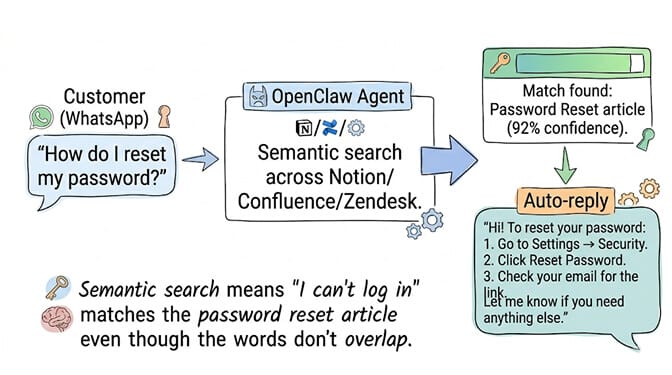
Customer asks "How do I reset my password?" The agent searches your knowledge base, finds the relevant article, and responds with the specific steps. No human needed. No queue wait. Instant resolution.
The setup: Connect your knowledge base (Notion, Confluence, Zendesk Help Center, or static docs) via MCP. The agent searches semantically, not by keyword. "I can't log in" matches the password reset article even though the words don't overlap.
3. Conversation summary for escalation handoffs
A customer has exchanged 12 messages with the agent across 3 channels. Now the issue needs a human. Without summarization, the human reads all 12 messages (5-10 minutes). With summarization, they read a 3-sentence summary: "Customer John (Enterprise plan, 3 years) reports billing discrepancy on May invoice. Agent confirmed $340 charge is correct per usage logs. Customer disputes and requests manager review."
Time saved per escalation: 5-10 minutes. At 50 escalations/day, that's 4-8 hours of reading time eliminated.
4. SLA monitoring and proactive alerts
The agent monitors open tickets against your SLA thresholds. When a ticket approaches its response deadline, the agent alerts the assigned agent via Slack or Telegram. When a ticket breaches SLA, the agent escalates to the team lead with a summary.
The difference: Without monitoring, SLA breaches are discovered in weekly reports. With monitoring, they're caught 15 minutes before they happen. INSIDEA's analysis found that proactive SLA monitoring reduces breach rates by 40-60%.
5. Sentiment detection for priority escalation
The customer writes: "I've been waiting three days and nobody has responded. This is unacceptable and I'm considering cancelling our contract."
The agent detects negative sentiment + churn signal + duration complaint. It immediately escalates to the retention team with a flag: "High churn risk. Enterprise customer. 3-day response gap."
Without sentiment detection: This email sits in the general queue for 2 more hours. With sentiment detection: It's in front of the retention specialist in under a minute.
If setting up ticket classification, knowledge base MCP connections, SLA monitoring, sentiment detection, and multi-channel routing across email, WhatsApp, Slack, and Telegram sounds like a significant infrastructure project, BetterClaw provides the managed platform specifically built for multi-channel agent deployment. 15+ channels from a single agent. Persistent memory across all conversations. Smart context management that doesn't burn tokens on classification overhead. Verified skills for support workflows. Free tier with 1 agent and BYOK. $49/month for Pro.
The safety rules (read this before deploying to production)
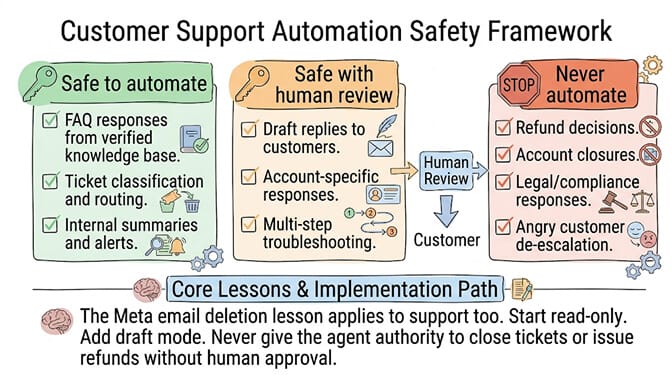
Rule 1: Start with classification only. Don't let the agent reply to customers on day one. Let it classify, route, and summarize for one week. Verify its accuracy. Then enable draft responses for Tier 1 tickets. Build trust incrementally.
Rule 2: Never automate financial decisions. Refunds, credits, billing adjustments. These require human approval. The agent can identify that a refund is needed and prepare the paperwork. The human clicks "approve."
Rule 3: Angry customers go to humans immediately. Sentiment detection should escalate, not respond. An AI response to a frustrated customer risks making things worse. Route to your best people, fast.
Rule 4: Log everything. Every classification, every draft, every escalation. Your team needs an audit trail. When the agent misclassifies a ticket (it will), the logs show what happened and why.
The Meta lesson applies here too. Summer Yue's agent deleted 200+ emails while ignoring stop commands. In support, a misconfigured agent could send wrong information to customers, close tickets prematurely, or issue unauthorized refunds. Start narrow. Expand slowly. Keep humans in the loop for every customer-facing action until trust is established.
For the security considerations when connecting OpenClaw to customer-facing systems, our security guide covers the attack surface in detail.
The ROI math (for your CFO)
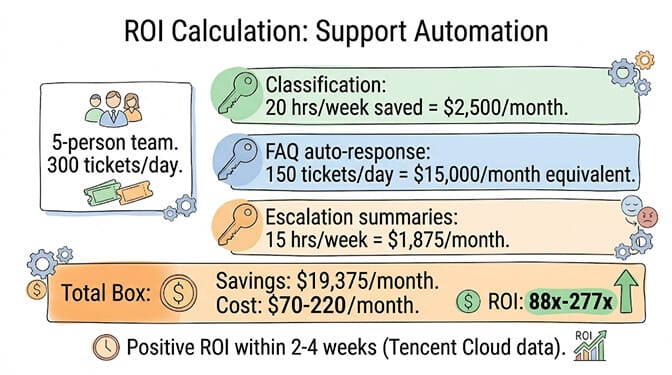
Conservative numbers from Tencent Cloud's analysis:
Most organizations see positive ROI within 2-4 weeks. Time savings: 10-40 hours per week depending on ticket volume and complexity. Customer satisfaction improvements of 15-30%. First-response time reduction: typically 60-85%.
The specific math for a 5-person support team handling 300 tickets/day:
Classification automation saves ~20 hours/week ($2,500/month at $30/hour). FAQ auto-response handles ~150 tickets/day ($15,000/month in equivalent labor). Escalation summaries save ~15 hours/week ($1,875/month). Total savings: ~$19,375/month in labor equivalent.
Cost: BetterClaw Pro at $49/month + model API costs (~$50-200/month depending on volume). Total: ~$99-249/month. ROI: 78x-196x in the first month.
If your organization is exploring AI agents for customer support but not sure where to start, we offer a free AI readiness audit. We identify the highest-impact support workflows for your specific operations, share a clear proposal with expected ROI, and if it makes sense, implement it for you on the BetterClaw platform. No commitment required to get the audit.
Frequently Asked Questions
Can OpenClaw handle customer support automation?
Yes. OpenClaw connects to support channels (email, WhatsApp, Telegram, Slack, Discord) and can classify tickets, route to the correct queue, respond to FAQs from a knowledge base, summarize conversations for escalation, and monitor SLA compliance. Tencent Cloud reports 70-80% of routine inquiries resolved automatically. A SaaS company cut first-response time from 4 hours to 22 minutes using classification-only automation.
How long does it take to set up OpenClaw for customer support?
Tencent Cloud estimates 2-3 hours for basic setup (classification + routing + knowledge base connection). A full deployment with SLA monitoring, sentiment detection, and multi-channel support takes 1-2 weeks including testing. BetterClaw's managed platform reduces this to under an hour for basic setup with pre-built support workflow templates.
What percentage of support tickets can AI handle automatically?
70-80% of routine tickets (FAQ answers, order status, password resets, shipping inquiries) according to Tencent Cloud and Latenode data. The remaining 20-30% require human judgment (refund disputes, angry customers, policy exceptions). The key is separating tickets into automate, assist, and escalate tiers. Never automate financial decisions or emotionally charged interactions.
How much does OpenClaw customer support automation cost?
Self-hosted OpenClaw: free software + $5-10/month VPS + model API costs ($50-200/month). BetterClaw managed: $0 (free plan) or $49/month for Pro + API costs. For a team handling 300 tickets/day, the total cost is $99-249/month versus $19,375/month in equivalent labor savings. ROI is typically positive within 2-4 weeks.
Is AI customer support reliable enough for production use?
For Tier 1 (FAQs, status checks): yes, highly reliable when backed by a verified knowledge base. For Tier 2 (drafted responses with human review): reliable with the review step. For Tier 3 (complex/emotional): AI should only summarize and route, never respond directly. Start with classification-only for one week before enabling customer-facing responses. The Meta email deletion incident demonstrates why human oversight is essential for any agent handling customer data.