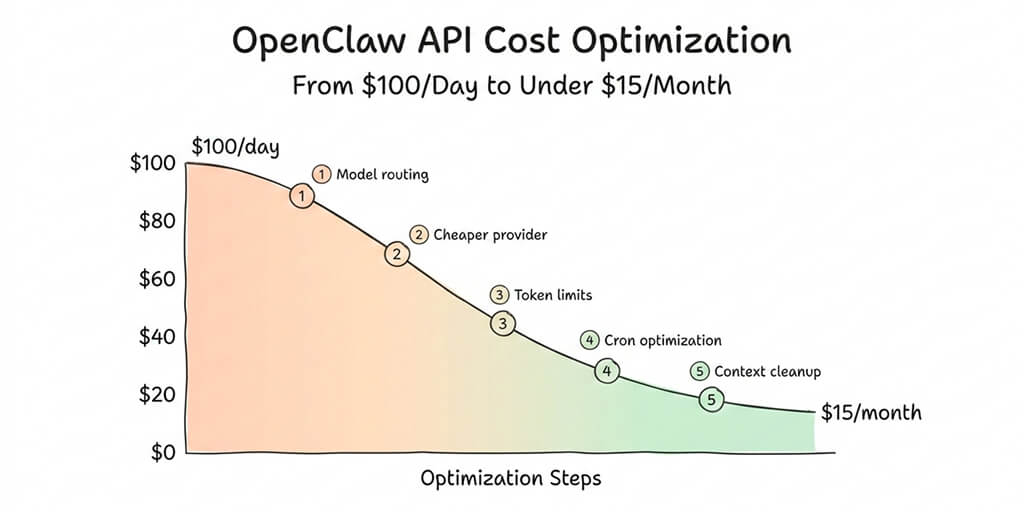
Five specific changes that dropped my OpenClaw spending by 95%. No quality loss. No missing features.
The email from Anthropic was polite. Almost apologetic. "Your usage for the current billing period has exceeded $312."
Three days. I'd been running my OpenClaw agent for three days.
The agent was doing exactly what I'd asked: morning briefings, email triage, calendar management, a few research tasks, and scheduled cron jobs checking for updates every 15 minutes. Nothing exotic. The kind of setup every OpenClaw tutorial shows you how to build.
What no tutorial showed me was the OpenClaw API cost of actually running it.
Claude Opus at $15/$75 per million tokens (the old pricing before the 4.5 series dropped it to $5/$25) was eating through my budget like it was competing for a prize. Heartbeats every 30 minutes. Sub-agents spawning for parallel tasks. Cron jobs silently accumulating context with every execution. Each one billing at Opus rates.
$100 per day. For a personal assistant.
That was three months ago. Today, the same agent runs the same tasks for under $15 per month. Same quality where it matters. Same functionality. Here's exactly what I changed.
Why OpenClaw costs more than you expect
The sticker shock is real, and it hits almost everyone. The viral Medium post "I Spent $178 on AI Agents in a Week" wasn't an outlier. It was typical.
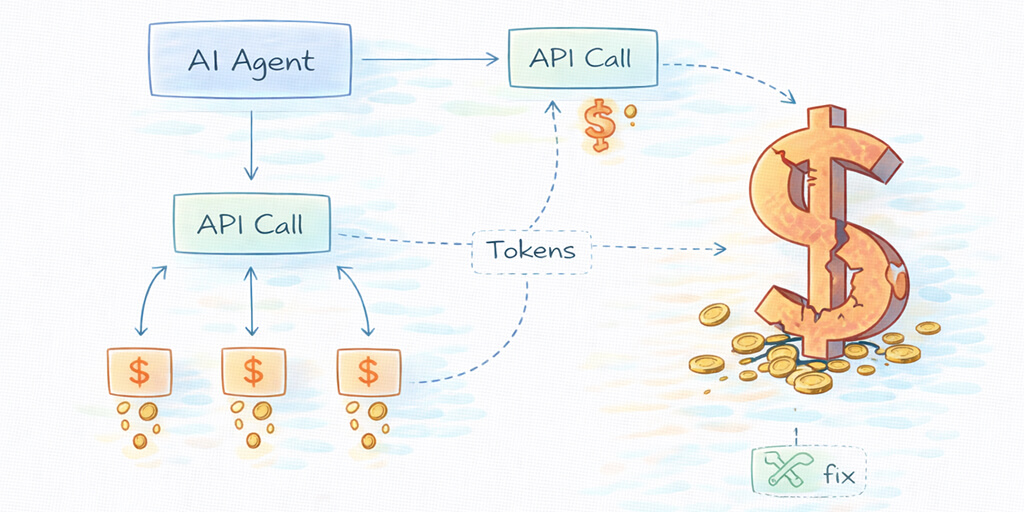
OpenClaw agents aren't chatbots. They don't wait for you to type a message and respond once. They run continuously. They process heartbeats (status checks every 30 minutes, 48 per day). They spawn sub-agents for parallel work. They execute cron jobs on schedules you define. And every single one of these operations calls your AI model and bills you tokens.
Here's what the OpenClaw API cost breakdown actually looks like for a "standard" agent running on a premium model:
Heartbeats: 48/day x ~200 tokens each = 9,600 tokens/day. Sub-agents: 5-20 per day, depending on your workflows. Cron jobs: variable, but context grows with each execution. Direct interactions: your actual conversations with the agent. Skill executions: every tool call (web search, file read, API call) costs tokens.
On Claude Opus 4.6 at $5/$25 per million tokens, a moderate usage pattern runs $3-7 per day. On the older Opus pricing ($15/$75), it was $10-30 per day. On GPT-4o at $2.50/$10, it's $2-5 per day.
None of these are catastrophic individually. But they compound across 30 days. And most people don't realize their agent is making 100+ model calls per day until the bill arrives.
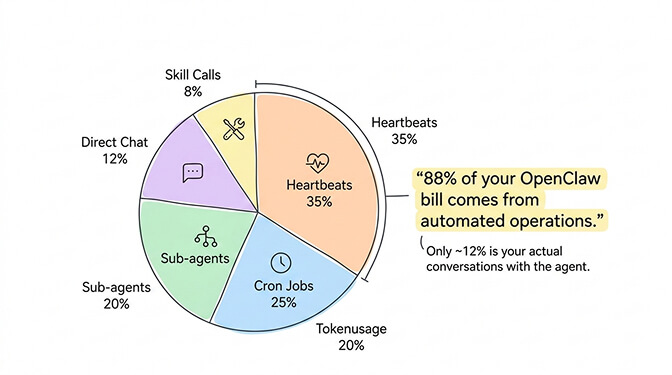
88% of a typical OpenClaw API cost comes from automated operations you never directly see. Only 12% is your actual conversations.
Change 1: Stop using Opus for heartbeats (saves 60-70%)
This is the single biggest win. It took me five minutes to implement and cut my daily spend by more than half.
By default, OpenClaw sends everything to your primary model. If your primary is Opus or GPT-4o, your heartbeats (those 48 daily "are you alive?" checks) run at premium rates.
A heartbeat doesn't need Opus. It doesn't need Sonnet. It barely needs a language model at all.
In your ~/.openclaw/openclaw.json, set a separate heartbeat model:
{
  "agent": {
    "model": {
      "primary": "anthropic/claude-sonnet-4-6",
      "heartbeat": "anthropic/claude-haiku-4-5",
      "subagent": "anthropic/claude-haiku-4-5"
    }
  }
}
Haiku 4.5 at $1/$5 per million tokens handles heartbeats and sub-agents perfectly. That drops your automated operation costs by 60-80% compared to Opus and 50-70% compared to Sonnet.
Monthly heartbeat cost on Opus: ~$4.30. On Haiku: ~$0.14. For a task that just confirms your agent is running.
For a full walkthrough of how OpenClaw's agent architecture works and where model calls actually happen, that context helps you understand exactly which calls are worth optimizing.
Change 2: Downgrade your primary model (and you probably won't notice)
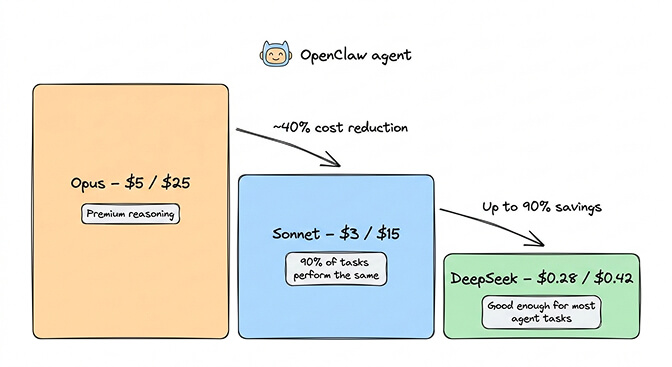
Here's the uncomfortable truth about the OpenClaw API cost debate: Sonnet 4.6 handles 90% of agent tasks as well as Opus does.
I ran both side by side for two weeks. Email triage, morning briefings, calendar management, research summaries, scheduled tasks. The quality difference was noticeable on complex multi-step reasoning (maybe 5-10% of my total tasks). For everything else, Sonnet was indistinguishable.
Opus 4.6: $5/$25 per million tokens. Sonnet 4.6: $3/$15 per million tokens.
That's a 40% reduction on input and 40% on output for 90% of your workload. When you need Opus, you type /model opus in your chat, handle the complex task, then /model sonnet to switch back.
But wait. It gets better.
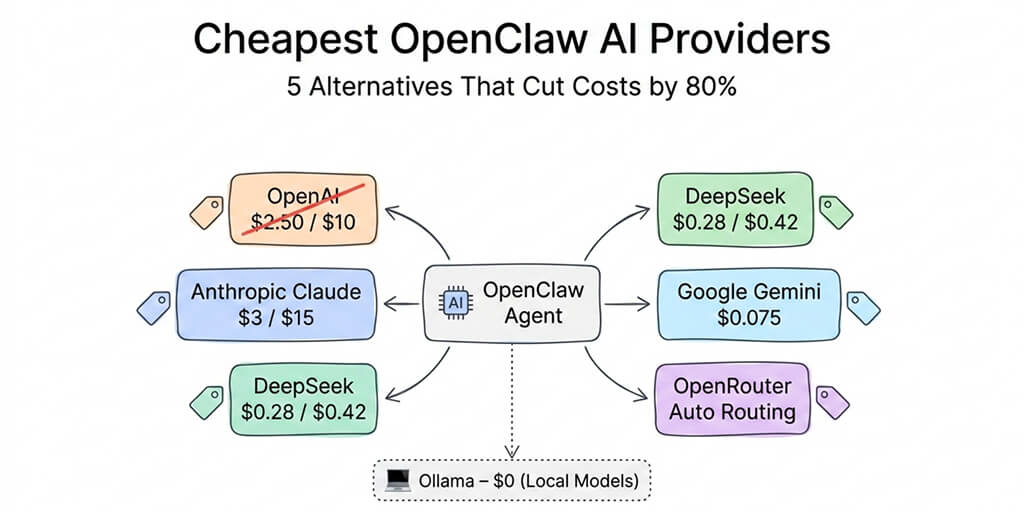
If you're willing to use DeepSeek V3.2 as your primary ($0.28/$0.42 per million tokens), that same workload drops to roughly $0.50-1.00 per day. DeepSeek is genuinely capable for standard agent tasks. Tool calling is slightly less reliable than Claude on complex chains, and data routes through Chinese infrastructure, but for personal automation where those tradeoffs are acceptable, the savings are staggering.
For a full comparison of how each provider performs on real agent tasks, our OpenClaw model comparison covers 7 task types with actual cost data.
Change 3: Cap your cron job context (stops the silent budget killer)
This is the one that was silently draining my account.
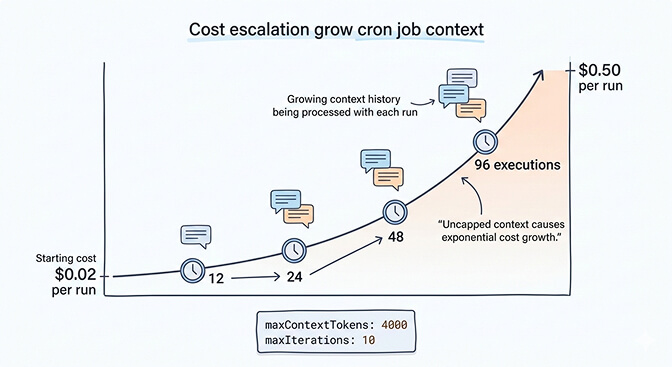
OpenClaw cron jobs accumulate context with every execution. A task scheduled to check emails every 15 minutes gradually builds a conversation history that grows by hundreds of tokens per run. After 96 executions per day, your context window is massive.
The math: a cron job that starts at $0.02 per execution can climb to $0.50 per execution as context accumulates. At 96 runs per day, that's the difference between $1.92/day and $48/day.
The fix is straightforward. Add context limits to every skill that runs on a schedule:
{
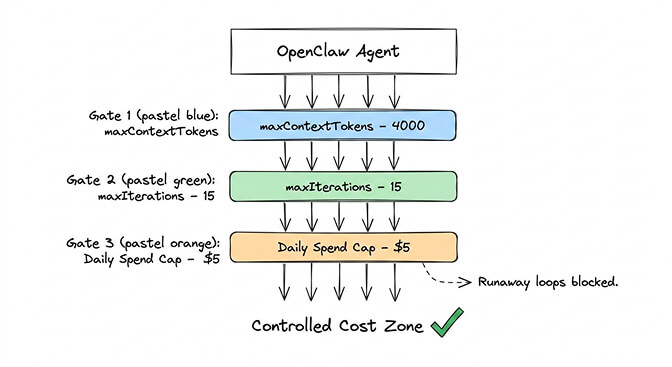
  "maxContextTokens": 4000,
  "maxIterations": 10
}
This forces OpenClaw to truncate context instead of letting it grow unbounded. You lose some conversation continuity between runs, but for scheduled tasks that's almost never a problem. Each execution should be self-contained anyway.
The memory compaction bug in OpenClaw can make this worse. Context compaction sometimes kills active work mid-session, and the workaround requires these manual limits. It's one of the 7,900+ open issues on GitHub that the community is still working through.
Uncapped cron jobs are the #1 reason people get surprise OpenClaw API cost spikes. Set maxContextTokens on every scheduled skill.
Change 4: Use the ChatGPT OAuth trick (free Opus-level quality)
Here's what nobody tells you about reducing OpenClaw costs.
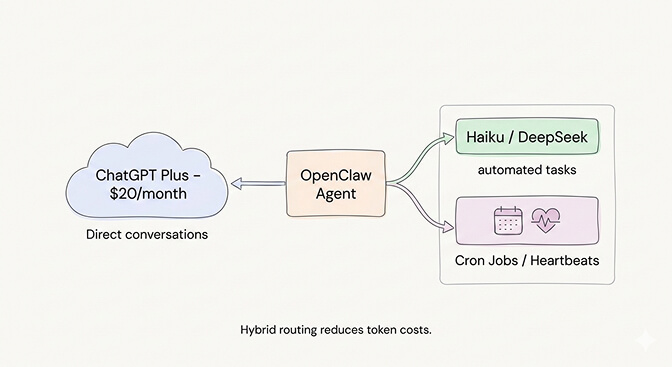
If you have a ChatGPT Plus subscription ($20/month), you can connect OpenClaw to your ChatGPT account using OAuth. This routes your agent's requests through your ChatGPT subscription instead of the API, meaning you pay the flat subscription fee instead of per-token pricing.
The catch: ChatGPT has usage limits on the Plus plan. You'll hit rate limits during heavy agent usage. It's not suitable for high-frequency cron jobs or tasks that need consistent throughput. But for direct interactions and moderate daily usage, it effectively gives you GPT-4o access for a flat $20/month instead of variable per-token billing.
The ChatGPT OAuth approach works best as a supplement, not a replacement. Use it for your direct conversations with the agent. Keep Haiku or DeepSeek for automated operations. This hybrid approach caps your conversational costs at a flat rate while keeping background operations cheap.
If you want to see how model routing, context capping, and provider switching work in practice, this community walkthrough covers the full optimization process with real before-and-after cost numbers.
Watch on YouTube: OpenClaw Cost Optimization and Model Routing Setup (Community content)
The ChatGPT OAuth approach works best as a supplement, not a replacement. Use it for your direct conversations with the agent. Keep Haiku or DeepSeek for automated operations. This hybrid approach caps your conversational costs at a flat rate while keeping background operations cheap.
If managing multiple API providers, OAuth configs, and model routing files sounds like more DevOps than you signed up for, Better Claw handles all of this natively at $29/month per agent. BYOK with any provider, built-in cost monitoring, and anomaly detection that auto-pauses your agent before costs spiral. Zero config files.
Change 5: Set hard spending limits everywhere
This is insurance, not optimization. But it's the change that prevents the horror stories.
One community member reported a recursive research task that burned $37 in six hours. Another hit $3,600 in a single month from uncontrolled agent loops. These aren't bugs in OpenClaw. They're bugs in configuration.
If you're using OpenRouter, set a daily spending cap:
OPENROUTER_MAX_DAILY_SPEND=5
If you're using Anthropic directly, check your usage dashboard daily for the first week and set up billing alerts.
In your OpenClaw config, limit iterations on every skill:
{
  "maxIterations": 15,
  "maxSteps": 50
}
These limits mean your agent occasionally fails on very long tasks. That's the right tradeoff. A failed task costs you nothing. A runaway loop costs you your weekend budget.
The Gemini Flash hack (almost free)
One more option worth mentioning for the truly budget-conscious.
Google Gemini 2.5 Flash offers a free tier through Google AI Studio: 1,500 requests per day, 1 million token context window, no credit card required. For personal OpenClaw use (morning briefings, basic calendar management, simple automations), the free tier is often enough.
Even the paid tier at $0.075 per million input tokens is essentially free at agent scale. A full month of moderate usage runs $1-3 total.
The tradeoff: Gemini's tool calling isn't as reliable as Claude for complex chains. It works well for straightforward operations but stumbles on multi-step reasoning that needs precise instruction following. Best used for heartbeats, simple lookups, and as a fallback model.
For a deeper look at all the budget-friendly providers that work with OpenClaw, our guide to the cheapest OpenClaw AI providers covers five alternatives with real pricing data.
What my actual bill looks like now
Here's the before and after for the same agent, same tasks, same platforms:
Before (everything on Opus 4.1 at old pricing): Heartbeats: ~$15/month. Cron jobs: ~$40-80/month (context growth). Sub-agents: ~$20/month. Direct interactions: ~$25/month. Skill executions: ~$15/month. Total: $115-155/month ($3.80-5.00/day).
After (optimized setup): Heartbeats on Haiku: ~$0.14/month. Cron jobs capped, on Haiku: ~$2/month. Sub-agents on Haiku: ~$1.50/month. Direct interactions on Sonnet: ~$8/month. Complex tasks on Opus (manual switch): ~$3/month. Total: ~$14.64/month ($0.49/day).
Same agent. Same functionality. 90% cost reduction.
The key insight: most of your OpenClaw API cost comes from automated operations that don't need premium models. Route cheap models to cheap tasks, cap your context growth, and only pay for Opus when you genuinely need Opus-level reasoning.
For the full picture of which tasks justify premium model spend, our use case guide ranks workflows by complexity.
The honest bottom line
OpenClaw is free. Running it is not.
But "not free" doesn't mean "expensive" if you're intentional about it. The difference between a $100/day OpenClaw habit and a $15/month one isn't the agent. It's the configuration.
Model routing. Context caps. Spending limits. Provider selection. These four things, applied together, transform OpenClaw from a money pit into something that costs less than a Netflix subscription.
The model market keeps getting cheaper. Opus 4.5 at $5/$25 is 66% cheaper than Opus 4.1 at $15/$75. Sonnet 4.6 delivers quality that would have required Opus just months ago. DeepSeek and Gemini Flash keep pushing the floor lower.
The trend is clear. Running an AI agent will get cheaper every quarter. But right now, in 2026, the cost is the #1 thing people get wrong about OpenClaw. Don't let it surprise you.
If you'd rather not manage config files, model routing, and spending caps manually, give Better Claw a try. It's $29/month per agent, BYOK with any provider, and includes built-in cost monitoring that auto-pauses your agent on anomalies. Your first deploy takes 60 seconds. We handle the infrastructure optimization. You handle the interesting part.
Frequently Asked Questions
How much does it cost to run OpenClaw?
OpenClaw itself is free and open source. The cost comes from AI model API fees. Running everything on Claude Opus costs $80-200/month. With smart model routing (Sonnet for primary tasks, Haiku for heartbeats and sub-agents), a typical agent runs $15-50/month. Using DeepSeek or Gemini Flash can bring costs under $10/month. Hosting adds $5-29/month depending on self-hosted VPS versus managed platforms.
Why is my OpenClaw API bill so high?
The most common cause is running a premium model (Opus, GPT-4o) for every operation, including heartbeats (48/day), cron jobs, and sub-agents. The second biggest cause is cron job context accumulation, where scheduled tasks silently build growing context windows that multiply token costs over time. Setting separate cheap models for heartbeats and adding maxContextTokens limits to skill configs typically cuts costs by 60-90%.
What's the cheapest way to run OpenClaw?
Google Gemini 2.5 Flash offers a free tier (1,500 requests/day) that handles basic personal agent usage. DeepSeek V3.2 at $0.28/$0.42 per million tokens is the cheapest paid option, running a full agent for $3-8/month. The ChatGPT Plus OAuth method gives you GPT-4o for a flat $20/month. The best value setup is Sonnet primary with Haiku heartbeats, typically $15-30/month total.
Is Claude Sonnet good enough for OpenClaw, or do I need Opus?
Sonnet 4.6 handles 90% of typical agent tasks at quality indistinguishable from Opus. Email triage, calendar management, morning briefings, research summaries, and most scheduled operations work just as well on Sonnet at $3/$15 versus Opus at $5/$25. Use Opus on-demand with /model opus for complex multi-step reasoning, code architecture decisions, or nuanced analysis. Most users never need Opus as their default.
Can I run OpenClaw with spending limits to prevent surprise bills?
Yes. OpenRouter supports daily spending caps via environment variable (OPENROUTER_MAX_DAILY_SPEND). In your OpenClaw config, set maxIterations and maxContextTokens per skill to prevent runaway loops and context growth. Anthropic's dashboard allows billing alerts. Managed platforms like Better Claw include built-in anomaly detection that auto-pauses agents when costs spike unexpectedly.