PR volume is up 29% and most of it is AI-generated code. If your review process hasn't changed, you're already behind. Here's how to automate safely.
We had 47 open pull requests last Tuesday. Three engineers doing reviews. Most PRs had been open for two days. Two had been open for a week.
The bottleneck wasn't the code being written. AI-assisted coding tools had accelerated that. The bottleneck was humans reading what the machines wrote. And machines write a lot of code.
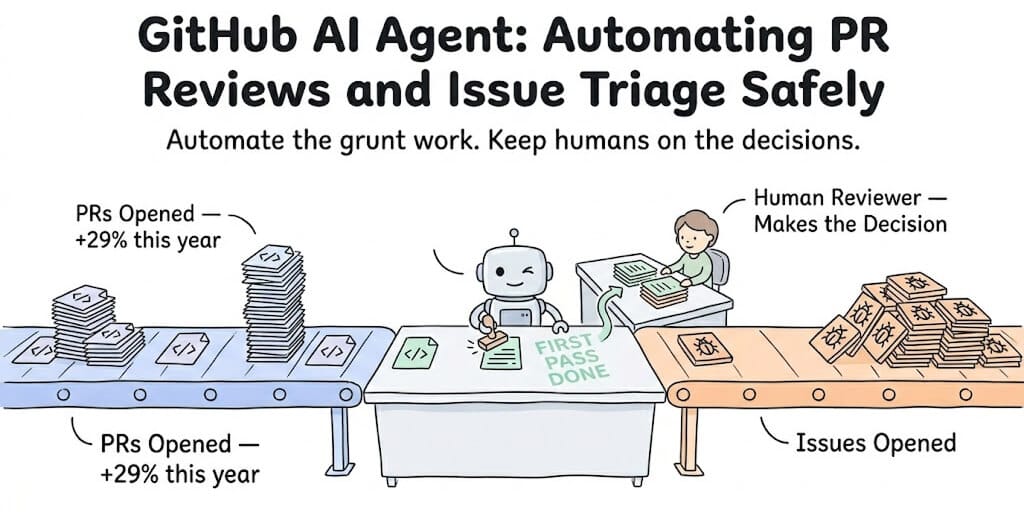
This is the story of 2026 development teams everywhere. GitHub data shows PR volume is up 29% year-over-year, driven by AI-generated code. Qodo's analysis of one million pull requests found that 17% contained high-severity issues that would have passed manual review under time pressure and reached production without an AI agent enforcing review depth.
More code. Faster code. Same number of humans reviewing it. Something has to give.
A GitHub AI agent for PR reviews and issue triage doesn't replace your senior engineer's judgment. It handles the first pass. The grunt work. Reading every diff. Checking for obvious issues. Labeling incoming issues before anyone has to look at them. The human still makes the decision. The agent just makes sure the human sees the right information first.
Here's how to set it up without turning your repository into a chaos engine.
The PR review bottleneck (and why it's getting worse)
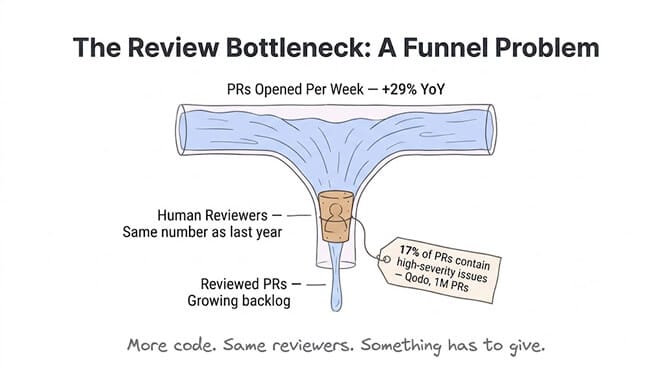
Gartner projects that by the end of 2026, AI-assisted development will account for more than half of all new enterprise code. GitHub Copilot's code review feature alone has processed over 60 million reviews, growing 10x in under a year. More than one in five code reviews on GitHub now involve an AI agent.
But here's what a January 2026 study titled "More Code, Less Reuse" discovered: agent-generated code introduces more redundancy and more technical debt per change than human-written code. The surface looks clean. The code passes tests. But the debt is quiet and accumulative.
Reviewers, according to the same research, actually feel better about approving AI-generated code. It's clean. It's formatted well. It looks correct. But looking correct and being correct are different things, especially when the code interacts with systems the AI doesn't have context about.
This is why blind automation is dangerous and smart automation is essential.
The goal isn't automating approval. It's automating the first pass so your human reviewers focus on architecture and intent, not syntax and formatting.
What a GitHub AI agent actually does on PRs
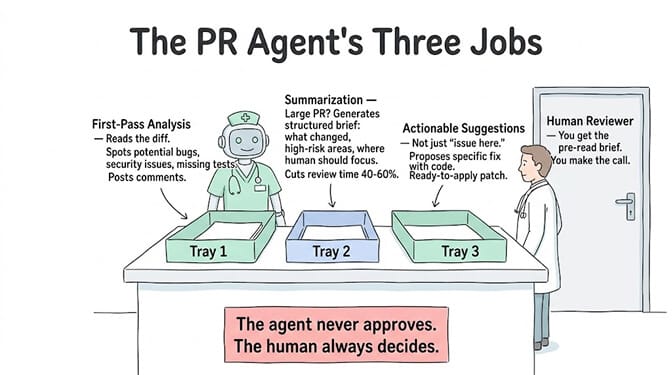
A properly configured GitHub AI agent for PR reviews does three things:
First-pass analysis. When a PR is opened, the agent reads the diff, understands the changes in context of the repository, and generates review comments. This includes identifying potential bugs, security issues, style violations, and missing test coverage.
Summarization. For large PRs (50+ changed files), the agent generates a structured summary: what changed, why it likely changed, which areas are high-risk, and what the human reviewer should focus on. This alone can cut review time by 40-60%.
Actionable suggestions. Good AI review agents don't just say "this might be an issue." They suggest specific fixes with code. GitHub Copilot's review feature includes auto-fix handoffs that generate ready-to-apply patches for common issues.
The key players in 2026: GitHub Copilot (native, single-repo context, GA since April 2025), CodeRabbit (popular for detailed review comments), Qodo (multi-repo awareness, enterprise governance), and Amazon Q Developer (AWS ecosystem).
What the agent shouldn't do
Approve PRs automatically. Ever. AI review agents should flag, suggest, and summarize. The merge decision stays with a human.
Review security-sensitive changes without human oversight. Authentication logic, payment processing, access control... these need human eyes. The agent can flag them as high-priority, but automated approval of security-critical code is reckless.
Operate without context boundaries. An agent that reviews PRs without understanding your team's conventions, architecture decisions, and historical context will generate noise instead of signal. Custom instructions matter.
Issue triage: the automation nobody talks about
PR review gets all the attention. Issue triage is the automation that actually saves the most time for maintainers and engineering managers.
GitHub's own Agentic Workflows (launched in technical preview February 2026) treat issue triage as the "hello world" of agent automation. The reason: it's immediately useful, relatively safe (labeling and commenting vs. merging code), and the impact is measurable within days.
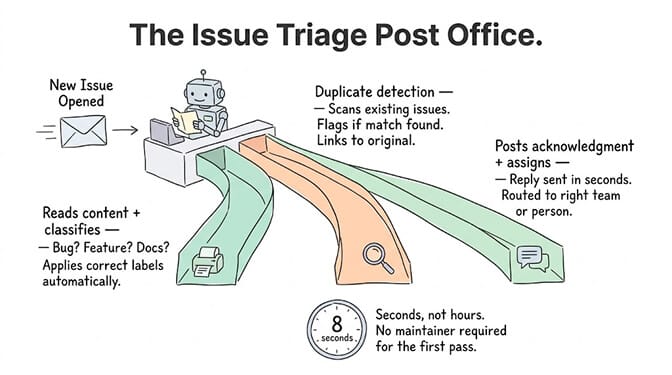
A properly configured GitHub AI agent for issue triage does this automatically when a new issue is opened: reads the issue content and understands the technical context, applies appropriate labels (bug, feature request, documentation, priority level), posts an acknowledgment comment explaining the classification, requests clarification if the issue lacks detail, detects and flags potential duplicates, and assigns to the right team or individual based on the code areas involved.
GitHub reports that Copilot auto-fills approximately 80% of structured metadata in their own internal accessibility triage workflow. Issues are labeled and acknowledged within seconds, not hours.
The open-source community has adopted this fast. Alex Yan's Issue AI Agent, built in roughly 500 lines of TypeScript, classifies, labels, and replies to GitHub issues in about 8 seconds. It runs entirely as a GitHub Action with no separate server or database.
The safety layer most teams skip
Here's where most GitHub AI agent setups fail: they automate without guardrails.
GitHub's Agentic Workflows are designed with safety defaults that every team should understand and enforce, regardless of which tooling you use.
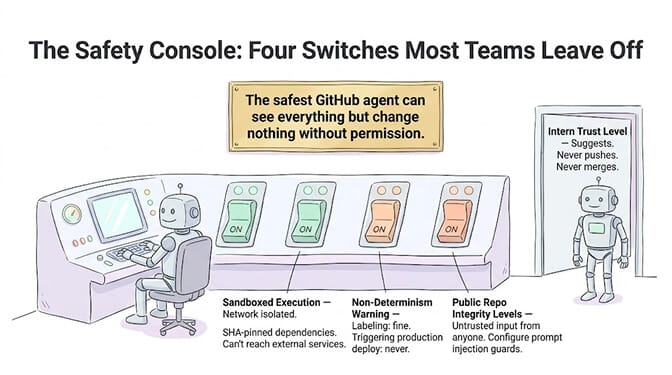
Read-only by default. The agent can read repository contents, issues, and PR diffs. But write operations (posting comments, applying labels, suggesting changes) require explicit "safe outputs" configuration. Preapproved operations only, with sanitized inputs.
Sandboxed execution. The agent runs in a sandboxed environment with network isolation. It can't reach external services unless you explicitly allow it. Dependencies are SHA-pinned to prevent supply chain attacks.
Non-determinism is real. The same triage workflow might produce slightly different outputs on different runs because LLMs are probabilistic. For labeling and commenting, this is fine. For anything touching deployment pipelines, stick to deterministic logic. Never let an AI agent trigger a production deploy.
Public repo exposure. In public repositories, your triage agent processes issues from anyone, including untrusted external users. A carefully crafted issue could attempt to manipulate the agent's classification or inject instructions into the triage prompt. Configure integrity levels appropriately.
This is one reason we built trust levels directly into BetterClaw agents. An "Intern" level agent can read and draft but never execute. A "Specialist" can execute within defined boundaries. A "Lead" can act autonomously. For GitHub integrations, starting at Intern level means your agent suggests but never pushes, comments but never merges, labels but never closes.
The safest GitHub AI agent is one that can see everything but change nothing without permission. Start read-only. Add write permissions gradually.
The three setups (from simple to advanced)
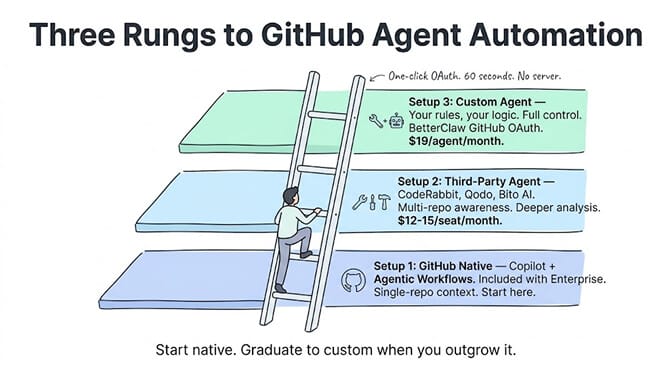
Setup 1: GitHub-native (simplest)
Install GitHub Copilot code review on your organization. It's included with Copilot Enterprise. When a PR is opened, Copilot automatically reviews the diff and posts comments. For issue triage, enable GitHub Agentic Workflows (technical preview) with a Markdown definition file in your repository.
This covers 80% of teams. The limitation: Copilot's context is single-repository. It doesn't understand cross-repo dependencies or your team's architectural conventions beyond what's in the current repo.
Setup 2: Third-party agent (more capable)
Install a specialized agent like CodeRabbit, Qodo, or Bito AI as a GitHub App. These offer deeper analysis, multi-repo awareness (Qodo specifically), and customizable review rules. They integrate as automated reviewers on PRs and can be configured for issue triage through webhooks.
Cost: CodeRabbit starts free for open source, $12-15/seat/month for teams. Qodo has enterprise pricing. These add a layer of intelligence that Copilot alone doesn't provide, especially for larger codebases.
Setup 3: Custom agent with GitHub integration (most flexible)
Build a custom agent that connects to GitHub's API via OAuth and handles PR reviews and issue triage based on your specific logic. This gives you full control over the review criteria, triage rules, and response formatting.
On BetterClaw, this means connecting our one-click GitHub OAuth integration, pointing the agent at your repository, and defining the review or triage behavior in natural language. The agent runs on managed infrastructure with isolated containers, AES-256 encrypted credentials, and secrets that auto-purge from memory after 5 minutes. No server to maintain. No GitHub Actions compute to manage. The GitHub skill page lists what the agent can do once connected: review PRs, triage issues, search code and watch CI runs. Free plan with 1 agent and 100 credits a month. $49/month on Pro.
The same triage idea works for production errors. The ready-made PostHog Errors to Linear workflow files each new frontend error as a Linear ticket every morning and skips ones already filed, and GCP Error Log Triage groups Google Cloud errors by root cause before filing them and posting a Slack summary.
What actually changes when you automate
The teams we work with report three consistent outcomes after deploying a GitHub AI agent:
Review backlog drops within a week. When the agent handles first-pass review (formatting, obvious bugs, missing tests), human reviewers spend their time on architecture decisions and intent review. PRs move faster because the easy stuff is already handled.
Issue triage becomes near-instant. No more issues sitting unlabeled for days. Contributors get acknowledgment within seconds. Maintainers open their issue board and see categorized, prioritized work instead of an unorganized pile.
Developer satisfaction goes up. This is the surprising one. Developers consistently report that having an AI reviewer catch obvious issues before the human reviewer sees the PR reduces the friction of the review process. The human reviewer's comments become more substantive and less nitpicky. The dynamic shifts from "catching mistakes" to "discussing design."
McKinsey estimates AI agents represent a $2.6-4.4 trillion addressable market. Development workflow automation is one of the clearest, most measurable applications. A team of five engineers who each spend 5 hours per week on reviews gets back 25 hours. That's half an engineer's entire workweek returned to actual development.
The best part about GitHub AI agents isn't the automation itself. It's what your team does with the time they get back.
PR review and issue triage are necessary. They're also repetitive, pattern-based, and exactly the kind of work that AI handles well. Let the agent do the first pass. Let your engineers do the thinking.
Give BetterClaw a look if you want a GitHub AI agent that runs on managed infrastructure with trust levels, secrets auto-purge, and one-click OAuth. Free plan with 1 agent and 100 credits a month. $49/month on Pro. Your agent connects to GitHub in about 60 seconds. We handle the infrastructure. You handle the code.
Frequently Asked Questions
What is a GitHub AI agent for PR review?
A GitHub AI agent automatically reviews pull requests when they're opened, providing first-pass analysis, code quality suggestions, security flagging, and diff summaries. It doesn't replace human reviewers. It handles the repetitive checks (formatting, obvious bugs, missing tests) so humans focus on architecture and design intent. GitHub Copilot, CodeRabbit, and Qodo are the most widely used options in 2026, with Copilot alone processing over 60 million reviews.
How does automated PR review compare to manual code review?
Automated PR review catches pattern-based issues instantly (17% of PRs contain high-severity issues per Qodo's analysis of 1M PRs). Manual review catches architectural problems, design intent mismatches, and subtle system interactions. The best setup uses both: the AI agent handles first-pass analysis within seconds, then human reviewers focus on the decisions that require context and judgment. PR review backlog typically drops within a week of deploying an AI reviewer.
How do I set up AI-powered issue triage on GitHub?
The simplest path is GitHub's own Agentic Workflows (technical preview), which let you define triage logic in a Markdown file. The agent reads new issues, applies labels, posts acknowledgment comments, and detects duplicates. For more customization, tools like Dosu or custom agents via BetterClaw's GitHub OAuth integration let you define triage rules in natural language. Basic setup takes under 30 minutes.
How much does a GitHub AI review agent cost?
GitHub Copilot review is included with Copilot Enterprise. CodeRabbit is free for open-source projects and $12-15/seat/month for teams. Qodo has enterprise pricing. Running a custom agent on BetterClaw costs $49/month on Pro ($39/month billed annually), which includes 5 agents, 12,000 credits a month, and full GitHub integration. GitHub Agentic Workflows run on Actions compute at $0.002/minute base plus LLM token costs, though GitHub says 96% of customers see no bill change.
Is it safe to let an AI agent review code and triage issues?
Yes, with proper guardrails. Start agents in read-only mode (comment and label, never merge or close). Use sandboxed execution with network isolation. For public repos, configure integrity levels to handle untrusted input safely. Never let an AI agent auto-approve PRs or trigger production deployments. GitHub's Agentic Workflows enforce these safety defaults, and BetterClaw's trust levels let you set Intern (read-only), Specialist (bounded actions), or Lead (autonomous) permissions per agent.