Most people overcomplicate this. Here's how to decide, with real cost math and architecture patterns that work.
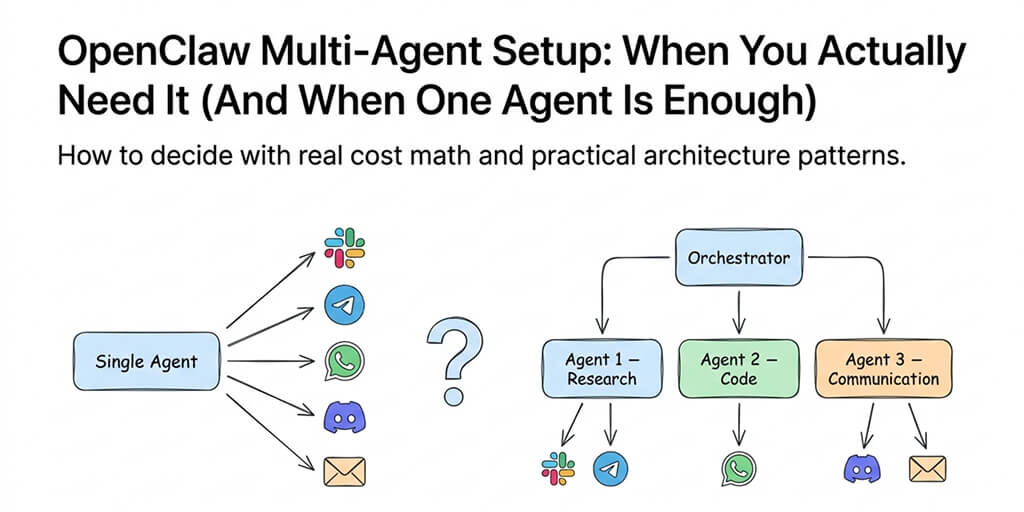
I had three agents running. A research agent. A code review agent. A communications agent. Each with its own workspace, its own memory, its own model configuration.
My Anthropic bill that month: $287.
The research agent was checking the same sources the communications agent was summarizing. The code agent was re-reading files the research agent had already analyzed. They weren't collaborating. They were duplicating work. Three agents doing the job of one, at triple the cost.
I tore it all down and replaced it with a single well-configured agent. Same capabilities. Same platforms. Same skills. Monthly cost: $45.
Here's what I learned about the OpenClaw multi-agent setup that nobody's guide tells you: most people don't need it. And the ones who do need it are building something very different from what the tutorials suggest.
The multi-agent hype (and why it's usually wrong)
The OpenClaw community loves multi-agent architectures. The GitHub feature request for two-tier model routing (Issue #6421) describes an elegant vision: specialized agents handling different domains, an orchestrator routing tasks, each agent optimized for its specific job.
It sounds great on paper. In practice, it creates three problems that most OpenClaw multi-agent setup guides completely ignore.
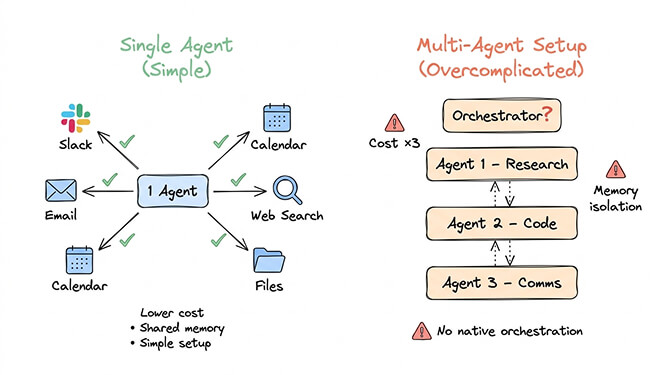
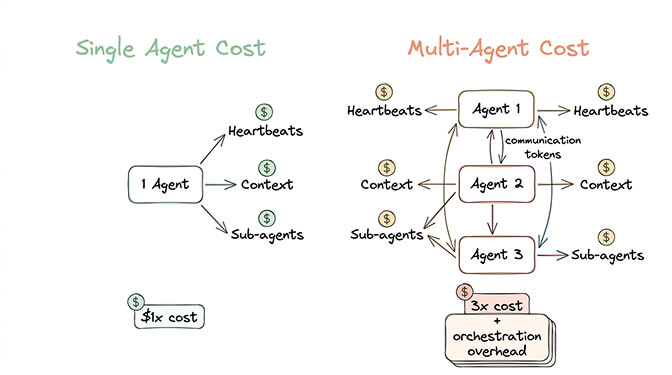
Problem 1: Cost multiplication. Each agent runs its own heartbeats (48 per day per agent at your primary model rate). Each agent maintains its own context window. Each agent spawns its own sub-agents. Three agents don't cost 3x. They cost 3x plus the overhead of inter-agent communication, duplicate context loading, and orchestration tokens.
For most users, the real costs of running OpenClaw are already a challenge with one agent. Multiplying by three without a clear architectural reason is just expensive complexity.
Problem 2: Memory isolation. Each OpenClaw agent has its own memory. Your research agent learns that you prefer concise summaries. Your communications agent doesn't know this. It sends verbose emails. You tell it to be concise. Now it knows. But tomorrow, the research agent generates a verbose report because it never got the memo.
Memory isolation is a feature for security (you don't want agents sharing sensitive data across trust boundaries). But for personal automation, it means you're constantly re-teaching multiple agents things a single agent would learn once.
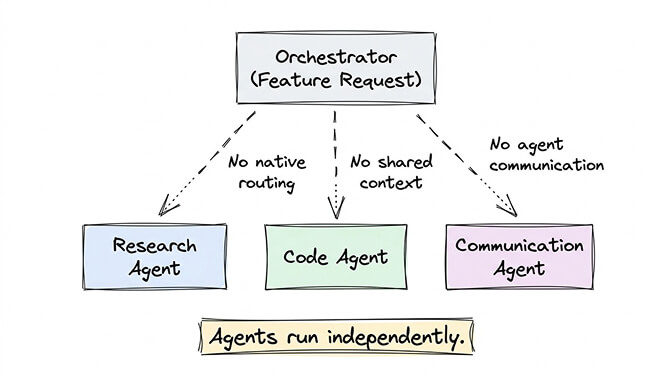
Problem 3: Orchestration doesn't exist yet. OpenClaw doesn't have native agent-to-agent communication. The orchestrator pattern from Issue #6421 is a feature request, not a shipped capability. In practice, multi-agent setups are independent agents that happen to share a server. They can't pass context. They can't delegate tasks. They can't coordinate.
Some community members have built custom routing using tools like n8n or custom webhook bridges. But that's significant infrastructure work on top of an already complex self-hosted setup.
Before building a multi-agent architecture, ask: "Could one agent with better skills do this?" The answer is usually yes.
When a single agent is actually enough
A single OpenClaw agent with the right configuration handles far more than most people realize. One agent can:
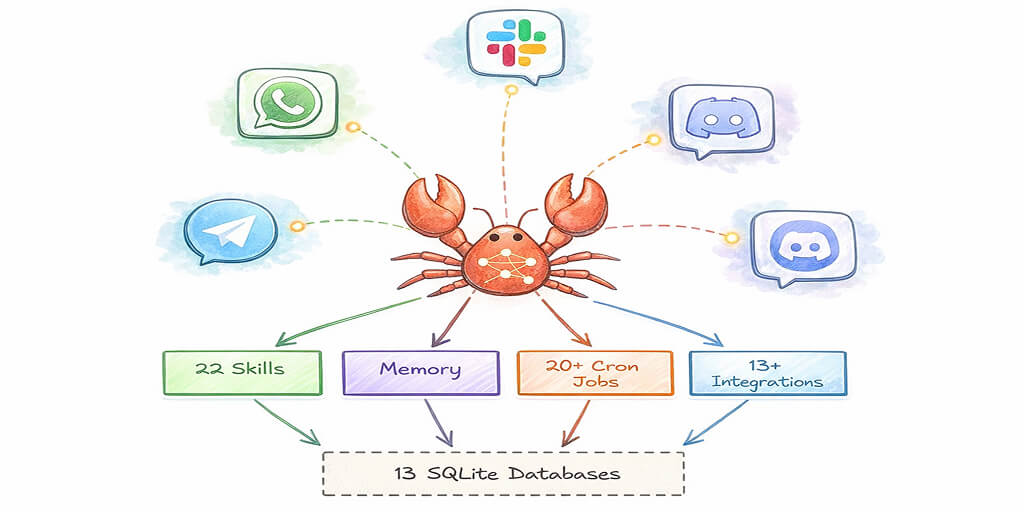
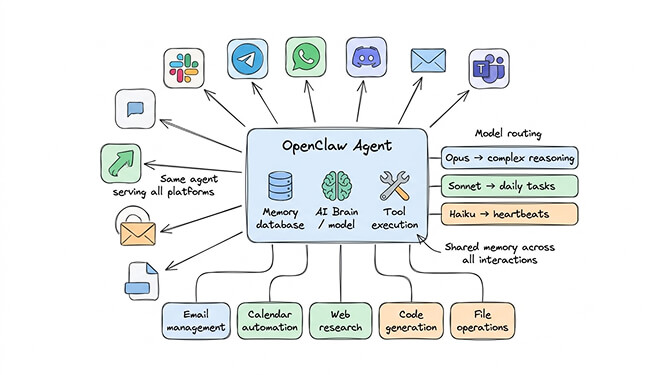
- Connect to 15+ chat platforms simultaneously (Telegram, WhatsApp, Slack, Discord, Teams, iMessage, and more). Each platform gets the same agent, same memory, same capabilities.
- Run multiple skills covering different domains (email management, calendar, research, code generation, file operations). Skills are modular. Adding a new capability is installing a skill, not deploying a new agent.
- Use different models for different task types through model routing. Opus for complex reasoning, Sonnet for daily tasks, Haiku for heartbeats. One agent, three intelligence tiers.
- Maintain persistent memory across all interactions. Tell it something on Telegram, reference it on Slack. It remembers.
For a full look at what a single agent can actually accomplish, our guide to the best OpenClaw use cases covers the workflows that most people build.
The "I need multiple agents" instinct usually comes from one of two places: either you want different personalities for different contexts (professional vs personal), or you want to separate concerns for security reasons (work data vs personal data). Both are valid. But only the security concern actually requires separate agents.
For personality differences, OpenClaw's SOUL.md configuration and per-channel settings handle this within a single agent. Your agent can be formal on Slack and casual on Telegram without needing two separate deployments.
When you genuinely need multi-agent (the real use cases)
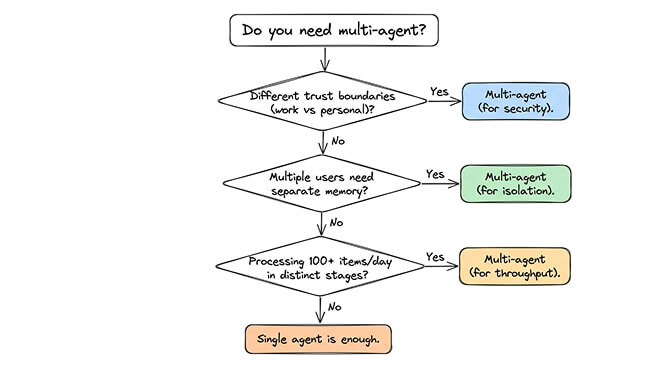
There are three scenarios where an OpenClaw multi-agent setup is the right call. Everything else is over-engineering.
Use case 1: Trust boundary separation
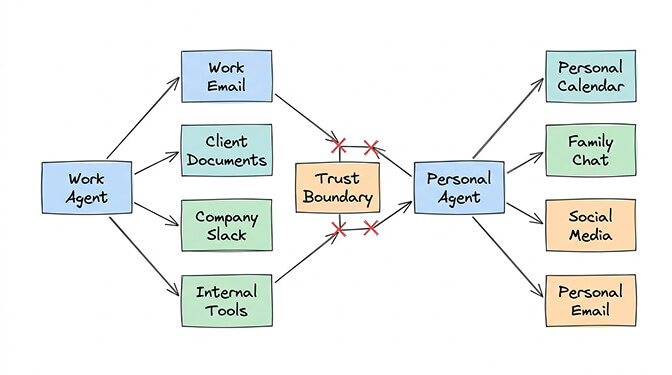
You're running OpenClaw for your company and your personal life. Work emails, client data, and internal documents absolutely should not share memory or context with your personal calendar, family chats, and social media.
This isn't a preference. It's a security requirement.
Two agents: one scoped to work accounts and tools, one scoped to personal. Separate workspaces. Separate memory. Separate credential stores. They never cross-contaminate.
Use case 2: Multi-user deployments
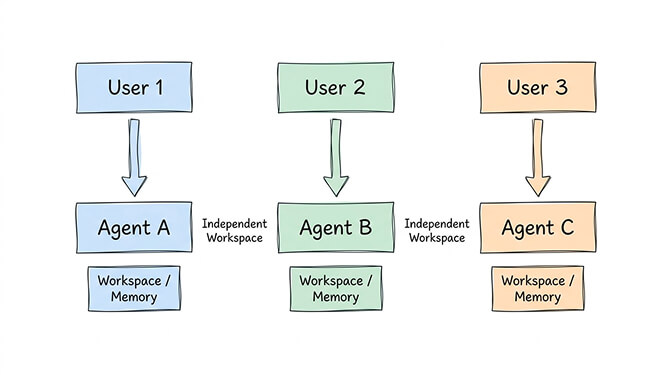
You're deploying OpenClaw for a team. Each team member needs their own agent with private memory, personal preferences, and individual account connections.
Community tools like TinyClaw handle this with @agent_id syntax for message routing. Each agent operates in its own workspace directory with independent conversation history. Tmux-based process management keeps them running in parallel.
This is the use case where multi-agent architecture genuinely shines. The isolation isn't overhead here. It's the whole point.
Use case 3: Specialized high-volume pipelines
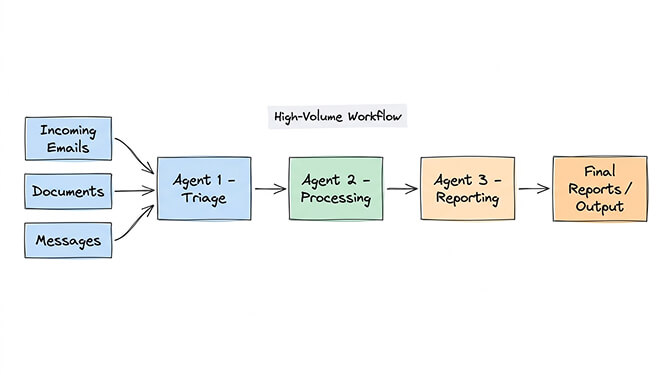
You're processing hundreds of items daily through distinct pipeline stages. A triage agent classifies incoming items. A processing agent handles each category differently. A reporting agent compiles results.
This pattern works when volume is high enough that a single agent's context window becomes a bottleneck, and when the pipeline stages are genuinely independent (the triage agent doesn't need to know how the processor works).
Most personal and small business OpenClaw users never hit this threshold.
Watch: OpenClaw Multi-Agent Architecture and Practical Setup If you want to see how multi-agent configurations work in practice (including the memory isolation patterns and workspace separation that make them viable for team deployments), this community walkthrough covers the architecture decisions and config patterns. Watch on YouTube
The cost math nobody shows you
Let's put real numbers on this. Using Claude Sonnet as the primary model with Haiku for heartbeats (a reasonable optimized setup).
Single agent, optimized:
- Heartbeats (Haiku): $0.14/month
- Primary interactions (Sonnet): $8-15/month
- Sub-agents (Haiku): $1.50/month
- Cron jobs (capped context): $2-5/month
- Total: $12-22/month in API costs
Three agents, same optimization:
- Heartbeats: $0.42/month (3x)
- Primary interactions: $24-45/month (3x, but typically less per agent since workload splits)
- Sub-agents: $4.50/month (3x)
- Cron jobs: $6-15/month (3x)
- Orchestration overhead (inter-agent webhook calls, duplicate context): $5-10/month
- Total: $40-75/month in API costs
That's before hosting. On a VPS, one server can run multiple agents (though each adds memory and CPU load). On a managed platform, each agent is typically a separate billing unit.
If you want the multi-agent architecture but don't want to manage the infrastructure yourself, Better Claw supports multiple agents per account at $29/month per agent, each with its own workspace scoping, memory isolation, and channel configuration. Deploy a new agent in 60 seconds. BYOK with any of the 28+ supported providers.
For a detailed look at how API costs compound differently across single vs multi-agent architectures, we covered the full breakdown in our OpenClaw API cost guide.
How to set up multi-agent when you actually need it
If you've determined you genuinely need multiple agents, here's the architecture that works.
Workspace separation
Each agent gets its own workspace directory. In your openclaw.json, set a unique workspace path per agent:
{
  "agents": {
    "defaults": {
      "workspace": "/home/user/.openclaw/workspace-work"
    }
  }
}
Your personal agent uses /workspace-personal. Your work agent uses /workspace-work. Memory, conversation history, and skill data stay completely isolated.
Process management
On a VPS, use tmux or systemd to run each gateway instance on a different port:
# Agent 1: Work
OPENCLAW_CONFIG=/path/to/work-config.json openclaw gateway --port 18789

# Agent 2: Personal
OPENCLAW_CONFIG=/path/to/personal-config.json openclaw gateway --port 18790
Each agent gets its own config file, its own gateway port, and its own set of channel connections.
Model routing per agent
Different agents can use different models. Your work agent might use Claude Sonnet for security-sensitive business tasks. Your personal agent might use DeepSeek for cost optimization on non-sensitive personal automation.
This is where multi-agent actually saves money: you can optimize each agent's model tier independently instead of running everything on the same (expensive) model.
For the specifics of how to configure model routing per agent, our detailed multi-agent setup guide covers the config patterns.
The "sub-agent" confusion
Here's where most people get the OpenClaw multi-agent setup wrong.
OpenClaw has a built-in sub-agent system. When your main agent needs to do parallel work (researching three topics simultaneously), it spawns sub-agents within its own process. These are lightweight, temporary workers that share the parent agent's context and configuration.
This is not the same as running multiple independent agents.
Sub-agents are cheap (they use your heartbeat model by default), temporary (they dissolve after their task completes), and coordinated (they report back to the parent agent automatically).
Most of what people try to build with multi-agent architectures is actually better served by a well-configured single agent with good sub-agent model routing. Use Haiku or DeepSeek for sub-agents, Sonnet for the primary, and you get parallel processing without the overhead of separate gateway instances.
The memory compaction bug affects sub-agents too, so make sure you set maxContextTokens limits on any skills that spawn parallel workers. Without limits, sub-agent context accumulation can silently escalate costs.
The honest recommendation
After building, tearing down, and rebuilding multi-agent setups across dozens of configurations, here's my actual advice:
Start with one agent. Configure it well. Use model routing (Sonnet primary, Haiku heartbeats). Install the skills you need. Connect all your channels. Give it a week.
If after a week you find yourself wishing for separate memory between work and personal contexts, or you're deploying for multiple team members, then spin up a second agent with workspace isolation.
Don't start with three agents because it feels architecturally clean. Start with one because it's simpler, cheaper, and 90% of the time it's all you need.
The agent architecture space is moving fast. OpenClaw's 230,000+ stars and 850+ contributors mean features like native orchestration and agent-to-agent communication are actively being built. The multi-agent story will get better. But today, in 2026, the single-agent-with-good-skills approach wins for most users.
If you want to experiment with multi-agent without managing separate gateway processes, config files, and VPS resources, give Better Claw a try. Each agent is $29/month, BYOK, with independent workspace scoping and memory isolation built in. Deploy your first agent in 60 seconds. Add a second only if you actually need it.
Frequently Asked Questions
What is an OpenClaw multi-agent setup?
An OpenClaw multi-agent setup runs multiple independent agent instances, each with its own gateway process, workspace directory, memory, and channel connections. Each agent operates autonomously with separate configuration and credentials. This differs from OpenClaw's built-in sub-agent system, which spawns temporary parallel workers within a single agent's process.
How does a single agent compare to multi-agent for OpenClaw?
A single optimized OpenClaw agent handles 15+ chat platforms, multiple skill domains, and model routing (different models for different task types) at roughly $12-22/month in API costs. A three-agent setup performing the same work costs $40-75/month due to multiplied heartbeats, context windows, and sub-agent overhead. Single agent wins unless you need trust boundary separation, multi-user isolation, or high-volume pipeline processing.
How do I set up multiple OpenClaw agents on one server?
Create separate config files and workspace directories for each agent. Run each gateway on a different port using environment variables: OPENCLAW_CONFIG=/path/to/config.json openclaw gateway --port 18789. Use tmux or systemd for process management. Each agent needs its own channel connections (separate Telegram bot tokens, Slack app configurations, etc.).
How much does an OpenClaw multi-agent setup cost per month?
API costs multiply roughly linearly: a three-agent setup costs approximately 3x a single agent ($40-75/month vs $12-22/month on optimized Claude Sonnet/Haiku routing). Hosting is separate: a single VPS ($5-10/month) can run multiple agents, or managed platforms like Better Claw charge $29/month per agent with independent workspace isolation included.
When is multi-agent overkill for OpenClaw?
Multi-agent is overkill when your use case is personal automation on a single set of accounts. A single agent with multiple skills, model routing, and per-channel personality settings handles email, calendar, research, code, and chat across 15+ platforms. You only need multiple agents when security requires separate trust boundaries (work vs personal data), multiple team members need isolated memory, or you're processing high volumes through distinct pipeline stages.