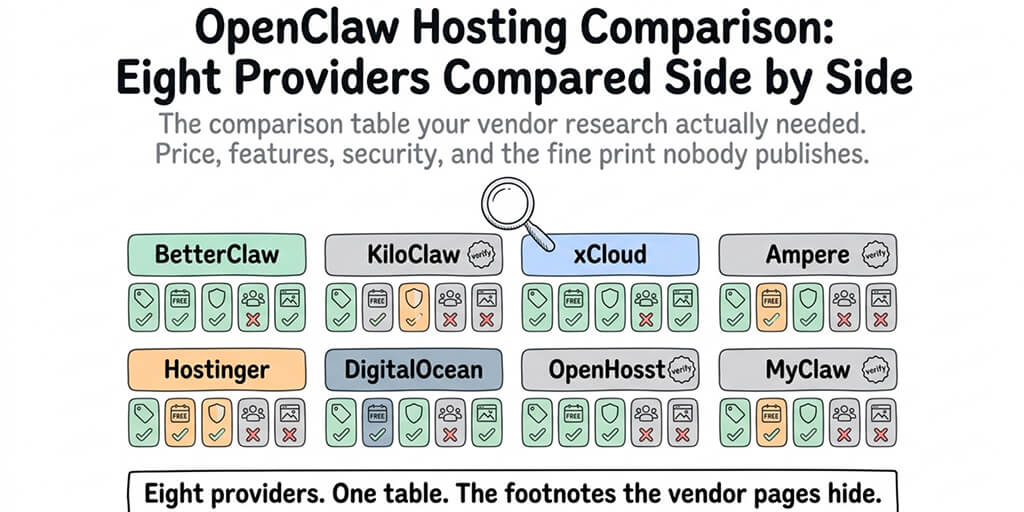
The comparison table your vendor research actually needed. Price, features, security, and the fine print nobody publishes.
Three hours lost comparing hosting providers.
That's the average I've heard from founders making this decision for the first time. Tabs open on eight different vendor sites. Each one claims to be the best. Each feature page buries the pricing in a modal. Each pricing page says "starting at" and hides the real number behind a calculator.
By hour three, everyone's just picked the cheapest or the first one they recognized.
This is the OpenClaw hosting comparison I wish existed when I was making this call. Eight providers in one table. Honest columns. Footnotes for the things vendor pages hide.
The eight providers in the OpenClaw hosting market
Let me quickly name the eight options and what category each falls into.
BetterClaw: managed, security-focused. KiloClaw: managed (verify current product positioning). xCloud: managed, low-price. Ampere: hosting option (verify category). Hostinger: VPS with Docker template. DigitalOcean: VPS with 1-Click template. OpenHosst: managed (verify current product positioning). MyClaw: managed (verify current product positioning).
Four of these I've tested in production or have direct verified information on. Four I'm deferring to your own due diligence. I've marked those clearly in the comparison table below so you don't trust numbers that might be stale or inaccurate. This matters more than vendor posts admit, because pricing and features in this space change monthly.
The comparison table
This is the reference table. Save the tab. I've written prose sections afterward that explain what each column actually means in practice.
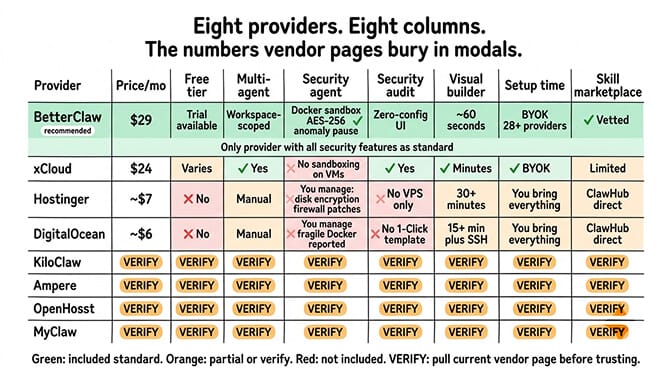
A note on the VERIFY cells: I've left these blank intentionally rather than fill them with guesses. Before you act on this, pull the current pricing page, security documentation, and feature list from each of those providers and confirm the cells directly. It's better to have four verified rows than eight potentially wrong ones.
What each column actually means
The table is only useful if you know how to read it. Let me walk through each column in the order that actually matters for your decision.
Price
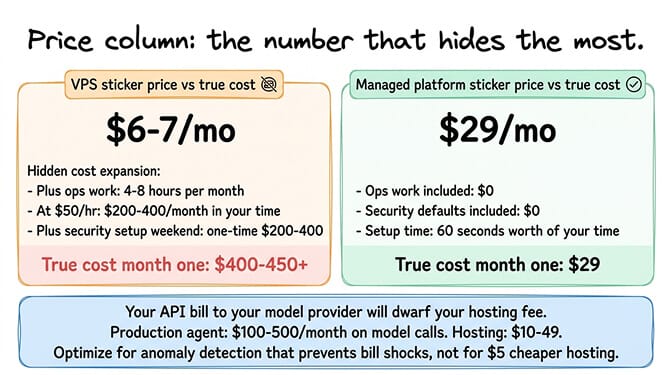
The two cheapest numbers in the table are VPS plans ($6 to $7/month). Those don't include the API costs or your time managing the server. A fair comparison adds roughly 4 to 8 hours/month of operations work for any VPS plan, valued at whatever your time is worth.
Managed plans (xCloud at $24, BetterClaw Pro at $49) include the operations work. You pay more per month, you pay zero in setup time.
The honest truth about hosting pricing: your API bill to your model provider will dwarf your hosting fee. A production OpenClaw agent often spends $100 to $500/month on model calls alone. Your hosting is $10 to $49. Optimizing for the hosting price saves you pennies. Optimizing for the hosting provider's anomaly detection, which protects you from API bill shocks, saves you real money.
Free Tier
Some managed providers offer trials. Some offer free tiers with limited agents or skills. VPS hosts don't have free tiers in the meaningful sense. You're paying for the server either way.
Free tier is genuinely useful for one thing: confirming the product works before you commit. If a managed provider doesn't offer any way to test without paying, skip them. There are enough alternatives that you shouldn't buy blind.
Multi-Agent
The number that quietly drives cost calculations. If you'll run one agent, everything scales linearly. If you'll run five, VPS plans start winning on raw cost (one server, many agents), while managed plans either charge per agent or bundle a fixed number into the tier — BetterClaw Pro includes 5 agents and charges $12/month for each one beyond that.
The catch: workspace scoping. Running five OpenClaw agents on one VPS means one compromised agent can reach the other four's credentials. Managed platforms like BetterClaw enforce isolation between agents. On a VPS, you're responsible for that isolation yourself.
Security Audit
This is where the table gaps open widest. Docker-sandboxed execution, AES-256 encryption at rest, and anomaly detection are table stakes for managed platforms that take security seriously. They're expensive to build into a raw VPS setup.
30,000+ OpenClaw instances were found exposed on the internet without authentication this year, per Censys, Bitsight, and Hunt.io. Most of those weren't run by careless people. They were run by operators who assumed the hosting provider handled security. The providers assumed the operators did.
Visual Builder
For non-developer founders, this is the decider. A zero-config UI where you paste API keys, pick skills, and deploy beats a YAML config file every time. For developers, this is just nice-to-have. Either way, the absence of a visual builder on VPS options isn't a VPS problem, it's a feature the OpenClaw framework itself doesn't provide until you layer a managed UI on top.
Setup Time
The numbers in the table are first-deploy times, not setup-plus-configure-plus-learn-the-tool times. True setup time for a VPS with Docker is more like "first working agent in 2 to 6 hours" including Docker install, skill config, API key management, and firewall rules. For managed platforms, it really is minutes.
If you're tired of setup time eating a weekend you could spend building the actual agent, BetterClaw handles deployment in about 60 seconds with the security features included. $49/month for Pro, BYOK, no Docker, no YAML.
API Included
None of the providers in this table include model API credits. All of them require BYOK (bring your own API keys) from Anthropic, OpenAI, Z.ai, or wherever. "API Included" in the table really means "BYOK supported cleanly vs makes you wrestle with environment variables." Managed platforms support BYOK cleanly. VPS hosts make you manage your own credential storage.
Skill Marketplace
All OpenClaw hosting options ultimately pull skills from ClawHub. The difference is vetting. Some managed platforms vet the skills they let you install. Others let you install anything ClawHub offers. Given that the ClawHavoc campaign placed 824+ malicious skills on ClawHub (~20% of the registry at the time), vetted installation meaningfully reduces your attack surface.
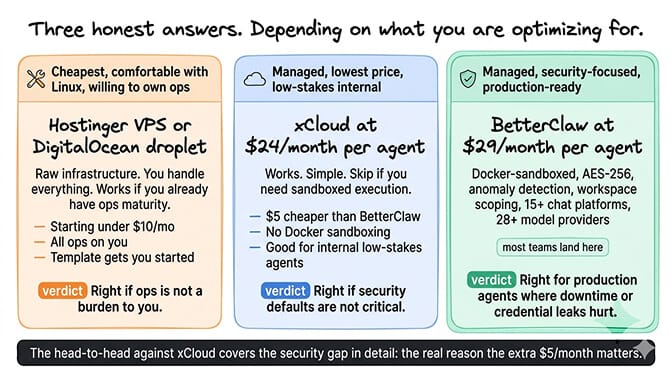
The three honest answers
After running this analysis with dozens of teams, three answers actually surface depending on what you're optimizing for.
Cheapest, comfortable with Linux, willing to own ops: Hostinger VPS or DigitalOcean droplet. Raw infrastructure, you handle everything. Works if you already have ops maturity.
Managed, lowest price: xCloud at $24/month per agent. Works. Skip if you need sandboxed execution.
Managed, security-focused, multi-agent ready: BetterClaw at $49/month for Pro. Docker-sandboxed, AES-256, anomaly detection, workspace scoping, 15+ chat platforms from a single agent, 28+ model providers. For production agents where downtime or credential leaks would hurt, this is the sweet spot.
The head-to-head comparison against xCloud specifically goes deeper into the security gap, which is the real reason the extra $25/month matters.
Where VPS options genuinely win
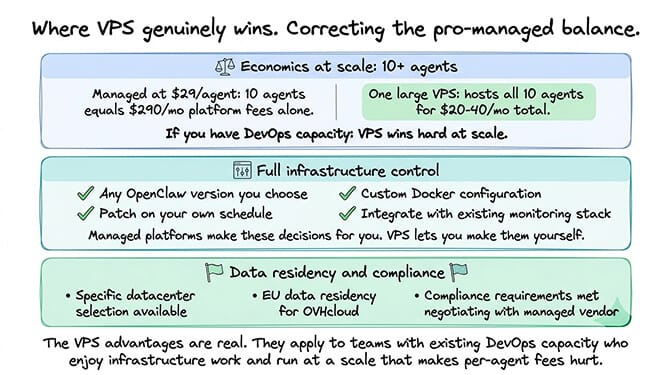
I've been slightly pro-managed throughout this post and I want to correct the balance, because VPS hosting has real advantages I don't want to dismiss.
Economics at scale. If you're running 10+ agents, one large VPS can host all of them for less than $300/month total, with no per-agent or per-usage metering on top. Bundled managed tiers hold up better here than the old per-agent pricing did — BetterClaw Business is $149/month for 25 agents — but the ceiling moves from agents to credits: 40,000/month on Business, with extra credits at $4 per 1,000-credit pack. A fleet of busy agents can work through that allowance. On a VPS you pay for the server, not for how much work the agents do. At scale, ops work can be cheaper than metered usage, if you have the ops capacity.
Full control. You can run any version of OpenClaw you want, patch on your schedule, customize the Docker setup, integrate with your existing monitoring stack. Managed platforms make those decisions for you.
Data residency. Some VPS providers let you pick the exact datacenter your agent runs in. Managed platforms often offer fewer regions. For EU customers with compliance requirements, this matters.
If you're leaning VPS, the VPS hosting comparison covers the tradeoffs in more depth.
The one question that should decide this
Here's what nobody tells you. The price column matters least. The security column matters most. The order of columns in the table above is actually the wrong order for how you should weight them.
Reorder it mentally: security, multi-agent support, setup time, visual builder, price, free tier, skill marketplace, API support.
If you've ever seen what happens when an agent's credentials leak, or an unsandboxed skill exfiltrates data, or a misconfigured VPS starts mining crypto on someone else's key, you understand why security is column one. If you haven't seen it yet, you will, and the provider you picked last month will either help you recover or help you clean up.
For a broader look at how costs actually compound across providers beyond the sticker price, the full hosting costs comparison breaks down the numbers that matter.
One last thing
If you want managed OpenClaw hosting with security as the default rather than an upgrade, give BetterClaw a try. $49/month for Pro, BYOK, Docker-sandboxed execution, AES-256 encrypted credentials, anomaly auto-pause, 60-second first deploy. For direct feature comparisons against every competitor above, the pricing page and the BetterClaw vs OpenClaw comparison have the side-by-side details.
Three years from now, this category is going to consolidate hard. Half the providers in the table above will either grow into real platforms or quietly shut down. The teams picking hosting today based on "cheapest that works" are going to migrate twice before 2028. The teams picking based on "will this still be operating in two years and will it still match my security requirements" will migrate once, maybe never.
The comparison table is a tool. What you do with it is the real decision.
Frequently Asked Questions
What is the best OpenClaw hosting based on this comparison?
It depends on what you're optimizing for. For cheapest with full control, Hostinger VPS or DigitalOcean droplet starting around $6 to $7/month. For managed with the lowest price, xCloud at $24/month per agent. For managed with security defaults (Docker-sandboxed execution, AES-256 encryption, anomaly detection, multi-channel support), BetterClaw at $49/month for Pro. Most production use cases benefit from managed with proper security.
How does BetterClaw compare to xCloud in this OpenClaw hosting comparison?
Both are managed platforms. xCloud is cheaper on sticker price: $24/month against $49/month for BetterClaw Pro. BetterClaw includes Docker-sandboxed execution, AES-256 credential encryption, and anomaly auto-pause as defaults; xCloud's VMs don't include the sandboxing layer. So xCloud wins on price for a single agent and BetterClaw wins on security defaults. The gap narrows if you run more than two agents, since xCloud charges $24 per agent while BetterClaw Pro bundles 5 into the $49. BetterClaw also has a free plan (1 agent, 500 credits/month, BYOK) if you want to test before paying. See the direct comparison page for full feature mapping.
How do I pick the right OpenClaw hosting provider from this list?
Answer three questions in order: how important is security (dictates managed vs VPS), how many agents will you run in six months (dictates per-agent vs per-server pricing), and do you want to own ops (dictates managed vs self-hosted). If your answers are "very important," "multiple agents," and "no," managed platforms like BetterClaw fit. If your answers are "moderate," "one agent," and "yes," Hostinger or DigitalOcean fit.
Is a managed OpenClaw platform worth the monthly price over a cheap VPS?
For most production use cases, yes. Managed at $49/month for Pro includes security defaults, anomaly detection, and operational coverage that would take 5 to 10 hours/month to maintain on a VPS. The break-even on your time usually hits in the first month. For tinkering, side projects, or if you genuinely enjoy ops work, a VPS is fine and cheaper.
Is a VPS secure enough for a production OpenClaw agent?
It can be, with real work. Full disk encryption, restricted SSH, proper firewall rules, a secret manager for credentials, automated patching, and log monitoring add up to roughly a weekend of setup plus ongoing maintenance. Most VPS deployments never get there. Given that 30,000+ OpenClaw instances were found exposed on the internet without authentication this year, the realistic security bar on VPS is lower than operators assume. Managed platforms enforce the defaults by design. If you're not going to do the security work yourself, managed isn't a luxury, it's the protection.